
Calligraphy Practice: Cursive
Calligraphy Practice: Cursive — Trace any word on real guidelines and improve your handwriting
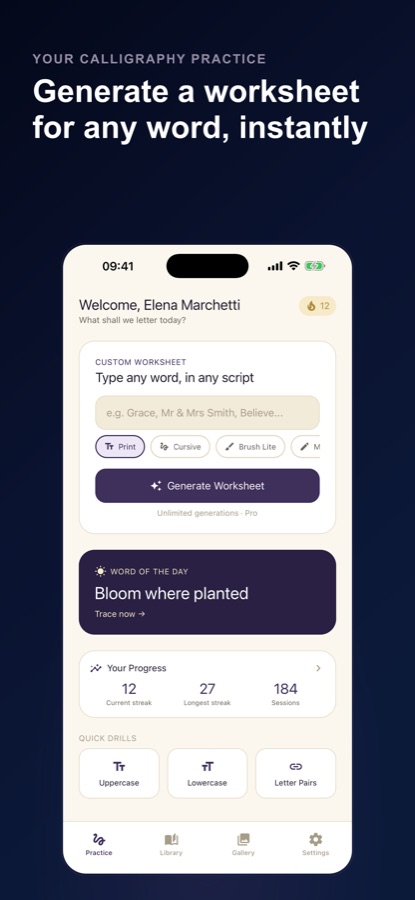
Calligraphy Practice: Cursive is a free Android app that turns any word or phrase, such as a name, a vow, a quote or a gift tag, into a calligraphy worksheet you trace on the screen. Pick one of 8 lettering styles, follow the faint ghost letters with a finger or stylus on a ruled grid, and see how closely you stayed on the guides. It is made for a few focused minutes of hand lettering and neat-handwriting practice a day.

- Price
- Free, Pro upgrade
- Platforms
- Android
- Languages
- 10
The guides do the measuring, so your hand can do the learning.
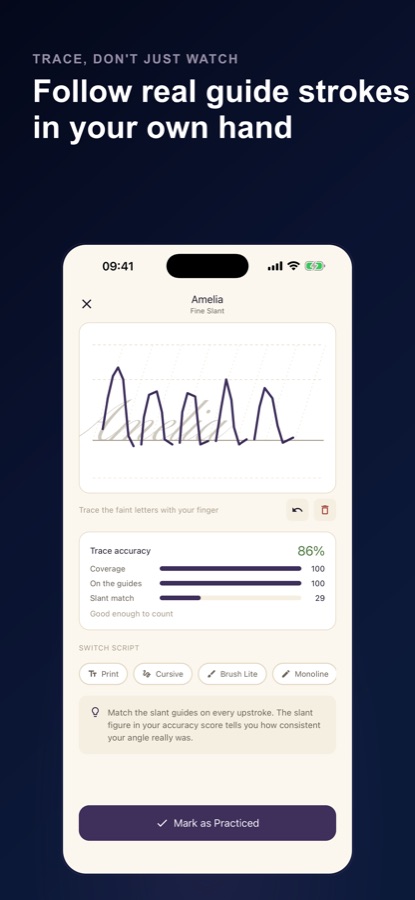
Every worksheet sits on a ruled grid with baseline, x-height, cap-height and descender lines plus slant guides at the style's own angle. You can adjust the guide spacing in nib widths and set your own slant, and after each trace the app scores coverage, staying on the guides, slant match and an even pace.
What it is
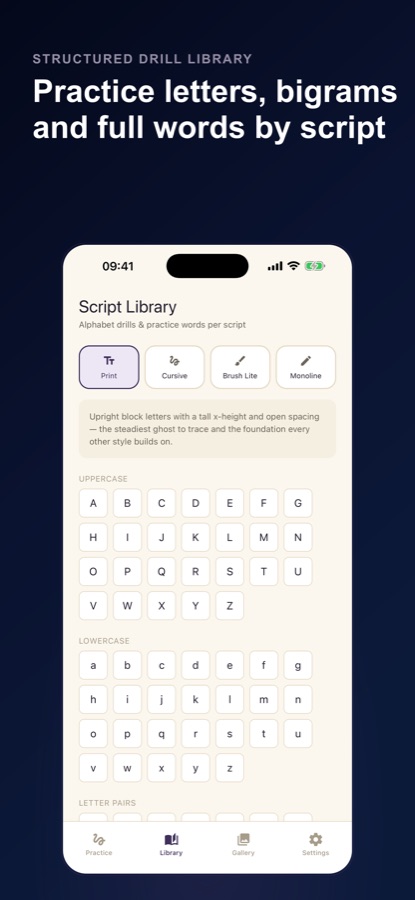
Calligraphy Practice: Cursive is a free Android app for learning calligraphy, hand lettering and neater handwriting by tracing. You type any word or phrase and get a custom worksheet in seconds, trace it on ruled guidelines in one of 8 lettering styles from Print to Brush Bold, and receive a trace accuracy score after every session. A library of 87 drills, six basic strokes and an optional AI neatness score for photos of your paper practice support the daily habit.
Inside the app
What it looks like
Background
How do you improve handwriting or start calligraphy with daily tracing practice?
Handwriting improves the same way any motor skill does: short, regular, deliberate repetition with feedback. Calligraphy adds a vocabulary of its own, with consistent slant, letter height and spacing, and strokes made in a set order and direction. Tracing on guidelines trains the hand to repeat those shapes before you rely on memory, and a few minutes a day usually serves better than one long session a week. Paper practice still matters, because a screen cannot reproduce the drag of a pen, so many learners use both.
Baseline, x-height and ascendersthe lines every letter sits on
The baseline is the line letters rest on, the x-height is the height of a lowercase letter such as x or o, and ascenders and descenders reach above and below it. Keeping a style's proportions between these lines is most of what makes lettering look even.
Slantthe angle of the downstrokes
In slanted scripts all the downstrokes lean at the same angle, and inconsistency is the most visible flaw. Practising against slant guides shows whether the angle drifts from the first letter to the last.
Basic strokesthe building blocks of every letter
Six strokes cover most letterforms: the upstroke, downstroke, oval, overturn, underturn and compound curve. Drilling them before whole alphabets helps because every letter is a combination of the same few movements.
Monoline and brush letteringtwo ways to build a letter
Monoline lettering keeps one even line width, while brush lettering varies the width between thin upstrokes and thick downstrokes. Monoline is usually the easier place to learn letter shape before adding pressure control.
How it works
How a practice session works
No account is needed; you can start as a guest. Sessions are built for a few minutes at a time.
Type a word and choose a style
Enter a name, a quote or a phrase and pick Print, Cursive, Brush Lite, Monoline, Fine Slant, Steep Slant, Heavy Block or Brush Bold. Each has its own guideline geometry and a short coaching tip. A Word of the Day is also offered.
Trace the ghost letters
Follow the faint letters with your finger or a stylus. If you want to see how a letter is built, Show me draws each stroke in the order and direction it is written.
Read the score and practise again
After the trace you see coverage, staying on the guides, slant match and an even pace. Reach the accuracy bar and the session counts toward your daily streak. Letters that fight you ranks your hardest letters, and the practice sheet retunes itself to them.
What's inside
What is in the app
8
Lettering styles
From upright Print to a steep 22 degree slant, with Cursive, Brush Lite, Monoline, Fine Slant, Steep Slant, Heavy Block and Brush Bold between. Three styles are free.
87
Library drills
Uppercase and lowercase alphabets, common letter pairs and practice words, all free, plus six basic strokes and a short warm-up.
AI
Neatness score
Photograph a page of your paper practice and get a score for neatness, consistency and spacing against the targets of the style you chose, with tips. The app asks permission first.
Streak
Progress and weekly report
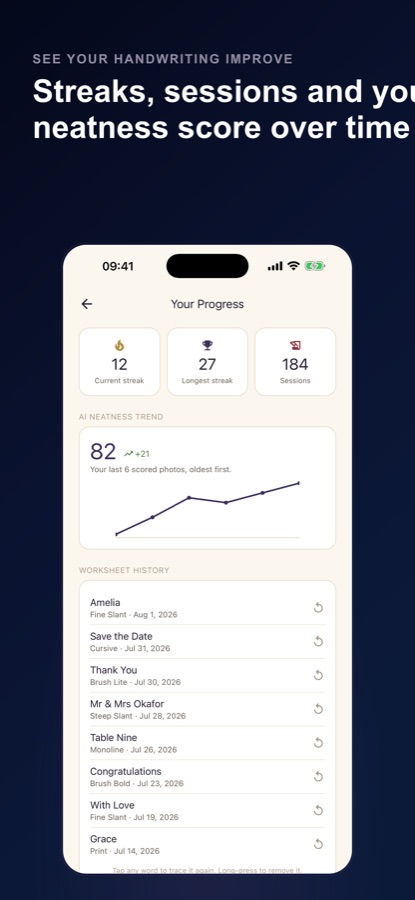
Current and longest streak, total sessions, a worksheet history you can trace again and a weekly report of days practised, traces and your average score.
Journal
Practice journal
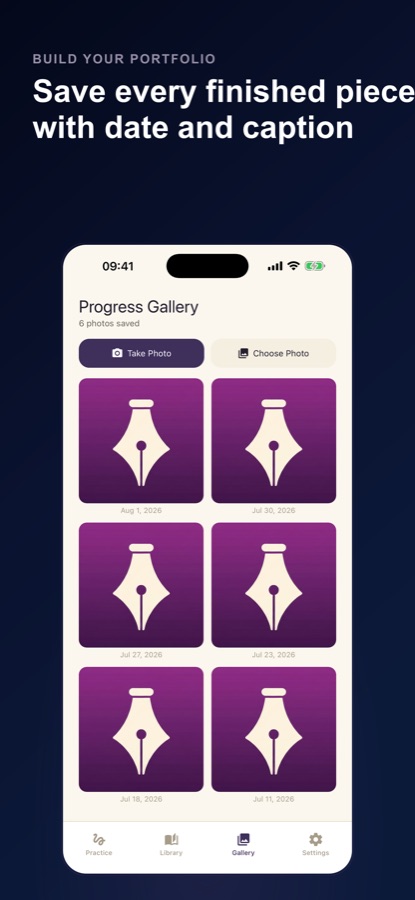
Save photos of your pages with a note to compare over time, and share a practice specimen card.
Reminder
Optional daily reminder
A nudge that arrives only on days you have not practised yet.
Fit
Who it's for — and who it isn't
A good fit if you
- Are a beginner who wants to try calligraphy or hand lettering without printing a stack of worksheets
- Want neater handwriting or better penmanship in a few minutes a day
- Letter cards, invitations, signs, journals or a name for a gift and want to rehearse the words first
- Like a score and a streak as feedback on how steady your hand is
Not the right tool if you
- Need an iPhone app, since the app is on Android only for now
- Expect a screen to replace ink on paper, because it cannot reproduce the feel of a pen or brush
- Want every style, unlimited worksheets and scores free: those are part of Pro
- Dislike ads, as the free version shows them
Privacy
What stays on your phone
No account is needed. Your journal photos and notes stay on your device. Trace scores, with the word you traced, and AI score numbers are saved to the CoddyKit server for your weekly report and history. The AI neatness score sends only the photo you choose, your app language and the chosen style to the server and its AI provider, and the photo is not stored after scoring.
Full details are in the CoddyKit privacy policy.
Questions
Frequently asked questions
What is the best app to practise calligraphy and hand lettering on a phone?
A good one lets you choose the word, shows real guidelines and tells you how steady you were. Calligraphy Practice: Cursive creates a traceable worksheet for any word or phrase on a ruled grid, offers 8 lettering styles, and scores coverage, staying on the guides, slant match and pace after each trace. It is free to start on Android.
Can I improve my handwriting by tracing?
Tracing trains the hand to repeat letter shapes, slant and proportions before you rely on memory, and a few minutes a day suits that kind of repetition. Calligraphy Practice: Cursive pairs tracing with a score and a streak, and a practice sheet that retunes itself to your hardest letters. Practising on paper as well gives the closest feel for a real pen.
What lettering styles does the app have?
Calligraphy Practice: Cursive has 8 styles: Print, Cursive, Brush Lite, Monoline, Fine Slant, Steep Slant, Heavy Block and Brush Bold, running from upright print to a steep 22 degree slant. Each has its own guideline geometry and a short coaching tip. Print, Cursive and Brush Lite are free.
How does the accuracy score work?
After every session Calligraphy Practice: Cursive shows trace accuracy as coverage, staying on the guides, slant match and an even pace. It also runs a pen-lift check on single letters and letter pairs, compared with how the shape is usually built. Reach the accuracy bar and the session counts toward your daily streak.
What does the AI neatness score do?
You photograph a page of your own paper practice and the app scores neatness, consistency and spacing against the targets of the style you picked, with tips to improve. It asks your permission first, and only the photo you choose, your app language and the chosen style are sent. The photo is not stored after scoring.
Can I practise a name, a vow or a quote?
Yes. Calligraphy Practice: Cursive turns any word or phrase you type into a worksheet in seconds, so you can rehearse a name for a gift tag, a line for an invitation or a quote for a journal before you write it in ink.
Do I need to be good at drawing to start?
No. The app begins with six basic strokes and a short warm-up, then moves to alphabets, letter pairs and practice words, so every letter is built from movements you have already drilled. It is aimed at beginners as well as people who already letter by hand.
Is Calligraphy Practice: Cursive free?
The app is free on Google Play and shows ads. Free includes 3 lettering styles, 2 custom worksheets a day, all 87 library drills, the Word of the Day, streaks and progress, 10 journal photos and 3 AI neatness scores a month, and a short ad can earn one more worksheet or score. Pro, an auto-renewing subscription or a one-time lifetime purchase, unlocks all 8 styles, unlimited worksheets and scores and removes ads.
Is there an iPhone version?
Not at the moment. Calligraphy Practice: Cursive is available on Android phones and tablets through Google Play, and this page links only to that listing.
Which languages does it support?
The app and this page are available in 10 languages. Word of the Day prompts are in English.
Get started
Trace your first word today
Free to start on Android, in 10 languages.
More from CoddyKit
Available on Android.