
Brick Collector: Set Tracker
Brick Collector: Set Tracker — A set tracker for every brick set and minifigure you own
Brick Collector: Set Tracker is a free iOS app for brick collectors that turns a shelf of building sets and minifigures into one organized inventory. Log set number, theme, piece count and condition, record what you paid, flag retired sets, and keep a wishlist you can share so nobody buys you the same set twice.

- Price
- Free, Pro upgrade
- Platforms
- iOS
- Languages
- 10
- Age rating
- 4+
- Version
- 1.2.0
- Requires
- iOS 15.1 or later
What do I actually have?
Every brick collector asks it eventually, usually while standing in front of a spare room of boxes. A spreadsheet answers it until the collection outgrows a shelf or two. Brick Collector keeps sets, minifigures and the wishlist of what is still missing in one running list, so the answer is a search away.
What it is
Brick Collector: Set Tracker is a free iOS set tracker for brick collectors, including adult fans of brick sets (AFOLs). It catalogs each set and minifigure with set number, theme, subtheme, piece count and release year, tracks the price you paid on a running chart, records condition, flags retired sets, and keeps a wishlist with priority levels that you can share. Pro adds unlimited items, CSV export and AI insights on your own collection.
Inside the app
What it looks like
Background
How do you catalog a brick collection, and what is worth recording for each set?
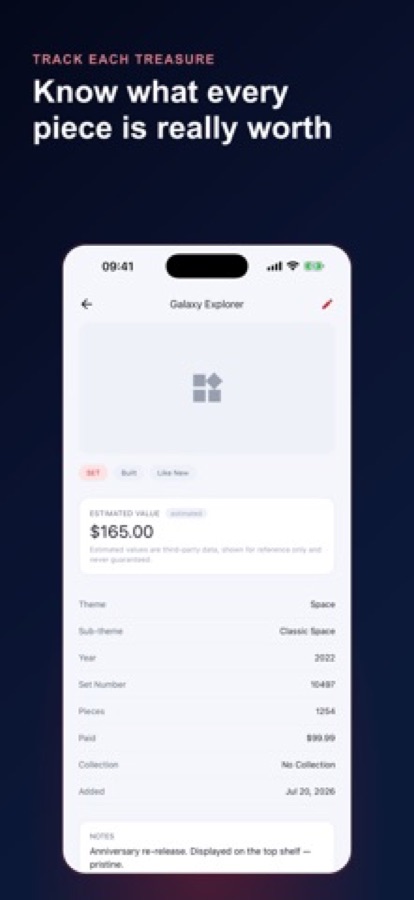
A useful catalog records what makes one box different from another: the set number, its theme and release year, the piece count and what you paid. Add the state it is in, such as sealed, built or kept only for parts, and a note on condition, because a mint-sealed set and a well-loved one with pieces missing are different things. A photo and a retired flag complete the record. Recording what you paid, instead of guessing a market price, keeps the numbers yours.
Set number, theme and yearthe identity of a set
The set number is the number printed on the box, and together with the theme, subtheme and release year it pins down exactly which set you hold. It is also what you search for when you want to check a duplicate on a shop shelf.
Sealed, built or parts-onlythe state of the set
Collectors keep some sets sealed, build others for display, and hold some only as sources of parts. Recording the state, with a condition rating from mint-sealed to well-loved, is what makes a count of items meaningful.
Retired setswhat is still on shelves
A retired set is one that is no longer being made. Flagging it in your catalog separates what you could still buy new from what only turns up secondhand, which shapes how you build a wishlist.
Minifigures as itemsnot an afterthought
Figures are collected on their own, often outside any set. A catalog that treats a minifigure as a first-class item, with its own photo, price and wishlist entry, avoids burying them in set notes.
How it works
How cataloging works
Most collectors start with a spreadsheet, a notes app or nothing at all. The app is built to take over from those with the fewest taps.
Add a set, a minifigure or a whole haul
Use Add Set or Add Minifig for one item, or log a whole haul in one pass after a big trip to a set store instead of adding twenty sets one screen at a time. Enter set number, theme, subtheme, piece count, release year, price paid, condition and a photo.
Organize it your way
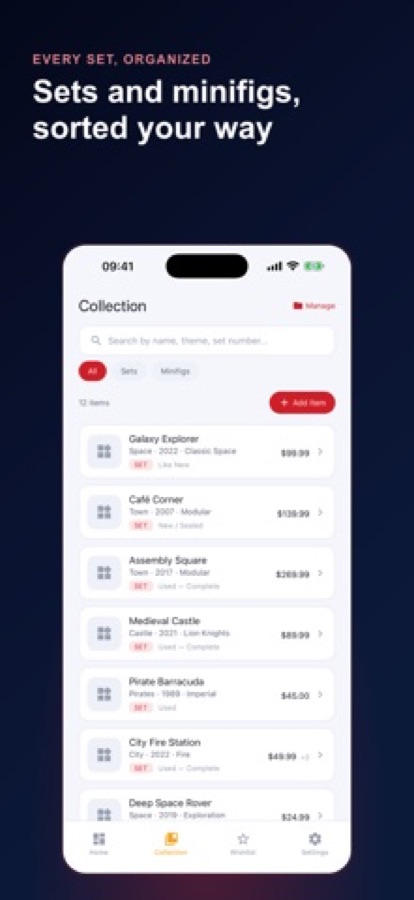
Group items into custom collections such as Space, Castle, City or Technic, mark them sealed, built or parts-only, flag retired sets, and filter the collection by sets or minifigs and search by name, theme or set number.
Keep a wishlist you can share
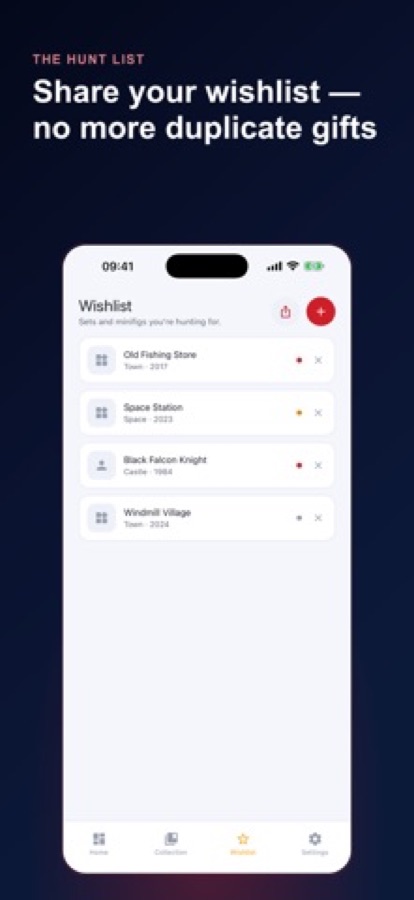
Add the sets and minifigures you are hunting for, give each a priority level, and share the list as plain text so relatives stop buying duplicates.
What's inside
What comes with the app
Sets + figs
One catalog for everything
Sets and minifigures in one running inventory, each with set number, theme, subtheme, piece count, release year, a photo and notes.
Paid
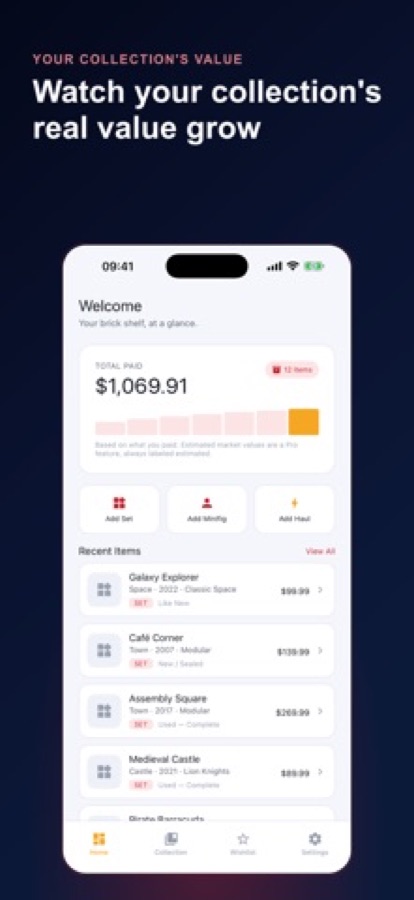
Value paid, tracked over time
Log a purchase price per item and watch the total you have paid change on a running chart. The stats screen also shows items by theme and by condition.
Wishlist
A wishlist with priorities
Sets and minifigures you are hunting for, each with a priority level, and a one-tap share sheet instead of a screenshot texted around.
Condition
Condition and a grading guide
Rate condition from mint-sealed to well-loved with pieces missing, and consult a grading guide so used, complete and sealed mean the same thing each time.
5 to 250
Milestone nudges
Gentle prompts as your inventory crosses 5, 25, 50, 100 and 250 items logged.
Pro
CSV export and AI insights
Pro unlocks unlimited sets and minifigures, CSV export of your whole inventory, and AI insights on your own collection, such as gaps, uncategorized items and missing photos, plus alternate-build ideas from sets you already own.
Fit
Who it's for — and who it isn't
A good fit if you
- Buy sets to keep, not just to build once and take apart
- Collect minifigures and want them treated as items in their own right
- Are tracking a growing haul from set stores, conventions or secondhand marketplaces
- Are a parent or gift-giver who wants a shareable wishlist so the right set is bought, not a duplicate
- Want a record of what you paid, condition and retired status in one place
Not the right tool if you
- Need a live market-price feed; the app tracks what you paid, and any estimate shown is third-party data for reference only
- Want an Android app; Brick Collector is on iOS
- Expect unlimited items free: the free tier covers a starter catalog with ads, and Pro unlocks unlimited sets and minifigures
Questions
Frequently asked questions
What is Brick Collector: Set Tracker?
Brick Collector: Set Tracker is a free iOS app that catalogs a brick collection. It stores each set and minifigure with set number, theme, piece count, release year, price paid, condition and a photo, and keeps a shareable wishlist. It is built for collectors and adult fans of brick sets rather than as a generic inventory app.
How do I add a lot of sets at once?
Use Add Haul to log a whole trip in one pass instead of adding each set on its own screen. You can still add a single set with Add Set or a figure with Add Minifig. Photos, condition and price paid are recorded for each item.
How does Brick Collector track the value of my collection?
It tracks what you paid. You log a purchase price per item, and a running chart shows the total you have paid over time. Any estimated market value is labelled as third-party data, shown for reference only and never guaranteed.
Can I record whether a set is sealed, built or retired?
Yes. Mark each item sealed, built or parts-only, rate its condition from mint-sealed to well-loved with pieces missing, and flag any set as retired. A grading guide in the app explains the condition terms so they stay consistent.
How does the wishlist work?
Add the sets and minifigures you want, give each a priority level, and share the list as plain text with a single tap. Relatives and friends can see what you still need, which helps avoid receiving the same set twice.
What does Pro add?
A Pro subscription, offered monthly or annually, unlocks unlimited sets and minifigures, CSV export, AI insights and alternate-build ideas, and removes ads. The free tier covers a starter catalog with ads. You can cancel from your device's subscription settings at any time.
What do the AI insights look at?
They look at your own collection: gaps, uncategorized items, missing photos and organization nudges, plus alternate-build ideas drawn from sets you already own. They are meant as organization help, not as a price estimate.
Can I export my data?
Yes. With Pro you can export your entire inventory to CSV whenever you want your own copy. That makes it easy to keep a backup or move the list into a spreadsheet.
Which devices and languages does it support?
Brick Collector: Set Tracker is an iOS app, rated 4+, and needs iOS 15.1 or later. The interface is available in 10 languages.
Get started
Know exactly what is on your shelf
Free to start on iOS, in 10 languages.
More from CoddyKit
Available on iOS.