

AI Travel Guide - Amsterdam
AI Travel Guide - Amsterdam — An AI trip planner for the canal city
AI Travel Guide - Amsterdam is a free AI trip planner and city guide built around Amsterdam's canal-ring center. Say what you're interested in and a budget style, and the chat planner hands back a day-by-day route ordered for walking or cycling, next to a browsable guide of the city's places with hours, directions and ratings for each one.


- Price
- Free, with ads
- Platforms
- iOS and Android
- Languages
- 13
- Age rating
- 4+
- Version
- 11.8.3
- Requires
- iOS 15.1 or later


A small city with too much in it to see on foot alone.
Amsterdam's center fits inside a ring of canals you can cross in twenty minutes, yet the Van Gogh Museum, the Rijksmuseum, the Anne Frank House and the Jordaan's side streets are each worth a half-day on their own. The planner's job is deciding how much of that actually fits into the days you have, in an order that doesn't backtrack across the canal rings.
What it is
AI Travel Guide - Amsterdam, listed under the name VoyageAI, is a free app for iOS and Android that plans visits to Amsterdam. A chat-style planner takes your interests and a chosen budget style — Luxury, Economy or Family-friendly — and turns them into a day-by-day route with each day's stops already sequenced for walking or cycling rather than left for you to sort. Next to the planner sits a place guide covering hours, address, directions and ratings for each spot, with a Saved list for anything worth bookmarking on its own.
Inside the app
What it looks like
Ask it
What to ask the planner
A budget style plus a short description of what you're after is all the planner needs — these are the sort of requests it turns into an Amsterdam route.
- Plan 3 days in Amsterdam mixing the Rijksmuseum, the Van Gogh Museum and the canals
- I have one day in Amsterdam — what's the most efficient route around the Jordaan and the center?
- Build a Family-friendly Amsterdam itinerary with Vondelpark and shorter walks between stops
- Plan an Economy weekend in Amsterdam that skips the expensive sit-down restaurants
- I want a Luxury Amsterdam itinerary with the best canal views and the Nine Streets
- Plan a day trip that includes Keukenhof without wasting the rest of the day traveling
- Build a 4-day Amsterdam trip that covers the big museums and the quieter neighborhoods
- Plan an evening route around the Jordaan for a canal walk and dinner
Background
What's useful to know before visiting Amsterdam?
Amsterdam's center is built around four concentric canal rings dug in the 1600s, which means almost nothing is more than a bridge or two from water, and distances that look long on a map are often a short walk along the canal instead of across it. Three things shape most visits: the bike traffic, the museum crowds, and the weather.
Canals and the centerthe Grachtengordel
The Grachtengordel — the Herengracht, Keizersgracht and Prinsengracht rings plus the older Singel — wraps the historic center, with the Jordaan district sitting just inside the Prinsengracht to the west. Most first-time sights (Anne Frank House, the Nine Streets shopping area, Dam Square) sit inside or just beside this ring, close enough to walk between in a normal day.
Getting aroundbikes, trams and an OV-chipkaart
Amsterdam is a cycling city before it is a walking or driving one: dedicated bike lanes run alongside most streets, and locals expect pedestrians to check for bikes, not just cars, before stepping off a curb. Trams and buses cover the center well and are usually paid for with a single reusable OV-chipkaart rather than cash. Fares and routes change, so check the current setup before relying on an old guide.
The big three museumsVan Gogh, Rijksmuseum, Anne Frank House
The Van Gogh Museum and the Rijksmuseum sit a few minutes apart at Museumplein, and the Anne Frank House is on the Prinsengracht in the Jordaan — all three regularly sell out their same-day capacity in high season, so visitors who plan a specific day around one of them usually decide which to prioritize in advance rather than show up and hope.
Weather and timingpack for rain any month
Amsterdam's weather changes fast and rain is possible in any season, so a day built entirely around outdoor stops — Vondelpark, a canal walk, the Jordaan's streets — benefits from an indoor alternative nearby. Spring (tulip season, including Keukenhof outside the city) and summer draw the largest crowds; autumn and winter are quieter with shorter daylight.
How it works
Getting a plan out of the app
There's no form to fill in — you type what you want, and the planner turns it into a route.
Say what the trip looks like
Tell the planner how many days you have in Amsterdam, what you care about seeing and who's coming, then pick Luxury, Economy or Family-friendly as the budget style. A single message is enough to start, and you can add more detail afterward if the first plan misses something.
Read back the day-by-day route
What comes back is split by day, each with its stops already sequenced so the walking or cycling route makes sense rather than zig-zagging across the canal rings. Swap out anything that doesn't fit, star what you want to keep, and the itinerary stays attached to the trip.
Check a place before committing to it
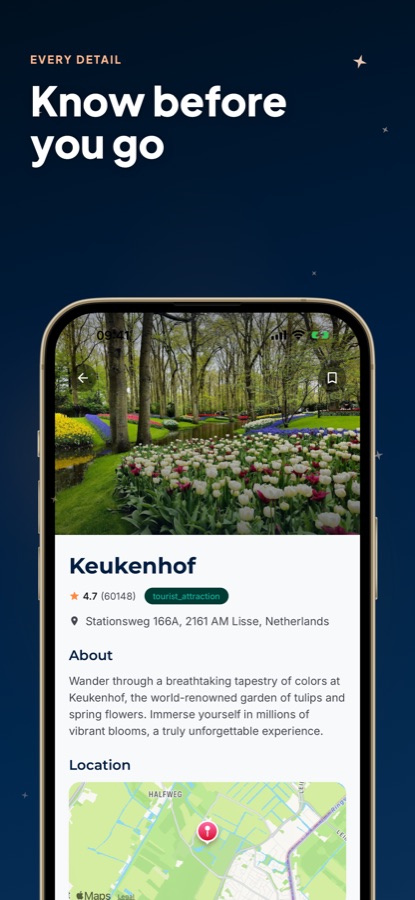
Any stop in the plan opens into its own page — hours, address, directions, ratings — pulled from the place's listing rather than left for you to search separately. Stops worth remembering can be bookmarked whether or not they end up inside a generated plan.
What's inside
What the app actually does
AI
Chat-based trip planner
Describe the trip once — interests, length, budget style — and get a full day-by-day Amsterdam plan back in a single reply rather than piecing one together from blog posts.
Map
Pre-ordered daily routes
Stops inside each day arrive already sequenced and plotted on the map, built around how close things sit to each other rather than how famous they are.
3
Three budget styles
Luxury, Economy and Family-friendly change what the planner recommends before it builds anything, not just a filter applied after the fact.
Explore
Browsable place guide
Popular, Trending and Top Rated lists sit alongside category rows — Attractions, Nature, Culture, Food & Drink — with a search box and the current weather on the same screen.
Info
Full detail per place
A place like the Van Gogh Museum or Keukenhof carries its own description, hours, address, directions and rating, viewable on its own before it's part of any plan.
Saved
A running favorites list
Bookmarking works independent of planning — anything you like gets added to Saved, generated itinerary or not.
Fit
Who it's for — and who it isn't
A good fit if you
- Have a few days in Amsterdam and nothing planned past a flight date
- Would rather read a sequenced route than re-sort a list of sights yourself
- Can't decide between the Museumplein museums and the Jordaan's streets and want both covered
- Check a place's hours and address inside the app instead of switching to a search engine
- Know whether the trip is Luxury, Economy or Family-friendly and want the plan to reflect it
Not the right tool if you
- Expect unlimited free AI plans — the free tier limits daily itineraries and runs ads
- Need live tram delays or turn-by-turn transit routing; this plans places and days, not live transit
- Want the app to handle museum entry or payment on your behalf — it informs, it doesn't transact
Privacy
What the planner sends, and where
The interests, budget style and trip details you type into the planner are sent to an AI service so it can generate your itinerary. That's what they're used for. The places in the guide are listed for information only; the app has no commercial relationship with them.
Full details are in the CoddyKit privacy policy.
Questions
Frequently asked questions
What's the best way to plan a first trip to Amsterdam?
Amsterdam rewards a route that respects the canal rings rather than a checklist of famous names visited in whatever order they come to mind — the center is small enough that a badly ordered day means doubling back across bridges you already crossed. AI Travel Guide - Amsterdam builds that route for you: describe your interests and a budget style, and the chat planner returns stops already sequenced for walking or cycling, with a place guide underneath for anything you want to check on its own.
Is it better to walk or cycle around Amsterdam?
Cycling is how most locals and plenty of visitors cover ground in Amsterdam — dedicated bike lanes run along most streets, and pedestrians are expected to watch for bikes as much as cars. Walking works fine inside the canal-ring center, where distances are short, but anything further out, or a day that mixes several neighborhoods, usually goes faster on two wheels.
How many days should a trip to Amsterdam be?
Two to three full days is enough to cover the center without rushing: a day around Museumplein for the Van Gogh Museum and Rijksmuseum, a day for the Jordaan, the canal rings and the Anne Frank House, and a third for something further out, such as Keukenhof during tulip season. Extra days go toward slower pacing rather than more stops per day.
Should I plan around the Van Gogh Museum and Anne Frank House in advance?
Yes — both regularly fill their same-day capacity well before closing, especially from spring through summer, so a day built around either one works better decided ahead of time than on the morning itself. A planner that treats these as fixed anchors when it orders the rest of the day avoids the backtracking that comes from adding them in afterward.
What does the planner need to build an Amsterdam itinerary?
Just a short chat message: your interests, how long you're in Amsterdam, and a budget style — Luxury, Economy or Family-friendly. AI Travel Guide - Amsterdam turns that into a day-by-day plan with each day's stops already ordered on the map, and you can keep adjusting it with follow-up details rather than starting over.
Does AI Travel Guide - Amsterdam cost anything?
No — it's free on the App Store and Google Play, with ads supporting the free tier. A Pro upgrade removes ads, lifts the cap on how many AI itineraries you can generate, and adds priority recommendations. Exploring places, reading place detail and saving favorites all work without upgrading.
What should I pack for Amsterdam's weather?
Something waterproof matters more than the calendar month — Amsterdam's weather shifts quickly and rain is possible any time of year. Spring brings tulip season and the heaviest crowds, summer is warmest, and autumn and winter are quieter with shorter days; a day planned entirely outdoors, like a long canal walk, is worth pairing with an indoor backup.
What's worth seeing in Amsterdam besides the major museums?
The Jordaan's narrower streets and smaller canals, Vondelpark as green space inside the city, and the Prinsengracht or Herengracht for the canal-house fronts each stand on their own, apart from the Museumplein sights. These show up in AI Travel Guide - Amsterdam's Culture and Nature category rows with the same hours-and-address detail as the bigger names.
How do the Luxury, Economy and Family-friendly settings change a plan?
Each one shifts what the planner reaches for before it builds anything, not after — Luxury favors higher-end places, Economy favors lower-cost ones, and Family-friendly favors stops and a pace that suit kids, like trading a long museum visit for time in Vondelpark. Picking a different setting before asking for a plan changes the itinerary itself, not just how it's labeled.
Get started
Skip the blank-page planning
Free on iOS and Android, with a Pro upgrade for unlimited AI itineraries.
More from CoddyKit
Available on iOS and Android.