
AI Course Maker: Learn Daily
AI Course Maker: Learn Daily — An AI course generator that turns any topic into a study plan
AI Course Maker: Learn Daily is an AI course generator app for Android (an iPhone version is coming) for anyone who wants to learn a topic that has no ready-made course. Type a topic, pick a level and a length, and the app builds a personalised study plan, writes two short lessons a day, quizzes you after each one and gives you an AI tutor for questions along the way.


- Price
- Free, Pro upgrade
- Platforms
- Android now, coming to iPhone
- Languages
- 11
A course made for your goal, not for everyone.
A fixed course starts at the beginning and ends at the end, whatever you already know. Here a quick check of three questions measures your starting point, so the plan can show the concepts you are able to skip.
What it is
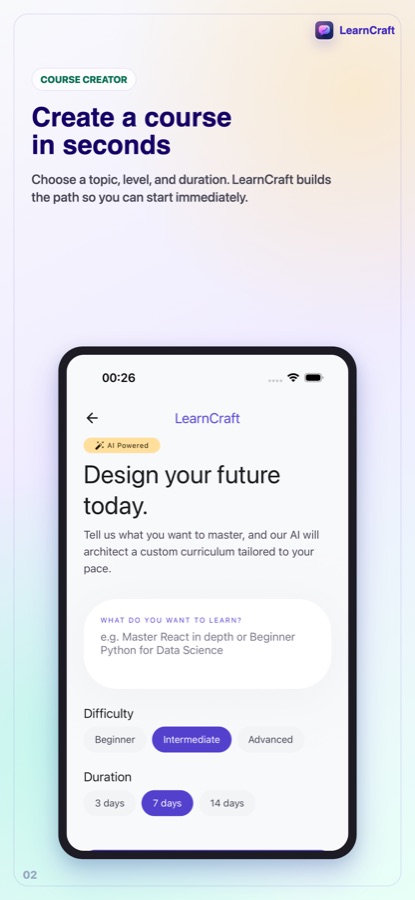
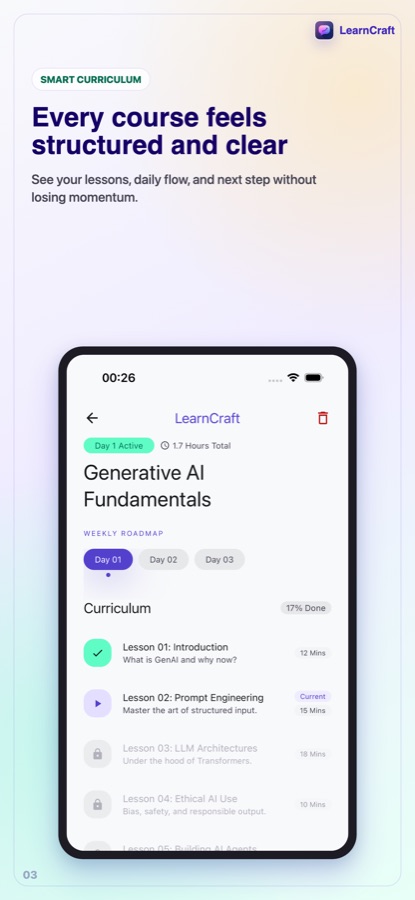
AI Course Maker: Learn Daily is an Android app, with an iPhone version planned, that builds a course from any topic you type. You choose a level of beginner, intermediate or advanced and a length of 3, 7 or 14 days or a custom number, answer a 3-question check, and receive a curriculum with two short lessons per day. Each lesson can be read as a chat or as concept cards, and a quiz with explanations follows it. An AI tutor answers questions.
Inside the app
What it looks like
Background
How do you teach yourself a new subject with short daily lessons?
Self-teaching works best when the goal is clear, the steps are small and there is a regular time for them. A usable plan states the topic and your starting level, breaks the subject into short lessons, adds a quick check after each one and puts them on real dates. That structure is what a syllabus normally provides, and an AI course generator tries to provide it for subjects that have no ready-made course.
Starting levelbeginner to advanced
A beginner course repeats what an advanced learner already knows, and an advanced one assumes what a beginner has not met. Stating your level, and checking it with a few questions, keeps the first lesson from being too easy or too hard.
Microlearningshort lessons, regular habit
Lessons of a few minutes fit into the gaps of a busy day, and the habit of returning matters more than the length of a single session. A study rhythm such as every day, weekdays or weekends turns the plan into dates you can keep.
Quizzes that explainfeedback beats a score
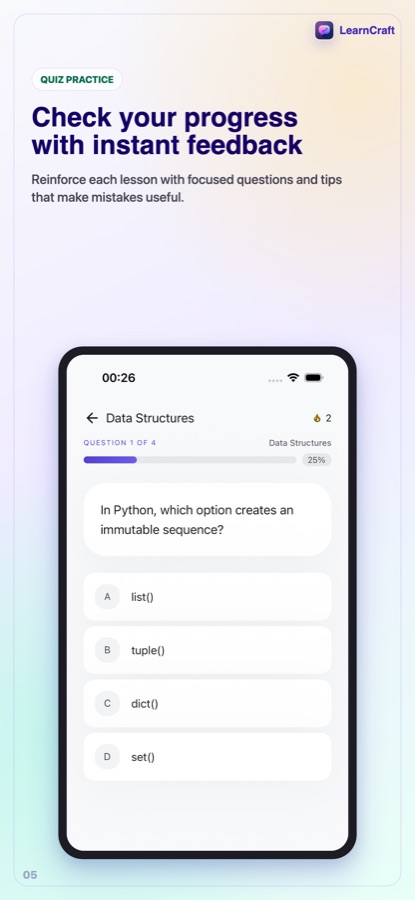
A question only teaches if you learn why an answer was right or wrong. Quizzes that show an explanation after every answer turn a mistake into the next piece of information.
Asking follow-up questionsa tutor in context
Most confusion is local: one term or one step. A tutor that answers inside the lesson you are reading can explain it again more simply, show an example or quiz you on it.
Checking AI-written lessonsuseful, not infallible
Generated lessons can contain mistakes. For anything important, such as health, money or exams, confirm the material with a trusted source before you rely on it.
How it works
How a course is built
The setup takes a minute. After that the app hands you one small lesson at a time.
Choose the topic, level and length
Type what you want to learn, pick beginner, intermediate or advanced, and choose 3, 7 or 14 days, or set your own number of days. Set a study rhythm of every day, weekdays, three times a week or weekends so the plan gets real dates.
Take the three-question check
When you start, three quick questions measure what you already know. The app then shows your plan: your level and the concepts you can skip.
Learn, get quizzed, ask
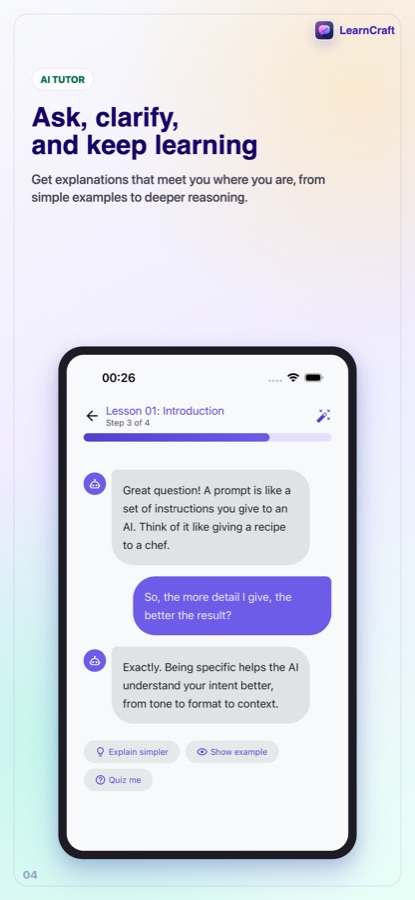
Read each lesson as a chat or as concept cards, tap Explain simpler, Show example or Quiz me, and answer the quiz that follows. Finish the course and a capstone project and a Skill Card sum it up.
What's inside
What is in the app
2/day
Two short lessons a day
A structured curriculum written for your goal rather than taken from a template, with two short lessons for each day of the plan.
2
Two ways to read
Chat mode feels like a conversation with a personal teacher, and step mode walks you through concept cards one at a time.
Quiz
Quizzes with explanations
A short multiple-choice quiz after each lesson, with an explanation for every answer, right or wrong.
Tutor
AI Tutor
Follow-up questions are answered in the context of the lesson, and a separate tutor tab handles everything else. Free use includes up to 5 questions a day.
Streak
Streak and reminders
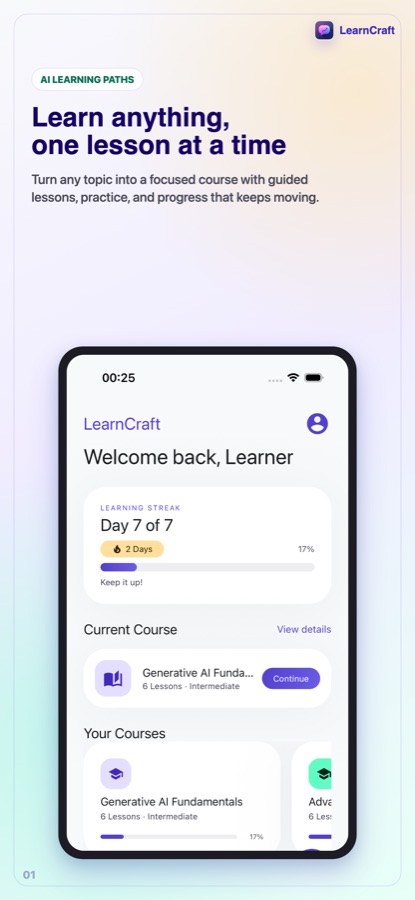
A daily streak, progress across all your courses, energy you earn by learning and spend to protect the streak, and an optional daily reminder at a time you choose.
Pro
Your own material
With Pro you can paste a link or your own notes and the course teaches that material. If the source cannot be read, the app tells you instead of quietly making a generic course.
Fit
Who it's for — and who it isn't
A good fit if you
- Want to learn a topic that has no ready-made course, from photography to personal finance
- Prefer short daily lessons to long videos
- Like a study plan with a level, a length and real dates
- Want a tutor you can ask in the middle of a lesson
- Are curious about a hobby and want a personalised path
Not the right tool if you
- Need a certified qualification or a course reviewed by a human teacher
- Want to rely on AI-written material for health, legal or exam decisions without checking it
- Expect unlimited courses for free, since free use creates your first course and Pro unlocks more
- Need the iPhone version today; it is not yet available
Privacy
What is sent to the AI
Course and lesson content is generated by AI models from the topic you enter. Before anything is generated, the app asks for your consent and explains what is sent: your course topic and tutor messages, never your email or account details. You can withdraw consent any time in Settings.
Full details are in the CoddyKit privacy policy.
Questions
Frequently asked questions
What is an AI course generator?
It is an app that writes a course for a topic you choose instead of offering a fixed catalogue. AI Course Maker: Learn Daily takes your topic, level and length, measures your starting point with three questions, then builds a curriculum with short lessons, quizzes and an AI tutor.
Who is AI Course Maker for?
AI Course Maker: Learn Daily is for adults, students and hobby learners who want a study plan for a subject without a fixed syllabus and who prefer short daily lessons to long videos. It suits topics from photography to personal finance, but it is not a certified course, so use it as a study aid rather than a qualification.
How long does a course take?
You choose. The length can be 3, 7 or 14 days, or a custom number of days, with two short lessons per day. A study rhythm of every day, weekdays, three times a week or weekends then sets the dates.
What topics can I learn with it?
The app is built for any topic you can type, such as photography, Python, public speaking, personal finance or a new language. The lessons are generated by AI, so for a subject where mistakes matter, check the content against a trusted source.
Can I ask the tutor questions?
Yes. Inside a lesson, you can tap Explain simpler, Show example or Quiz me, and ask follow-up questions that are answered in the context of that lesson. A separate AI Tutor tab is there for anything else. Free use allows up to 5 tutor questions a day.
Is AI Course Maker free?
Free use lets you create your first course, read its outline and first lesson, take the quiz and ask the tutor up to 5 questions a day. The free version shows ads, and inviting a friend who finishes a first lesson gives you both an extra course slot. Pro adds unlimited courses, every lesson, much more tutor chat, courses from your own links and notes, offline downloads and no ads, as a monthly or yearly subscription.
Can I make a course from my own notes?
Yes, with Pro. Paste a link or your notes and the course teaches that material, useful for a textbook chapter, an article or a work document. If the source cannot be read, you are told so and the app does not quietly fall back to a generic course.
Does AI Course Maker work on iPhone?
Not yet. The app is available on Android now, and an iPhone version is coming. The page will link to the App Store when it goes live.
Why does the app say LearnCraft inside?
AI Course Maker: Learn Daily is the name of the store listing, and the app shows LearnCraft on its home screen. It is the same app, and the package on Google Play is com.coddykit.learncraft.
Can I use AI Course Maker offline?
With Pro you can download courses to learn offline. Generating a new course and asking the AI tutor need a connection, because the content is written by AI models.
Get started
Type a topic and start today
An AI course generator for Android, free to start, with iPhone coming.
More from CoddyKit
Available on Android.