

AI Travel Guide - Tokyo
AI Travel Guide - Tokyo — Plan a trip across a city of distinct neighborhoods
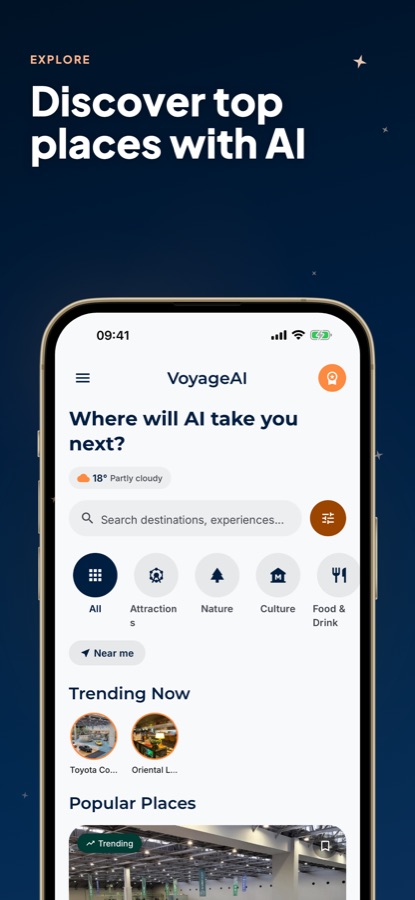
Tell AI Travel Guide - Tokyo what you're into, and it hands back a complete multi-day plan for the city, grouped by neighborhood instead of scattered across Tokyo's train map. It's free on iOS and Android, and every place in its guide carries real opening hours, an address, directions and a rating, with a running Saved list for anything you bookmark along the way.


- Price
- Free, with ads
- Platforms
- iOS and Android
- Age rating
- 4+
- Version
- 11.8.2
- Requires
- iOS 15.1 or later
Tokyo isn't one city; it's a cluster of them.
Shibuya, Asakusa and Akihabara each feel like a different place with their own pace and purpose, connected by a train network that's fast but not always obvious on a first look. The useful question isn't what to see — it's which neighborhoods belong on the same day.
What it is
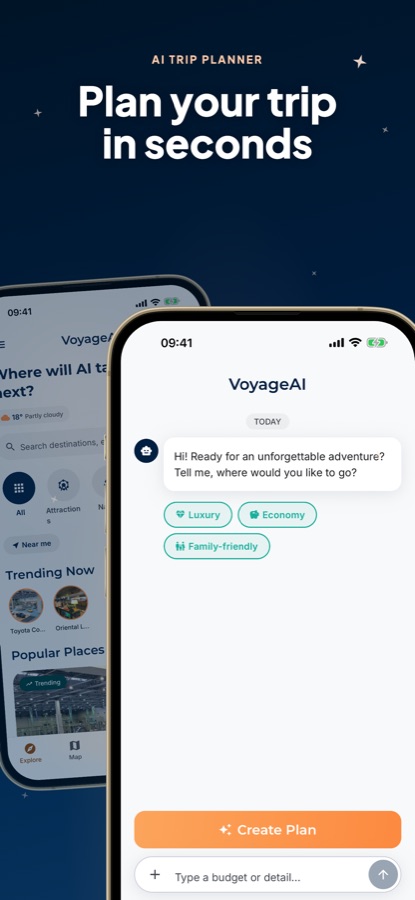
AI Travel Guide - Tokyo, listed as VoyageAI, is a free iOS and Android app for Japan's capital, combining an AI chat planner with a standing guide to the city's places. Say what interests you and pick Luxury, Economy or Family-friendly as a pace, and the chat writes a multi-day itinerary that groups stops by neighborhood rather than bouncing between districts. Any place you look up separately — temple, shop, restaurant — comes with its own hours, location and rating, and nothing you bookmark depends on it having been part of a generated plan.
Inside the app
What it looks like
Ask it
What to ask the planner
A short description plus a pace setting is all the chat needs — here's the kind of ask it handles well for Tokyo.
- Plan 5 days in Tokyo covering Shibuya, Asakusa and Akihabara without backtracking
- I have one full day in Tokyo — build the most efficient route around Asakusa
- Build a Family-friendly Tokyo itinerary with shorter walks and kid-friendly stops
- Plan an Economy weekend in Tokyo that keeps meals and attractions affordable
- Give me a Luxury Tokyo itinerary with Ginza shopping and standout dining
- Plan a day trip to Mount Fuji from Tokyo with a realistic travel time
- Build a 7-day Tokyo trip that mixes temples, neon streets and food markets
- Plan an evening in Shinjuku for nightlife and city views
Background
What should a first-time visitor to Tokyo know?
Tokyo doesn't really have one downtown — it's closer to a federation of town centers, each with a distinct job: a shopping crossing here, a temple quarter there, an electronics district a few stops over. Getting a rough map of what each area is for, plus a working sense of the trains and a handful of local habits, matters more for a first trip than memorizing a list of famous names.
Shibuya, Asakusa, Akihabara and the restreading the districts
Shibuya and Shinjuku carry the modern energy — shopping, nightlife, the scramble crossing everyone's seen in photos. Asakusa, built around Senso-ji Temple, runs slower and older. Akihabara is given over to electronics and anime culture, while Harajuku and Ginza mark the two extremes of Tokyo fashion, from street style to flagship luxury.
The rail systemJR, two subways, one card
Between JR lines, two separate subway operators and a handful of private railways, Tokyo's transit map looks far more complicated than it feels in practice — a single rechargeable IC card, Suica or Pasmo, works across nearly the whole network. Service is frequent and punctual; the one thing worth routing around is the weekday rush, when central lines get genuinely packed.
A Mount Fuji side trippossible, not guaranteed
Reaching the Fuji Five Lakes area by train or bus from Tokyo is a common day or overnight trip, with the clearest mountain views generally in winter's dry air. Summer haze frequently hides Fuji even when the city itself is having a perfectly sunny day, so a quick weather check before committing saves more disappointment than people expect.
Everyday habits worth matchingshoes, trash, trains
Shoes come off at the door of traditional restaurants, ryokan and some temples — look for a shoe rack or a raised step as the cue. Street-level trash cans are unusually hard to find, so carrying small rubbish for a while is normal rather than a sign you're missing something. Phone calls are rare on trains, which stay quiet even packed to capacity.
How it works
Using the planner
There's a short loop to the app: describe the trip once, get a route back, and look up any single place separately whenever you need more than the plan gives you.
Start with a short message
Mention your interests, how many days you've got and the kind of trip this is, then choose Luxury, Economy or Family-friendly for pace. It reads like texting a friend rather than filling out a form, and later messages just refine the plan already in hand.
Receive a grouped itinerary
The reply splits the trip into days, with each day's stops clustered by neighborhood instead of zig-zagging across the city, tracked on the map as you scroll through it. Drop anything that doesn't fit and keep what does — the plan updates rather than resets.
Pull up a single place
Open any stop for its own record — hours, location, directions, rating — whether or not it's attached to a day. Bookmark anything worth remembering while you browse on your own, and it's sitting in Saved whenever you want it back.
What's inside
What the app offers
AI
AI trip planner
A few lines about your interests and pace come back as a structured, multi-day Tokyo plan — the digging a stack of blog posts would otherwise take, compressed into one reply.
Map
Neighborhood-grouped routes
Rather than a scatter of pins, each day clusters its stops by area, so an afternoon in Asakusa doesn't end with a long ride back to somewhere you already passed.
3
Pace settings
Luxury, Economy and Family-friendly steer what the planner reaches for before it writes a word, so the trip that comes back fits how you actually want to travel.
Explore
A curated place guide
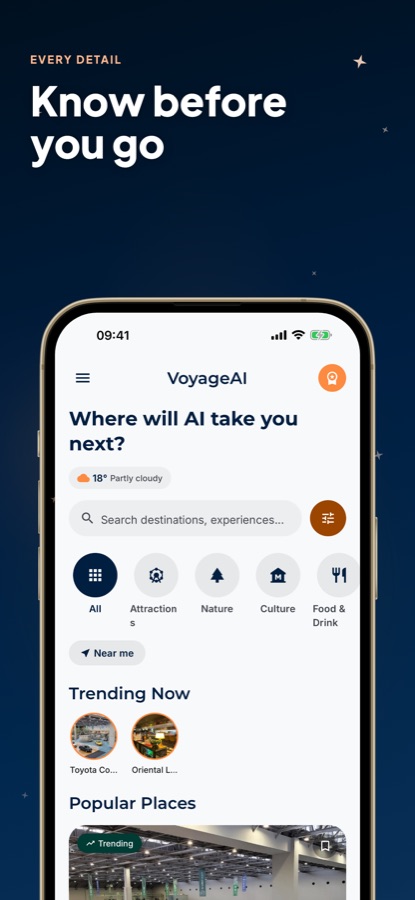
Popular, Trending and Top Rated lists sit beside browsing by category — attractions, nature, culture, food and drink — plus search and the day's weather on one screen.
Info
Full listings per place
Every entry comes with a write-up, hours, location, directions and a rating, enough to weigh something like Senso-ji Temple or a Shibuya diner on its own merits first.
Saved
A standing favorites list
Tap to save anything you come across while exploring, no itinerary required — the full list is always one tab away under Saved.
Fit
Who it's for — and who it isn't
A good fit if you
- Have a Tokyo trip coming up and would rather start from a route than a blank notebook
- Want each day's stops grouped by neighborhood instead of crossing the city back and forth
- Are trying to pick between Shibuya, Asakusa, Akihabara and the rest with limited days
- Like having a place's hours and directions on hand without a separate search
- Already know roughly how you want to travel — budget-wise — and want the plan to match
Not the right tool if you
- Are hoping for unlimited free AI plans — the no-cost tier caps how many you get per day and carries ads
- Need live platform numbers or minute-by-minute train timing; a dedicated transit app does that better
- Want to reserve or pay for things through the app itself — none of that happens here
Privacy
Where your trip details go
Whatever you type into the chat — interests, pace, trip specifics — travels to an AI service solely so it can write your itinerary; it isn't used for anything beyond that. Places listed in the guide appear purely as information, with no paid or commercial relationship behind any of them.
Full details are in the CoddyKit privacy policy.
Questions
Frequently asked questions
What makes a good AI travel guide for Tokyo?
Two things matter: whether it can turn a rough idea of what you want into an actual day-by-day route, and whether it backs that up with real, checkable detail on each place instead of pointing you elsewhere. AI Travel Guide - Tokyo handles both — a chat planner that writes a grouped itinerary from your own words, paired with a guide that gives every place its own hours, location and rating. It's free on iOS and Android.
How confusing is the Tokyo train system for a visitor?
Less than the map suggests. JR lines, two subway networks and a few private railways look dense at first glance, but a single rechargeable card — Suica or Pasmo — covers almost the entire system, so the complexity mostly disappears once you're tapping in and out. The real thing to plan around is rush hour on weekday mornings and evenings, when central lines fill up fast.
Should I bother with a Mount Fuji day trip from Tokyo?
It's an easy add-on by train or bus to the Fuji Five Lakes area, but it comes with no guarantee — winter generally offers the clearest views thanks to drier air, while summer haze can hide the mountain on an otherwise clear day in Tokyo. Checking the forecast the morning of is a better bet than assuming the mountain will show up because the sky looks blue.
What local habits should a visitor to Tokyo pick up quickly?
Shoes come off before stepping into traditional restaurants, ryokan and certain temples, usually signaled by a rack or a small raised step. Trash cans on the street are genuinely scarce, so holding onto wrappers for a while is completely normal. Trains stay quiet even when full, and phone calls on board are something almost nobody does.
How does the AI trip planner actually work?
You describe what you're interested in and the trip's length in a chat, choose Luxury, Economy or Family-friendly for pace, and AI Travel Guide - Tokyo writes back a multi-day plan. Each day groups its stops by neighborhood and tracks them on the map, rather than leaving you to figure out the order yourself.
Does AI Travel Guide - Tokyo cost anything?
No — downloading it on the App Store or Google Play is free, and everyday use runs on ad support. A Pro subscription takes the ads away and lifts the daily cap on AI-generated plans, plus moves your requests ahead in the queue. Browsing places, reading full listings and saving favorites cost nothing either way.
Which Tokyo neighborhoods are worth prioritizing on a short trip?
Shibuya and Shinjuku give you the modern side of the city — shopping, nightlife, the scramble crossing — while Asakusa, centered on Senso-ji Temple, is older and quieter by comparison. Akihabara serves electronics and anime fans specifically, and Harajuku and Ginza sit at opposite ends of Tokyo's fashion scene. Most short visits settle on two or three rather than trying to fit in all of them.
How much detail does the app give for a single place?
Each listing includes a short write-up, opening hours, location, directions and a rating, tagged with a category — attraction, museum, restaurant, café and so on. That's enough to decide whether somewhere like Senso-ji Temple or a neighborhood izakaya deserves a spot in the day, without needing to leave the app to check.
What changes between the Luxury, Economy and Family-friendly settings?
Pick one before you ask the AI planner for anything, and it shapes the whole plan it writes — Luxury tends toward higher-end places and dining, Economy toward budget-friendly options, Family-friendly toward pacing and stops that work with kids in tow. It's a real change to the plan's contents, not a cosmetic label over the same list.
Get started
A city this layered deserves a route, not a guess
Free on iOS and Android, with Pro for unlimited AI plans and an ad-free guide.
More from CoddyKit
Available on iOS and Android.