

Rizz AI: Wingman & Pickup Line
Rizz AI: Wingman & Pickup Line — An AI dating coach that suggests replies you edit and send yourself
Rizz AI: Wingman & Pickup Line is a free iOS and Android AI dating coach and texting wingman for adults. Upload a screenshot of a chat, or type or paste the messages, pick a tone such as flirty, friendly, respectful or funny, and get reply ideas you can edit and send yourself.


- Price
- Free, Pro upgrade
- Platforms
- iOS and Android
- Languages
- 7
- Audience
- Adults, 18+
- Requires
- iOS 15.1 or later
You send the message. The app only suggests.
Rizz AI does not connect to your other apps or read your messages by itself. It sees only the screenshot or text you choose to give it, offers several ideas, and leaves every edit, and the final send, to you in whichever messaging or dating app you already use.
What it is
Rizz AI: Wingman & Pickup Line is a free iOS and Android app that suggests replies for text conversations. You upload a screenshot or type or paste the chat, choose a tone, and it reads who said what, the mood of the conversation and where it is heading before offering several replies, which you copy, change and send from your own app. It is made for adults aged 18 and over, promises no matches or results, and treats every suggestion as an idea rather than a script.
Inside the app
What it looks like
Background
How do you write a good reply in a dating chat, and what can an AI wingman actually help with?
Most stalled chats do not fail for lack of interest. They fail for lack of a next line: a message gets overthought for twenty minutes, something flat is sent and the conversation fades. Replies tend to land when they answer something specific the other person said, ask an open question or add a small detail about yourself, and match the other person's energy instead of using a generic line. An AI wingman can offer starting points and a second opinion on the mood of a chat, but it cannot know the other person, so the final wording should always be yours.
Context before the last messagewhy a few earlier messages help
A reply reads better when it reflects the whole thread rather than only the last line. Rizz AI works from who said what, the mood and the direction of the conversation, so including a few earlier messages gives it more to go on.
Tonethe same idea, delivered differently
A flirty, friendly, respectful or funny version of one reply suits different people and different stages of a chat. Trying a second tone is often the fastest route to a message that sounds like you.
Two people in every screenshotprivacy runs both ways
A chat screenshot carries another person's messages, name and photo. Share only conversations you are comfortable sharing and crop out anything the app does not need, which is the same courtesy you would want for your own messages.
Knowing when to let it gogood flirting respects the answer
Nobody can promise a match or a date, and Rizz AI does not. If someone is not interested, the best reply is to let it go, and the app's own listing says to use it to express yourself better, never to pressure, mislead or harass.
How it works
How a reply is made
The whole flow takes under a minute and ends with your own words, not the app's.
Share the conversation
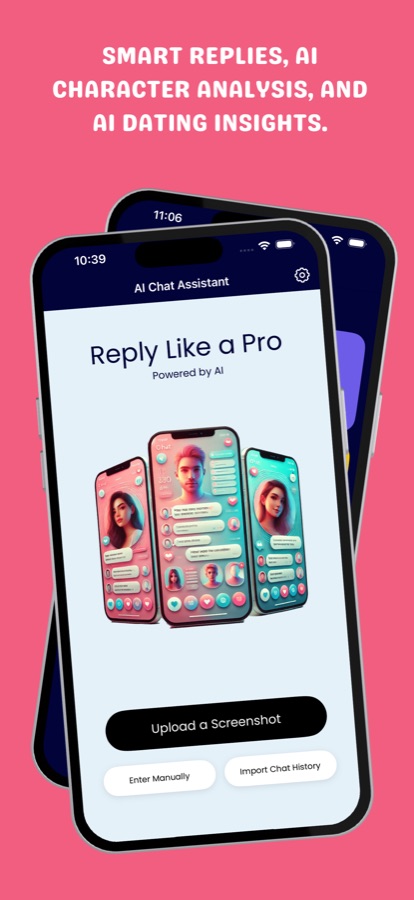
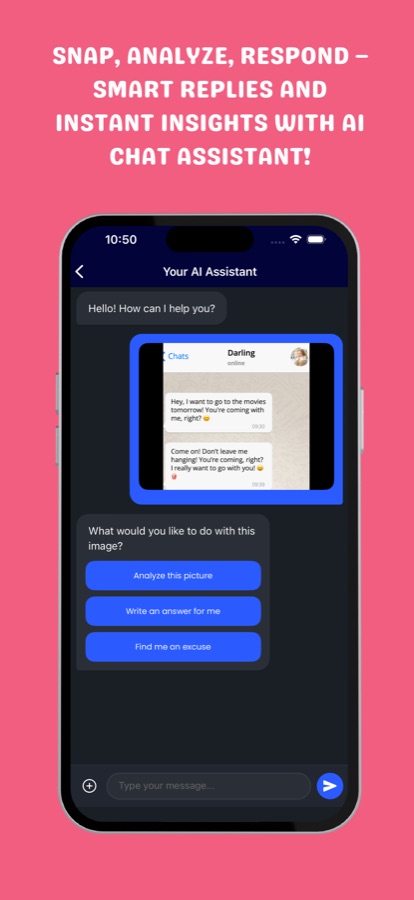
Tap Upload a Screenshot, paste a copied message from the clipboard, or type the conversation in by hand. A screenshot is read with the other person's messages on the left and yours on the right.
Pick a tone
Choose how you want to sound, such as flirty, friendly, respectful or funny. If the first ideas do not suit this person, ask again in another tone.
Edit, copy and send it yourself
Read the suggestions, copy the one closest to what you would say, reword it, and send it from your messaging or dating app. Your recent conversations are kept in history so you can return to a chat later.
What's inside
What is in the app
Tone
Choose the tone of the reply
Flirty for a crush, friendly or respectful when flirting is not the right move, and funny to keep a chat light, each producing a different set of suggestions for the same message.
Screenshot
Reads a chat screenshot
Upload an image of a conversation and the app works out who said what and how the exchange is going, instead of asking you to retype it.
You send
Nothing is sent for you
Rizz AI never posts or messages on your behalf. It shows ideas, you pick and edit one, and you send it from the app you already use.
Vibe
A second opinion on the mood
Ask for an analysis of a screenshot before you answer: the vibe, what the other person is likely to mean and how the chat is going.
Paste
Paste a message in one tap
Copy a message anywhere, open the app and use Paste from Clipboard to get tone options straight away, without taking a screenshot.
Deep
Deep Analysis of a chat history
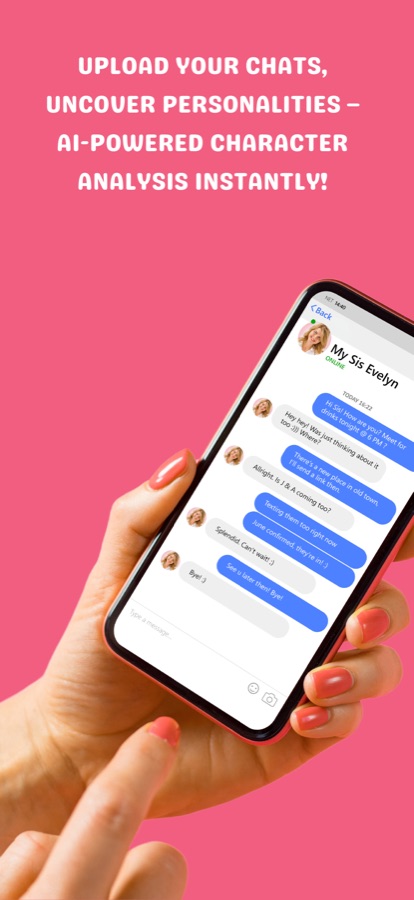
Import a chat history, such as an exported messaging thread, for a closer look at the conversation. Nothing is imported unless you choose to share it.
History
Recent conversations saved
Come back to an earlier chat from the My History list, or delete the saved history when you want it gone.
Fit
Who it's for — and who it isn't
A good fit if you
- Are new to texting a crush and often stare at a blank message box
- Get nervous in chats and want a few starting points to react to
- Want a quick second opinion on the mood of a conversation before answering
- Want to see what a good reply looks like and gradually write your own
- Use more than one messaging or dating app and want one place to get ideas
Not the right tool if you
- Are under 18, since the app is made for adults
- Want an app that reads your messages or sends them for you, which it does not do
- Expect guaranteed matches, dates or any particular result
- Are not comfortable sharing a conversation, which contains another person's words, with an AI service
- Want help pressuring, misleading or harassing someone
Privacy
Your privacy and the other person's
To create suggestions, the screenshot or text you submit is sent to the app's AI service for processing. A screenshot can contain another person's messages, name and photo, so share only conversations you are comfortable sharing and crop out anything you do not need. Please do not submit sensitive personal information.
Full details are in the CoddyKit privacy policy.
Questions
Frequently asked questions
What is a good AI dating coach app for texting?
The useful ones read the conversation before they answer and leave the decision to you. Rizz AI: Wingman & Pickup Line takes a screenshot or typed chat, considers who said what and the mood, then offers reply ideas in the tone you choose. You edit and send the message yourself, and the app promises no matches or dates. It is free to start on iOS and Android.
How does Rizz AI come up with reply suggestions?
You give it a conversation, either as a screenshot or as text you type or paste, and it reads the exchange for context: who said what, the mood of the chat and where it seems to be heading. It then writes several replies in the tone you picked. Including a few earlier messages, not only the last one, gives it more to work with.
Does the app read my messages or send texts for me?
No. Rizz AI: Wingman & Pickup Line does not connect to other apps and cannot read or send your messages by itself. It only sees the screenshot or text you choose to share, and you copy the suggestion you like and send it from your own messaging or dating app.
Which tones can I choose?
Flirty, friendly, respectful and funny are the main ones, so you can match a reply to the person and the moment. Rizz AI: Wingman & Pickup Line lets you try another tone if the first ideas do not feel right, which is often the quickest way to a reply that sounds like you.
Does it work with WhatsApp, Instagram or dating apps?
It works with any chat you can screenshot, copy or type, because Rizz AI: Wingman & Pickup Line takes the conversation as an image or text rather than plugging into another app. That also means nothing is posted for you. You return to the original app and send the reply there.
Will it get me matches or dates?
No app can, and Rizz AI: Wingman & Pickup Line says so plainly: it does not promise matches, dates or any particular result. It aims to give natural, kind and honest starting points, and it is up to you to respect the other person's answer.
Is Rizz AI free?
The app is free to download and try. Some features and higher usage need a Pro subscription, which renews automatically until you cancel it in your store account settings. The price for your country is shown in the app before you buy.
What happens to the screenshots I upload?
To generate suggestions, Rizz AI: Wingman & Pickup Line sends the screenshot or text you submit to its AI service for processing. A screenshot can include another person's messages, name and photo, so share only chats you are comfortable sharing, crop out what is not needed and avoid sensitive personal information.
Why is the App Store listing called TalkFlow?
Rizz AI: Wingman & Pickup Line is the name on Google Play, while the App Store listing is currently called TalkFlow - AI Chat Assistant. It is the same app, so this page covers both listings.
Who is the app for, and which languages does it support?
Rizz AI: Wingman & Pickup Line is made for adults aged 18 and over who want help with dating chats, flirting and everyday conversations. The interface is available in 7 languages, and it runs on iOS through the App Store and on Android through Google Play.
Get started
Get unstuck on the next message
Free on iOS and Android. Upload a chat, choose a tone, then make the reply your own.
More from CoddyKit
Available on iOS and Android.