

HTML for Kids: Learn with AI
HTML for Kids: Learn with AI — A child's first web page, with an AI helper nearby
HTML for Kids: Learn with AI is an iPhone and iPad app that teaches children how web pages are built. Short lessons start with what HTML is, a code editor on the same screen lets a child type and run what they learn, and an AI helper can answer questions, point out mistakes and generate example code. This page is written for parents deciding whether it suits their child.

- Price
- Free, with optional in-app purchases
- Platforms
- iPhone and iPad
- Age rating
- 4+
- Version
- 60.0.6
- Requires
- iOS 15.1 or later
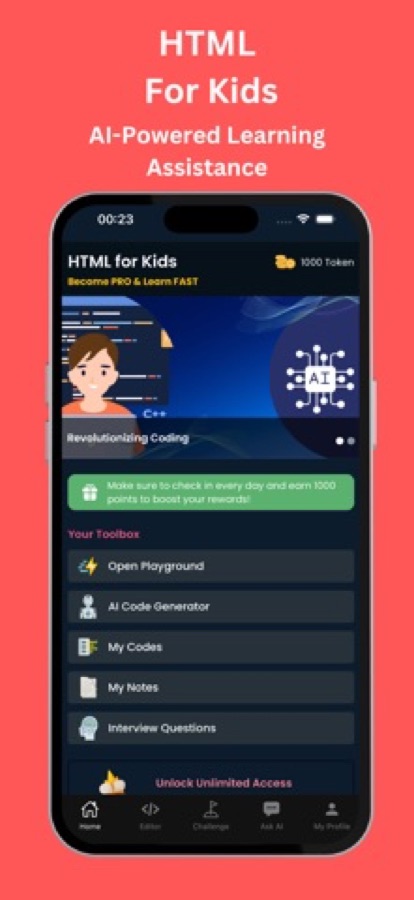
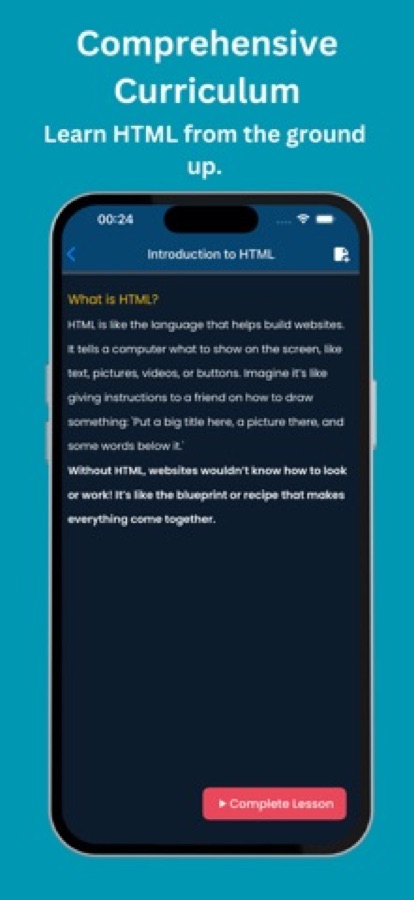
A web page is just instructions written in a language.
The app's first lesson explains HTML as telling a computer what to show, like giving a friend directions for a drawing: a big title here, a picture there, some words below. That plain framing is a gentle way into the idea that a screen is something a child can describe and build.
What it is
HTML for Kids: Learn with AI is an iOS app that teaches children HTML, the language that structures every web page, through short step-by-step lessons. It includes a built-in code editor where a child can write and run HTML on the device, an AI chatbot for questions, AI code generation, a notebook and saved code snippets, and online challenges with other learners. A final exam earns a certificate. The app runs on iPhone and iPad, is rated 4+ and is free to download with optional in-app purchases.
Inside the app
What it looks like
The course
What the HTML for Kids course covers
16 courses and 35 lessons from the site's course list, from the first lesson on what HTML is to CSS basics and best practices.
Introduction to HTML
A four-lesson start on what HTML is and why every website needs it.
Basic HTML Elements
Four lessons on the everyday elements that make up a simple page.
Advanced HTML Elements
Four lessons that move on to more of the elements used in fuller pages.
Getting Started with CSS and Introduction to CSS
A first look at CSS and how styles are defined, before moving into selectors.
Styling HTML
Four lessons on applying style to the elements a child has already written.
CSS Selectors and Common Properties
Class selectors, selector types and the most-used properties, including margin, padding, colour and background.
Fun Challenges and Activities
Two lessons of challenges that turn what a child has learned into small projects.
HTML Best Practices and Beyond HTML
Habits for writing tidy HTML and a look at what comes after it.
How it works
How a child uses it
A session mixes reading a short lesson with trying the idea in the editor, so a concept turns into something typed and seen.
Start with a lesson
A course opens into short lessons written in plain language. The first one, Introduction to HTML, explains what HTML is and why websites need it.
Try it in the editor
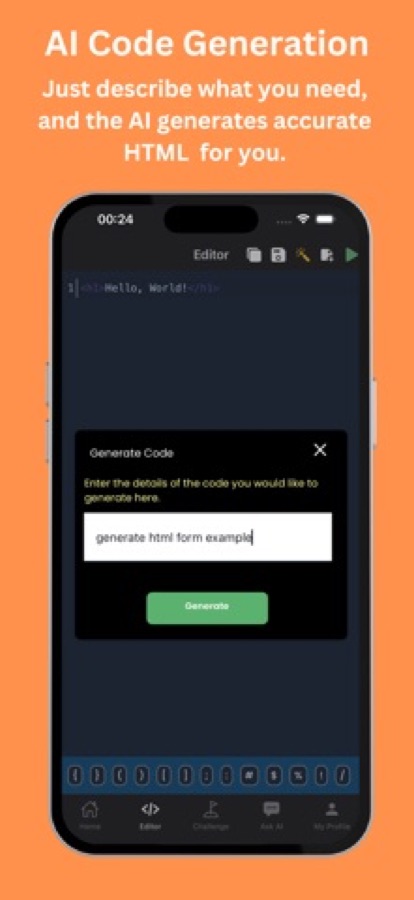
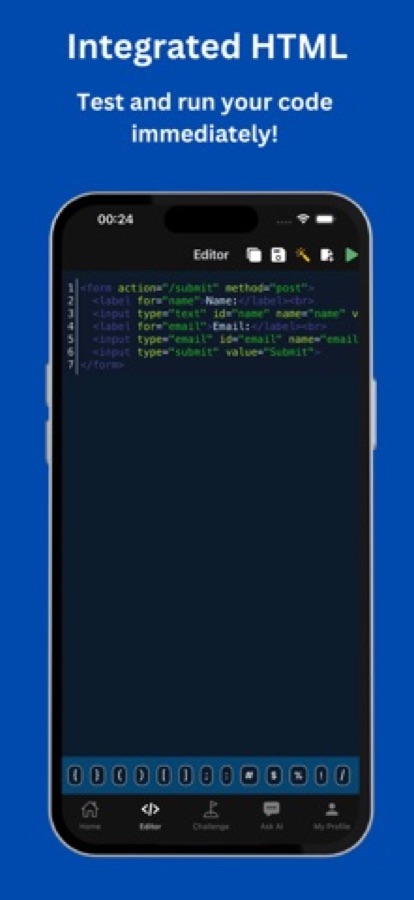
The built-in code editor runs the HTML on the device, so a child can type a tag and see the page change straight away, with a row of symbol keys for brackets and quotes.
Ask when stuck
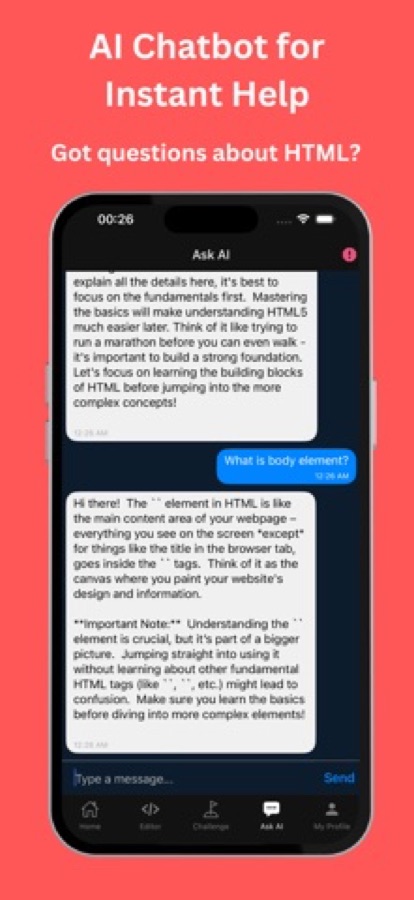
The AI chatbot answers HTML questions, and the AI can also generate example code from a short description or suggest a fix for a mistake.
Keep notes and finish with an exam
A notebook and saved code snippets let a child keep what they want to revisit. At the end of the learning path, an exam earns a certificate.
What's inside
What is in the app
16
Courses in the learning path
From Introduction to HTML and Basic HTML Elements through CSS basics, styling, fun challenges and best practices, 16 courses and 35 lessons in the site's course list.
Editor
Built-in code editor
Write HTML on the phone or tablet and run it on the spot to see the result.
AI
AI chatbot and code help
Ask HTML questions and get instant answers, have the AI generate example code from a short description, and get suggested corrections for a mistake.
Notes
Notebook and saved code
Write down important points and save favourite snippets to return to later.
Online
Challenges with other learners
Online challenges let children compete with other learners around the world, which adds a game-like element.
Exam
Exam and certificate
At the end of the learning journey a child can take an exam and earn a certificate.
For parents
Is HTML a good first step in coding for a child, and what will they actually learn?
HTML is a gentle place to start because the result is visible straight away: a heading, a paragraph or a picture appears on the page. It is a markup language, which means it describes what a page contains rather than making decisions the way a programming language does, so there is less to hold in mind at once. A child who learns HTML also learns how the web is put together, and it leads naturally to CSS for colours and layout and then to programming.
Tags and elementsthe basic building block
HTML wraps content in tags, such as a heading tag around a title or a paragraph tag around a sentence. Children quickly see that changing the tag changes how the same words appear, which is the core idea of the language.
Attributessettings on a tag
An attribute adds information to a tag, such as the address a link points to or the file a picture should show. They are the first step from typing text to controlling what an element does.
HTML and CSSstructure and style
HTML gives a page its structure and CSS gives it colour, spacing and layout. The course in the app moves from HTML into CSS basics such as selectors, margin, padding and background colour, because a page without style rarely satisfies a child for long.
Mistakes are normalwhy feedback matters
A missing closing tag or a typo can make a page look wrong, and that is frustrating for a young learner. Quick feedback, whether from a parent or an in-app helper, keeps small errors from becoming a reason to stop.
Fit
Who it's for — and who it isn't
A good fit if you
- Have a child who is curious about how websites and apps are made
- Want a first step into coding that shows a visible result quickly
- Prefer a child to learn on a phone or tablet with short lessons
- Are happy to sit nearby for the first sessions and the AI chat
- Want a certificate at the end as a record of finishing
Not the right tool if you
- Want a children's app with no online features, since there are online challenges and an AI chatbot
- Expect a story-based game for very young children, because it is a lesson and editor app
- Need an Android version, because the app is currently on the App Store only
- Want everything free, since optional in-app purchases unlock more
Privacy
Before you hand over the device
HTML for Kids includes an AI chatbot, AI code generation and online challenges with other learners around the world. Look at these features yourself first and decide what suits your child, and avoid typing personal details such as names or addresses into any chat or code field.
Full details are in the CoddyKit privacy policy.
Questions
Frequently asked questions
What is a good app for teaching a child HTML?
A good one lets a child try each idea straight away. HTML for Kids: Learn with AI has short lessons, a code editor that runs HTML on the device, an AI chatbot for questions and an exam with a certificate at the end. It runs on iPhone and iPad and is rated 4+.
What age is HTML for Kids suitable for?
The App Store rating is 4+, which describes the content and not the skill level. In practice HTML for Kids: Learn with AI suits a child who can read short lessons and type, and younger children will usually need a parent beside them. You know your child's reading and typing level best.
Is HTML a programming language?
Strictly, no. HTML is a markup language that describes the structure of a web page, such as headings, paragraphs, links and pictures, rather than making decisions like a programming language. That is why it is a friendly first step, and HTML for Kids: Learn with AI also introduces CSS for colour and layout.
Does the app have an AI helper, and is it safe for children?
It has an AI chatbot for HTML questions, AI code generation and suggested corrections. As with any AI tool, a parent should look at it first and stay nearby, and a child should not type personal details into a chat. The app does not replace parental supervision.
Can my child run their HTML in the app?
Yes. HTML for Kids: Learn with AI includes a built-in editor and a code runner, so a child can write HTML on the device and see the result straight away. They can also save favourite snippets and keep notes.
What does my child learn first?
The first course, Introduction to HTML, explains what HTML is and why websites need it, followed by the basic and advanced HTML elements. Later courses move into CSS basics such as selectors, margin, padding and colour, then best practices.
Are there online features?
Yes. The app has online challenges where children compete with other learners from around the world, and an AI chatbot. A parent who wants only the lessons and the editor should check these features first and decide how to use the app.
Is HTML for Kids: Learn with AI free?
It is free to download, with optional in-app purchases that unlock more of the app. Check the in-app offer on your own device before deciding, since what is included can change.
Does my child get a certificate?
Yes. At the end of the learning journey a child can take an exam and earn a certificate. It records that they finished the course and is not an academic qualification.
Is there an Android version?
Not at the moment. HTML for Kids: Learn with AI is available on the App Store for iPhone and iPad. The app is in English.
Get started
Build a first web page together
Free to download on iPhone and iPad, with optional in-app purchases.
More from CoddyKit
Available on iOS.