
Learn DevOps: Docker & K8s
Learn DevOps: Docker & K8s — Learn DevOps from the Linux shell to Kubernetes and CI/CD pipelines
Learn DevOps: Docker & K8s, also known as DevOps Bootcamp, is an Android app (iPhone version coming) for people who want to learn DevOps in short lessons. 142 courses in eight tracks lead from your first Linux commands through Git, Docker, Kubernetes, Helm, CI/CD, Terraform and Ansible, with an AI Mentor that answers about the lesson you are reading.


- Price
- Free, Pro upgrade
- Platforms
- Android now, coming to iPhone
- Languages
- 22
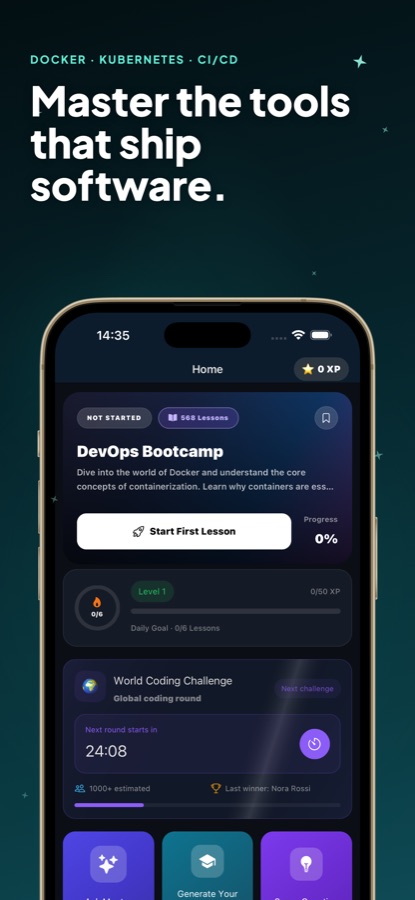
Nothing here deploys, and nothing is billed.
The debugging missions run in a simulated terminal, so you can chase a pod that will not start or a CI job that is red in the runner without a cloud account, a credit card or a laptop. You can also begin without creating an account.
What it is
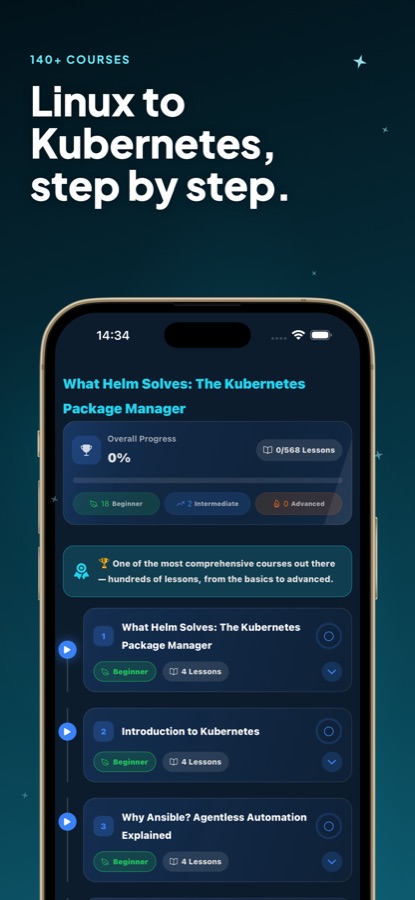
Learn DevOps: Docker & K8s (DevOps Bootcamp) is a free-to-start Android app with 142 courses and 568 lessons in eight tracks: Linux and Bash, Git and GitHub, Docker, Kubernetes, Helm, CI/CD, Terraform and Ansible. Lessons are short and levelled from beginner to advanced, with twenty troubleshooting missions in a simulated terminal, daily quizzes, flashcards and an AI Mentor, and an iPhone version is on the way.
Inside the app
What it looks like
The course
The eight tracks in the DevOps course
142 courses and 568 lessons from the app's course list; the first course of every track is free.
Linux and Bash
Navigating the shell, files and permissions, processes, SSH, grep, awk and jq, shell scripting and its testing and hardening.
Git and GitHub
Commits and local workflow, branching strategies, remotes and pull requests, hooks and release tagging.
Docker
Images and Dockerfiles, Docker Compose, networking and data, Swarm, and container security.
Kubernetes
Clusters, pods, deployments and ReplicaSets, services and networking, configuration and storage, scheduling and observability.
Helm
What Helm solves, charts and releases, values.yaml, template functions, hooks, subcharts, and Helm in a pipeline.
CI/CD
GitHub Actions workflows, Jenkins with Docker, deployment strategies, and securing and monitoring pipelines.
Terraform
Infrastructure as code, core concepts, state, modules and workspaces, and provisioning on AWS and Azure.
Ansible, GitOps and the capstone
Inventories, playbooks, roles, Jinja2, Vault and Molecule tests; then GitOps with Argo CD and Flux, and a zero-downtime capstone deploy.
How it works
How the bootcamp works
You move through a track one small lesson at a time, then test yourself on it the next day.
Choose a track and read a short lesson
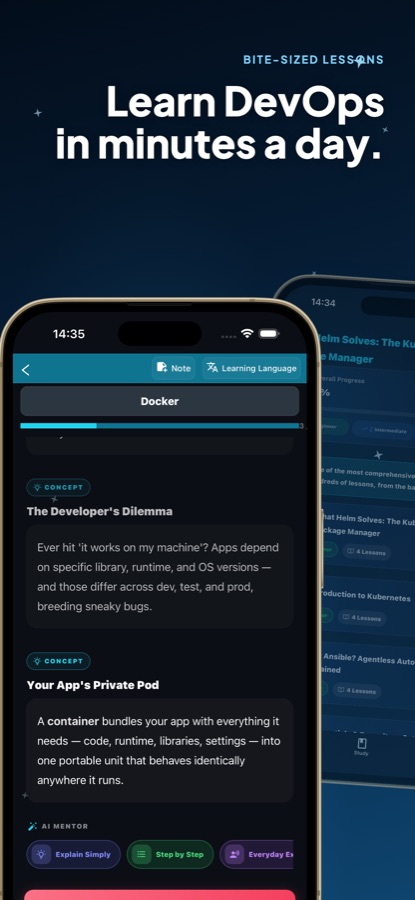
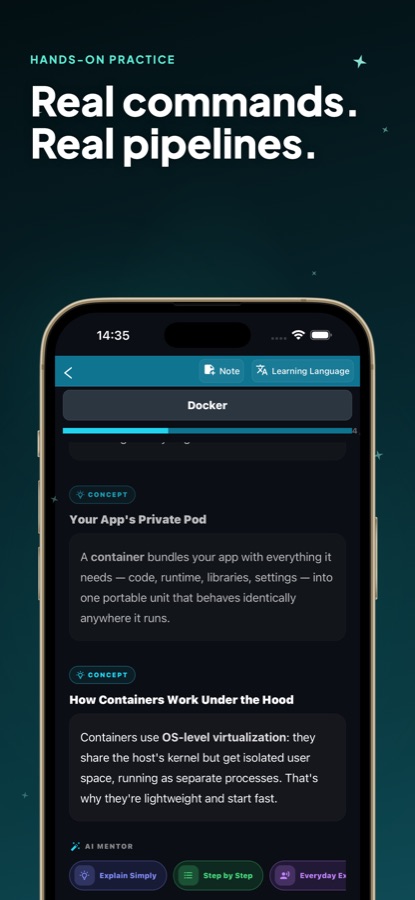
Eight tracks cover the DevOps toolchain, and the first course of every track is free. Each lesson explains a concept in a few lines, such as why a container is lightweight, and then builds on it.
Ask the AI Mentor about the page you are on
Tap a button such as Explain Simply, Step by Step or Everyday Example, or type your own question. The answer is about the lesson in front of you, not about DevOps in general.
Repeat, then try a troubleshooting mission
A daily mini quiz explains each answer, and the questions you miss come back as flashcards on a spaced schedule. A debugging mission then drops you in a broken setup in a simulated terminal.
What's inside
What is in the app
142
Courses, 568 lessons
Eight tracks in all: Linux and Bash, Git and GitHub, Docker, Kubernetes, Helm, CI/CD, Terraform and Ansible, levelled from beginner to advanced.
20
Debugging missions
Troubleshooting in a simulated terminal across containers, Kubernetes, CI/CD, observability and reliability: a 1.9 GB image nobody can pull, or an alert that stayed green through an outage.
AI
AI Mentor and lesson generator
Ask about the exact lesson you are on, or name a topic and have a structured lesson built for you. Lessons can also be translated into your own language.
Daily
Quiz and flashcards
A daily mini quiz with an explanation for each answer, and missed questions returning as flashcards on a spaced repetition schedule.
Cheat sheet
Commands you look up most
A DevOps cheat sheet for Docker, kubectl, Git, Linux and more, plus notes on any lesson and a saved list for later.
Streaks
Habit tools
Daily streaks with streak freezes so one missed day does not erase progress, along with XP, levels, a leaderboard and reminders at a time you choose.
Background
What does a DevOps engineer actually do, and what should you learn first?
DevOps is the practice of getting software from a developer's commit into production reliably, and keeping it running afterwards. In daily work that means writing automation more than clicking in consoles: scripts on Linux servers, containers that package an app, pipelines that test and release it, and infrastructure described in files. People usually start with the Linux command line and Git, then containers, and only then the orchestration and automation layers that sit on top of them.
Containersthe unit that gets shipped
A container bundles an application with the libraries and settings it needs, so it behaves the same on a laptop, in testing and in production. Docker is a widely used way to build and run them, and a Dockerfile is the recipe for an image.
Orchestrationwhat Kubernetes is for
Once there are many containers, something has to start them, restart them when they fail, route traffic and attach storage. Kubernetes does that with pods, deployments and services, and Helm packages those definitions into charts.
CI/CD pipelinesfrom commit to release
Continuous integration builds and tests every change, and continuous delivery moves a passing build towards production. GitHub Actions and Jenkins are two common tools, and a classic puzzle is the job that is green on your machine and red in the runner.
Infrastructure as codeservers described in files
Instead of building servers by hand, you describe them in files that can be reviewed and repeated. Terraform provisions resources such as cloud networks and machines, while Ansible configures the machines once they exist.
Fit
Who it's for — and who it isn't
A good fit if you
- Are a developer who wants to understand what happens between a git push and production
- Administer servers and want to move from manual work to containers and automation
- Are aiming for a first cloud engineer or site reliability role
- Want to practise reading real error situations without paying for cloud resources
- Have only a phone to hand during a commute and want structured material
Not the right tool if you
- Need a real shell or a live cluster to practise on; missions run in a simulated terminal
- Expect all 142 courses free; the first course of each track is free and Pro unlocks the rest
- Want an iPhone version today; it is not yet released
- Want an official course from a tool vendor; this is an independent learning app
Questions
Frequently asked questions
What is Learn DevOps: Docker & K8s?
Learn DevOps: Docker & K8s, also called DevOps Bootcamp, is an Android learning app with 142 courses and 568 lessons across Linux, Git, Docker, Kubernetes, Helm, CI/CD, Terraform and Ansible. It is for developers, system administrators and students who want to learn DevOps in short lessons on a phone. It is free to start, available in 22 languages, and an iPhone version is planned.
How do I learn DevOps from scratch?
Begin with the Linux command line and Git, because every other tool assumes them. Then learn containers with Docker, move on to Kubernetes, and add pipelines and infrastructure as code. DevOps Bootcamp follows roughly that order, and the first course of each of its eight tracks is free to try.
Do I need a laptop or a cloud account?
No. The app states that you do not need a laptop, a cloud account or a credit card to learn, and you can start without creating an account. The debugging missions use a simulated terminal, so nothing is deployed and nothing is billed.
What are the debugging missions?
They are twenty troubleshooting exercises in a simulated terminal, in five areas: containers, Kubernetes, CI/CD, observability and reliability. Examples include a 1.9 GB image nobody can pull, pods that will not start and a probe that kills an app while it boots. Two missions are free, and Pro opens all twenty.
Is it useful for DevOps interview questions?
It helps with the underlying knowledge that interview questions test. The daily quiz explains each answer, missed questions return as flashcards, and the cheat sheet collects commands you are likely to be asked about. Pair it with practice explaining your answers aloud.
Which tools does the course teach?
Linux and Bash, Git and GitHub, Docker and Docker Compose, Kubernetes, Helm, GitHub Actions and Jenkins, Terraform with AWS and Azure, and Ansible. It also touches GitOps with Argo CD and Flux, and monitoring and observability.
How does the AI Mentor work?
You ask about the lesson you have open and get an answer in that context, using buttons like Explain Simply or Step by Step or your own wording. Free users get a few questions each day, and Pro removes the daily limit. A separate lesson generator builds a structured lesson on a topic you name.
Is Learn DevOps: Docker & K8s free, and what does Pro include?
Learn DevOps: Docker & K8s is free to start: the first course of each track, a short preview of the other lessons, two missions, the daily quiz, flashcards and the cheat sheet cost nothing. Pro is a subscription you can cancel in Google Play. It unlocks every course and lesson, all twenty missions, unlimited AI Mentor questions and unlimited AI-generated lessons.
Is there an iPhone version?
Not yet. DevOps Bootcamp is available on Google Play now, and an iPhone version is coming. This page links the App Store entry and shows it as coming soon until it goes live.
Get started
Run your first Linux command today
Free to start on Android, iPhone coming, in 22 languages.
More from CoddyKit
Available on Android.