

Caregiver Planner: Elder Care
Caregiver Planner: one shared place for a family coordinating an aging parent's care
Caregiver Planner gives a family coordinating an aging parent's care one shared place instead of a group chat, a whiteboard and three separate calendars. Medication reminders, tasks, appointments and a care log sit together, so anyone helping can see what is done, what is coming and who is on it — without carrying every detail alone.


- Price
- Free, Pro upgrade
- Platforms
- iOS and Android
- Languages
- 10
- Age rating
- 4+
- Version
- 1.2.0
- Requires
- iOS 15.1 or later
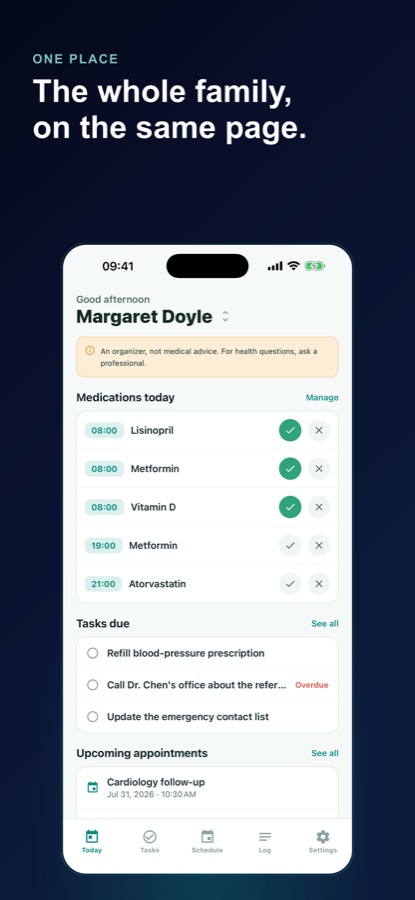
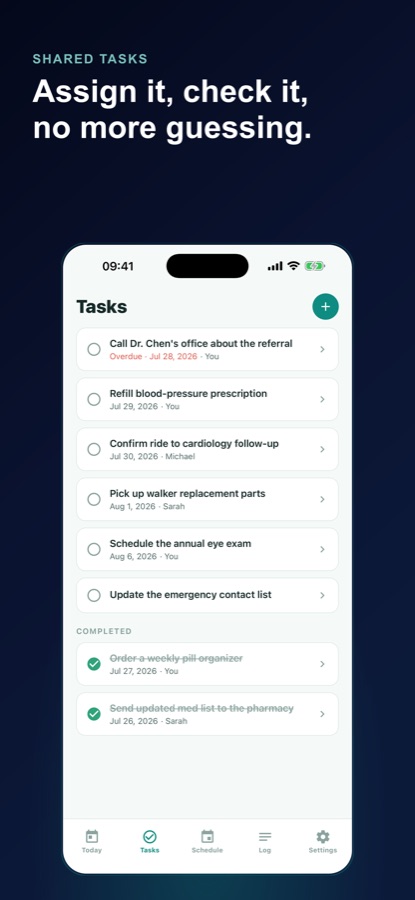
'I thought you had that' is a coordination failure, not a memory failure.
Caring for an aging parent usually involves more than one person, and most of what goes wrong is not forgetting a task — it is two people assuming the other one handled it. A shared list that everyone can see fixes that more reliably than reminding anyone to be more careful.
What it is
Caregiver Planner: Elder Care is a free iOS and Android organizer for family members coordinating the day-to-day care of an aging parent or loved one. It holds a shared task list that can be assigned to a specific person, an appointment calendar with reminders, medication reminders logged as taken or skipped, a shared care log for visit and call notes, saved contacts, and AI-generated prep checklists for situations like a specialist visit or hospital discharge. It is a coordination and organizing tool, not a source of medical, dosing or health advice.
Inside the app
What it looks like
Background
What makes family caregiving hard to coordinate?
Caring for an aging parent is rarely one person's job for long. A sibling nearby handles doctor visits, another manages medication refills from a distance, and a spouse covers daily check-ins — and each of them usually only sees part of the picture. The friction is almost never about the care itself; it is about everyone involved working from a different, partial, and often outdated version of what has already happened and what still needs doing.
The scattered-tools problema whiteboard, a notes app, a group text
Information about one person's care often ends up split across a kitchen whiteboard, a phone's notes app, several calendars and a group chat nobody scrolls back through. Each tool is fine on its own; the problem is that no single person, including the main caregiver, can see the whole picture in one place.
Medication adherence trackingtiming, not dosing
Keeping track of whether a medication was actually taken, and when, is a logistics problem a family can solve with a shared record. Deciding what to take, how much, or whether to change a dose is a medical decision that belongs to the prescribing doctor or pharmacist, not an app or a family member.
Handoff between caregiversthe information a replacement needs
When a sibling takes over for a weekend, or a new in-home helper starts, the useful handoff is specific: current medications and times, upcoming appointments, recent changes noted in a log, and who to call for what. Without a written handoff, that information usually has to be reconstructed from memory under pressure.
What this kind of app is notcoordination, not medical advice
A caregiving organizer can track what medications were taken, what a doctor said at the last visit, and who is doing what this week. It cannot and should not suggest a dose, interpret a symptom, or replace a conversation with a licensed doctor, pharmacist or other professional.
How it works
How the app is used
One person usually sets up the care profile; after that, everyone involved checks the same shared view instead of texting to ask what happened.
Set up the care profile
Add the person being cared for with a name, relationship and simple notes, so everyone helping starts from the same information. Save the doctor, pharmacy, nurse and family contacts that come up most, with two pinned to Today for a one-tap call.
Track meds, tasks and appointments as they happen
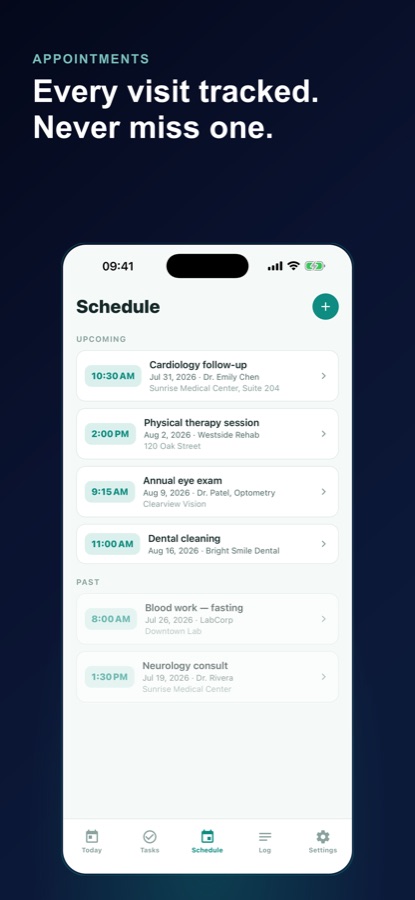
Add each medication and the times for a reminder, then log it taken or skipped. Add a task like picking up a prescription, assign it to a specific family member, and check it off. Keep doctor and specialist visits on one calendar with a reminder before each one, and write down what was decided afterward.
Keep a shared log and hand off clearly
Note visits, calls and updates in a shared care log grouped into concern threads, so you can tell a clinician how long something has been going on. Generate a handoff brief — reminder times, next tasks and appointments, recent updates and who to call — to send a sibling or save as a PDF before you step away.
What's inside
What the app coordinates
Meds
Medication reminders
Add each medication and the times you want a reminder, then log it taken, skipped, or snooze for 15 minutes. The app reminds you of the time only — it never suggests or adjusts what or how much to take.
Share
Care Circle
Invite siblings and other helpers with a code, and post tasks, log notes and duty shifts to a shared feed everyone in the circle sees, syncing when the app opens or refreshes. Pro.
Handoff brief and export
Generate a brief covering reminder times, next tasks and appointments, recent updates and who to call, ready to send to a sibling or save as a PDF, plus a full care log and appointment export for your own records.
AI
Prep checklists
Pick a situation — a specialist visit, hospital discharge, home-safety walkthrough, organizing medications, a caregiver rotation, new-diagnosis questions, arranging in-home help, or gathering documents — and get a checklist of questions to ask, papers to bring and jobs to divide up.
7d
Duty rotation
Set a weekly pattern of who is on duty and when, with an end-of-shift reminder, so a caregiving schedule split between family members stays visible instead of negotiated over text each week.
Log
Shared care log
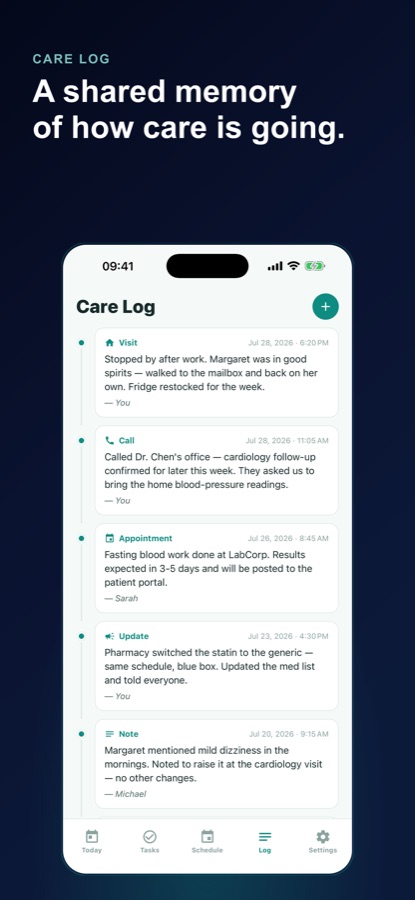
Note visits, calls and updates, grouped into concern threads like 'sleep at night' or 'swollen ankle', so the family's shared memory of how care is going is written down rather than scattered across memories.
Fit
Who it's for — and who it isn't
A good fit if you
- Are coordinating an aging parent's care with at least one other family member
- Keep losing track of who picked up the prescription or called the clinic
- Want one calendar for every doctor visit instead of three overlapping ones
- Need to hand care off to a sibling for a weekend and want it done with a written brief, not a phone call under pressure
- Want a shared log so you can tell a doctor exactly how long a change has been going on
Not the right tool if you
- Want medical, dosing or treatment advice — the app only reminds you of times you set and logs what you did
- Need to coordinate with more than one family member for free — Care Circle sharing is Pro
- Are looking after more than one care recipient and want that free — multiple profiles are Pro
- Want the app to replace a conversation with the prescribing doctor or pharmacist about a medication
Safety and limits
What this app is, and is not
Caregiver Planner: Elder Care is an organizer for the logistics of caregiving. It helps a family plan, remind, share and keep track, and it never gives dosing, diagnosis or treatment advice.
It does not provide medical advice. For any medical question — about a medication, a symptom or a change you have noticed — consult a licensed doctor or pharmacist. The app's medication reminders tell you the time you set; they never suggest, adjust or comment on what or how much to take.
In a medical emergency, call your local emergency number immediately rather than relying on the app. Caregiver Planner is a coordination tool for the family around the care, not a substitute for professional medical judgment or emergency services.
Privacy
What leaves your device
As a guest, your care profile, tasks, appointments, medication reminders and log stay on your phone. Care Circle sharing and cloud backup — both Pro features — store the shared or backed-up items on CoddyKit's servers so they can sync across family members' phones. AI prep checklists and visit suggestions are drafted by a third-party AI service after you agree, and medication names or recent log entries are sent only if you turn that option on.
Full details are in the CoddyKit privacy policy.
Questions
Frequently asked questions
What's a good app for coordinating care for an aging parent?
The useful test is whether more than one person can see the same information at the same time — a shared task list, one appointment calendar and a log everyone can read, instead of a group chat nobody scrolls back through. Caregiver Planner: Elder Care is built around that: assignable tasks, medication reminders logged as taken or skipped, a shared appointment calendar, a care log, saved contacts, and a handoff brief for stepping away. It is free to start on iOS and Android.
Does Caregiver Planner give medical or dosing advice?
No. It is an organizer for the logistics of caregiving, not a medical app. Medication reminders tell you the time you set to take something and let you log it as taken or skipped; they never suggest, adjust or comment on what or how much to take. For any medical question, consult a licensed doctor or pharmacist, and call your local emergency number for an emergency.
Can more than one family member use it together?
Yes, through Care Circle, a Pro feature. You invite siblings and other helpers with a code, and tasks, the care log and duty shifts post to a shared feed everyone in the circle can see, syncing when the app opens or refreshes. The free version works as a genuinely useful single-caregiver organizer on one device first.
How do medication reminders work?
You add each medication as printed on the label along with the times you want a reminder, and log each dose as taken or skipped, or snooze it for 15 minutes. The free plan supports up to 5 active medication reminders for one person; Pro removes that limit. The app only tracks timing — it never recommends or comments on dosage.
What is a handoff brief?
It is a generated summary covering current reminder times, the next tasks and appointments, recent care log updates, and who to call, built specifically to hand care over to someone else — a sibling covering a weekend, or a new in-home helper starting. You can send it directly or save it as a PDF, so the handoff is written down instead of reconstructed from memory under pressure.
What are the AI prep checklists for?
You pick a situation — a specialist visit, hospital discharge, a home-safety walkthrough, organizing medications, a caregiver rotation, new-diagnosis questions, arranging in-home help, or gathering documents and legal paperwork — and get a checklist of questions to ask, papers to bring and jobs to divide among the family. It is organizational help, never a diagnosis or treatment suggestion; one checklist is included free, and Pro adds unlimited checklists.
Is Caregiver Planner free?
Yes, to start. The free version covers one care recipient on your own device with unlimited tasks, appointments and care-log entries, up to 5 active medication reminders, saved contacts, a handoff brief, a weekly recap, PDF export and one AI checklist, and shows ads. Pro is a monthly or annual subscription that adds Care Circle family sharing, unlimited medication reminders and checklists, multiple care recipients, cloud backup and no ads.
Do I need an account to start?
No. You can start as a guest with no sign-up wall, and your plan for one loved one stays on your phone. An account becomes useful once you want Care Circle sharing with other family members or cloud backup and restore, both part of Pro.
Can I track care for more than one person?
The free version covers one care recipient. Pro adds multiple care recipients, so a family looking after both parents, for example, can keep each person's medications, tasks, appointments and log completely separate rather than mixed into one profile.
What does the shared care log actually record?
Visits, calls and updates, written in plain language and grouped into concern threads such as 'sleep at night' or 'swollen ankle' so a pattern is visible rather than scattered across separate notes. It becomes the family's shared memory of how care is actually going over time, and is useful to read back before a doctor's appointment to describe how long a change has been happening.
Get started
Get the whole family on the same page
Free to start on iOS and Android, with Care Circle sharing when the family needs it.
More from CoddyKit
Available on iOS and Android.