
Calisthenics Workout Log
Calisthenics Workout Log — A skill tree from your first push-up to a planche
Calisthenics Workout Log is a bodyweight training tracker built around a branching skill tree — 26 moves across Push, Pull, Core and Skills, from a knee push-up to a full planche. Clear the move below and the next one unlocks; log every set, rep and hold time, and an AI coach plans the path between where you are and the skill you're chasing.


- Price
- Free, Pro upgrade
- Platforms
- iOS and Android
- Languages
- 10
- Age rating
- 4+
- Version
- 1.0
- Requires
- iOS 15.1 or later
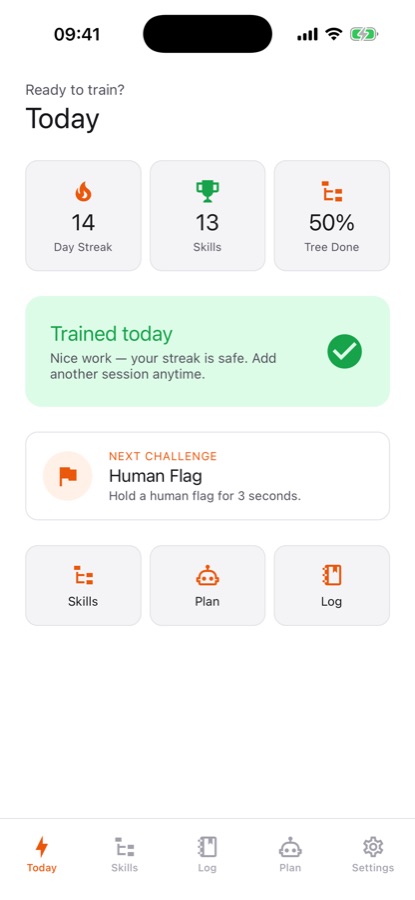
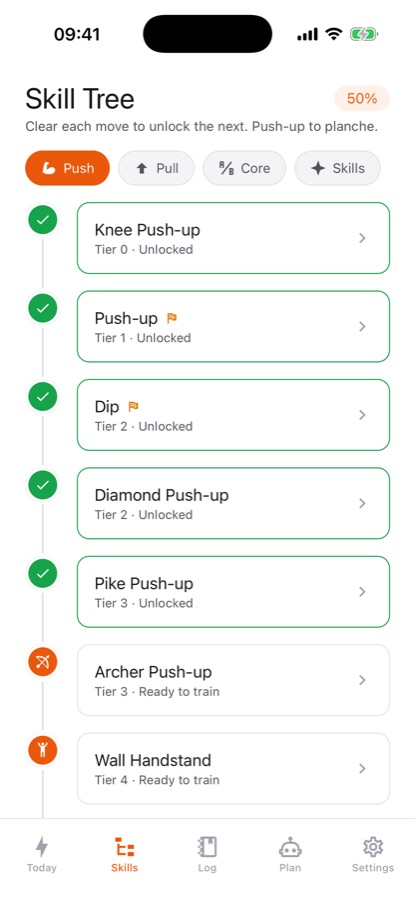
Every move has a prerequisite.
A muscle-up or a planche looks like a single trick to chase, but it's really the end of a chain of easier moves that build the strength to do it safely. The skill tree makes that chain visible instead of leaving you to guess what to train next.
What it is
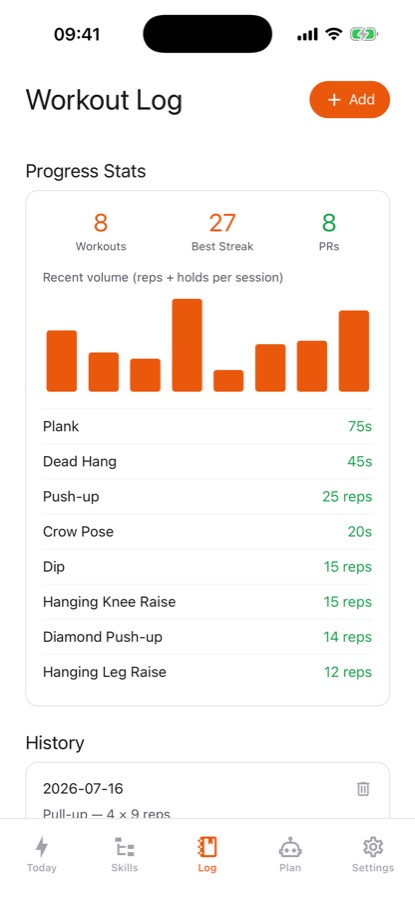
Calisthenics Workout Log is a bodyweight training app that maps every exercise — push-up, dip, pull-up, muscle-up, handstand, front lever, planche, human flag and more — as a node on a branching skill tree across four paths: Push, Pull, Core and Skills. Clearing one move unlocks the next, and a guided session on the Today screen walks through target reps or hold times, set by set, with a rest timer. Logging is sets, reps and hold times stored on your device, and an AI coach builds a multi-week progression plan toward a goal skill from your real numbers — max pull-ups, push-ups, dips and plank hold — rather than a generic template.
Inside the app
What it looks like
Background
What does a structured calisthenics progression actually look like?
Calisthenics skills build on each other in a fairly predictable order: a harder move usually requires the strength, stability or mobility that an easier move already trains. A muscle-up needs a strong pull-up and a strong dip before the transition between them makes sense; a planche needs wrist and shoulder strength most beginners don't have yet, built up through easier static holds first. Training the sequence in order, rather than attempting the advanced move directly, is what most structured bodyweight programs are built around.
Push, Pull, Core and Skillsthe four training paths
Push covers push-up variations through to the planche; Pull covers hangs and rows through to the muscle-up and front lever; Core covers plank and leg-raise variations through to the dragon flag; Skills groups standalone moves like the handstand and human flag that don't fit neatly into the other three.
Readiness versus a test attemptwhy the two are kept separate
Readiness compares your best recent sets against a skill's stated requirements, which is a prediction. A test attempt is the real thing — one honest try at the actual move, recorded once every requirement is genuinely met. Keeping the two separate avoids the common mistake of attempting an advanced skill before the base strength is actually there.
Why balance between paths matterspush-pull-core balance
Training push moves heavily while neglecting pull moves (or the reverse) is a common way bodyweight training produces imbalance, since many advanced skills — a muscle-up, a front lever — require both pushing and pulling strength together. Checking the balance across the last several weeks, not just the most recent session, is how an imbalance actually gets caught.
Why warm-up and form cues matter more as moves get harderjoint preparation
Advanced calisthenics skills put load through the wrists, shoulders and elbows in positions ordinary life rarely uses, which is why a warm-up matched to the specific joints involved — wrist circles before a planche attempt, scapular work before a pull-up session — is treated as part of training a skill, not an optional add-on.
How it works
How the app is used
The tree, the log and the AI coach are built to stay in sync: what you've logged determines what's ready to train, and what's ready to train is what the coach plans around.
Find your starting point
Six quick questions — max push-ups, pull-ups, dips, plank, dead hang and knee raises — light up the skills you already have, instead of starting the tree from zero regardless of your actual level.
Train a guided session
The Today screen gives a session with target reps or hold time for every set and a rest timer, with an optional warm-up matched to that session. Leaving mid-session and resuming later keeps the sets you already completed.
Let the AI coach plan the next stretch
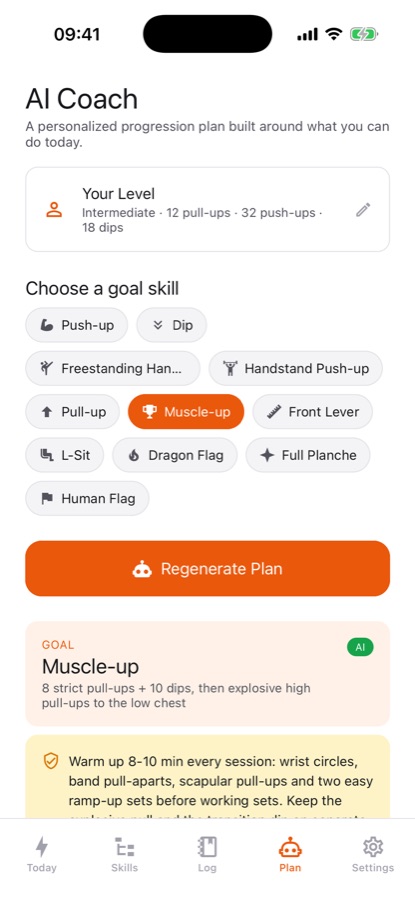
Pick a goal skill, enter your real numbers, and the coach builds a multi-week plan — which regressions to train, how to add volume, and the exact criteria that unlock the next move — adjusting as you log more sessions.
What's inside
What the app tracks
26
A 26-move skill tree
Four paths — Push, Pull, Core and Skills — covering every move from a knee push-up and a plank to a muscle-up, handstand, front lever, L-sit, dragon flag, planche and human flag, each gated behind its prerequisite.
AI
AI coach and sticking-point diagnosis
A multi-week progression plan built from your goal skill and real numbers, plus a diagnosis that names your slowest-moving requirement and suggests a two-week block to fix it.
Today
Guided sessions, set by set
Target reps or hold time for every set on the Today screen, a rest timer, an optional joint-specific warm-up, and the ability to resume a session left unfinished.
21d
Readiness against real requirements
Your best sets from the last 21 days are checked against each skill's stated requirements, with a progression ladder of four steps and a rough projection of how many weeks remain, naming the limiting requirement.
28d
Push-pull-core balance
Training volume across the last 28 days is split by category so an imbalance between pushing, pulling and core work shows up before it becomes a plateau, with a one-tap fix suggested.
CSV
Streaks, reminders and export
A session streak, training reminders on the days you choose, a share card for skill unlocks, and export of your full log as CSV or JSON.
Fit
Who it's for — and who it isn't
A good fit if you
- Want to know exactly which move to train next instead of guessing from random routines online
- Are chasing a specific goal skill — muscle-up, handstand, planche, front lever — and want a real plan toward it
- Want sets, reps and hold times logged somewhere other than memory or a notes app
- Like seeing a visible map of prerequisites rather than a flat list of exercises
- Want training reminders and a streak to keep sessions consistent
Not the right tool if you
- Have an injury or medical condition and have not yet spoken with a physician about starting bodyweight training
- Want every advanced skill path unlocked for free — muscle-up, handstand, planche, front lever and more are Pro
- Expect the app to correct your form from video; it logs numbers and plans progressions, not a motion coach
- Want unlimited AI progression plans without any daily limit on the free tier
Safety and limits
Read this before chasing an advanced skill
Calisthenics Workout Log provides general fitness information and a training log, not medical advice. It does not diagnose, treat or guarantee any fitness outcome, and nothing in the app replaces guidance from a qualified professional.
Talk to a physician before starting any exercise program, especially if you have an injury, a joint or cardiovascular condition, or have not trained in some time. Advanced calisthenics moves put real load through the wrists, shoulders and elbows, and that load increases with each step up the skill tree.
Earn each prerequisite before reaching for the next move — the skill tree exists specifically to discourage skipping steps. Warm up thoroughly before a session, especially one involving a static hold like a planche or front lever, and stop any movement that causes joint pain rather than pushing through it. Progress depends on your own effort, consistency and recovery, and results are never guaranteed.
Privacy
What the AI coach sends
Your log, skill tree and progress are stored on your device and work fully offline. The AI coach sends only your stated goal, training level, chosen training days and rep numbers to generate or adjust a plan — never your name or email. An optional training backup exists to restore your history on a new phone; it is not required to use the app.
Full details are in the CoddyKit privacy policy.
Questions
Frequently asked questions
What's a good app for tracking calisthenics progress?
A useful one shows the actual sequence of moves leading to an advanced skill rather than a flat exercise list, logs sets, reps and hold times, and can turn a stated goal into a real multi-week plan. Calisthenics Workout Log does this with a 26-move skill tree across Push, Pull, Core and Skills, guided sessions with a rest timer, readiness checks against each skill's real requirements, and an AI coach that builds a plan from your actual numbers.
How do I progress from a pull-up to a muscle-up?
The app's skill tree places the muscle-up on the Pull path above the pull-up and the dip, reflecting that both a strong pull-up and a strong dip are prerequisites for the transition between them. Readiness checks your best recent sets against the muscle-up's stated requirements, and the AI coach can build a progression plan from your current pull-up and dip numbers toward it, naming which one is the current limiter.
What's the difference between readiness and a test attempt in the app?
Readiness is a prediction: your best sets from the last 21 days compared against a skill's stated requirements. A test attempt is the real thing — one honest, recorded try at the move itself, meant to happen only once readiness says every requirement is genuinely met, which is meant to prevent attempting an advanced skill before the base strength is actually there.
How does the AI coach build a progression plan?
You pick a goal skill and enter your real numbers — current max pull-ups, push-ups, dips and plank hold — and the coach generates a multi-week plan: which regressions to train, how to add training volume week by week, and the specific criteria that unlock the next move. The plan adjusts over time based on the sessions you actually log, rather than following a fixed schedule regardless of your progress.
Is Calisthenics Workout Log free?
The first 12 moves of the tree — push-up, dip, pull-up, chin-up, plank, hanging leg raise, crow pose and their build-ups — guided sessions, the log, readiness checks, reminders and export are free, with no account required. Pro unlocks all 26 moves including muscle-up, handstand, front lever and planche, unlimited AI progression plans with a weekly re-plan, advanced stats and training backup.
Does the app check push-pull-core balance?
Yes. It splits your training volume across the last 28 days into Push, Pull and Core categories, which is how an imbalance — heavy pushing work with almost no pulling, for instance — actually gets caught before it turns into a plateau or a stalled skill. A one-tap fix is suggested when the split skews noticeably toward one category.
Can I log a workout without following a guided session?
Yes. Alongside the guided Today session, any workout can be logged by hand — sets, reps and hold times for whatever exercise you actually did — which matters for sessions that don't fit the app's prescribed structure, like extra accessory work or a different training split entirely.
What does the sticking-point diagnosis do?
When progress toward a goal skill stalls, the diagnosis compares your logged requirements against the skill's targets to name the single slowest-moving one — a weak dead hang holding back a front lever attempt, for example — and suggests a focused two-week training block around fixing that specific limiter rather than training everything equally.
Does the app require an internet connection?
No, logging, the skill tree and guided sessions all work fully offline, and no account is required to start. The AI coach and the sticking-point diagnosis need a connection to generate a plan; a rule-based diagnosis is available without one on the free tier.
Get started
Find the move you're actually ready for
Free to start, with a Pro upgrade for every skill path and unlimited AI plans.
More from CoddyKit
Not a medical device. Does not diagnose or treat any condition.