Python सीखें और लिखें
Python सीखें और लिखें — अपने फ़ोन पर असली Python लिखें और चलाएँ
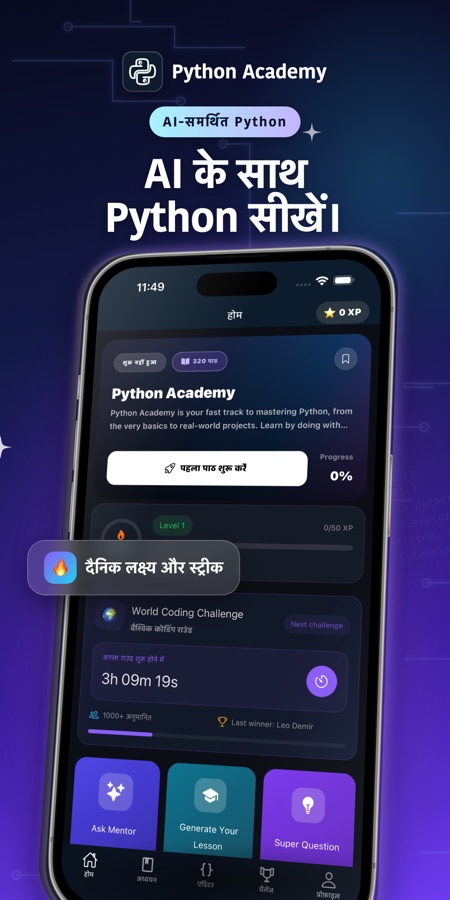
Python सीखें और लिखें एक मुफ़्त iOS और Android ऐप है, जिसमें फ़ोन के अंदर असली CPython interpreter बना हुआ है — आपका code device पर ही चलता है, input() काम करता है, और turtle drawings व matplotlib charts सीधे output में दिखाई देते हैं। 76 courses और एक AI Mentor आपको अपने पहले print() से Flask, pandas और interview prep तक ले जाते हैं।

- कीमत
- मुफ़्त, Pro upgrade
- प्लैटफ़ॉर्म
- iOS और Android
- भाषाएँ
- 22
- आयु रेटिंग
- 4+
- आवश्यकताएँ
- iOS 15.1 या बाद का संस्करण
Code server पर नहीं, फ़ोन पर चलता है।
Interpreter को एक बार डाउनलोड करें — लगभग 11 MB — और उसके बाद Python device पर ही चलता है, connection न होने पर भी। इसी वजह से input() प्रोग्राम के बीच में काम करता है और turtle drawing या matplotlib chart, missing display की error दिखाने के बजाय output में दिखाई देता है।
यह क्या है
Python सीखें और लिखें एक मुफ़्त iOS और Android ऐप है, जो पहले print() statement से लेकर real projects तक Python programming सिखाता है। इसमें पूरा CPython interpreter फ़ोन पर ही locally चलता है, remote server पर नहीं। इसमें 320 lessons वाले 76 courses हैं — variables और loops से लेकर object-oriented programming, Flask और Django के साथ web development, तथा pandas और NumPy के साथ data work तक — और जो भी समझ न आए, उसके लिए AI Mentor उपलब्ध है।
ऐप के अंदर
यह कैसा दिखता है
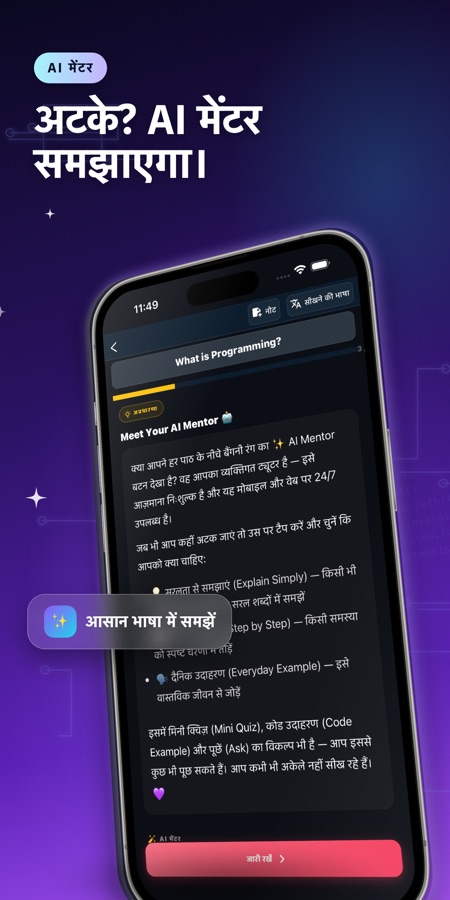
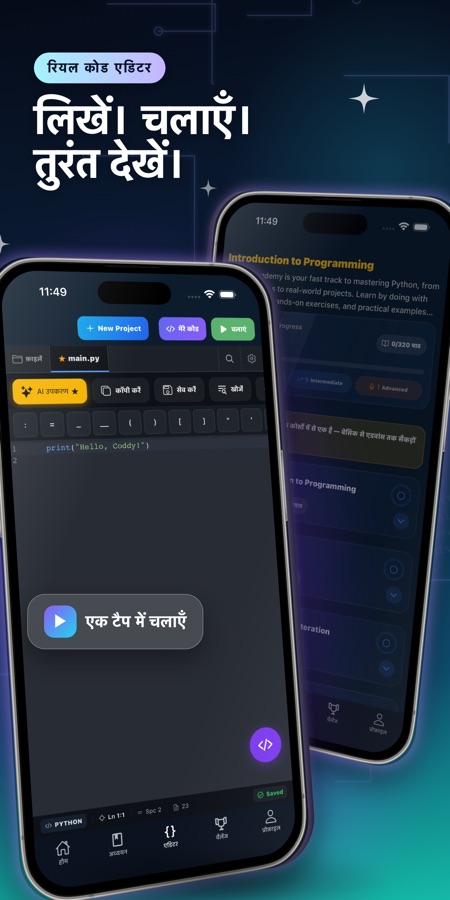
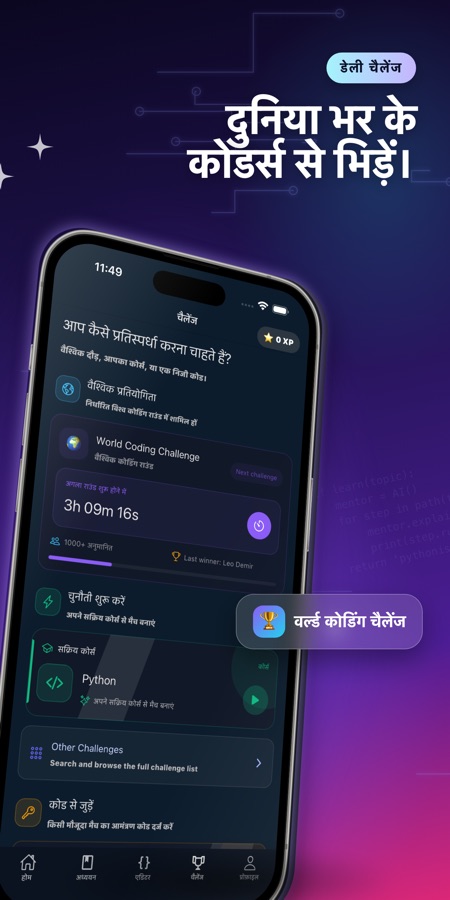
कोर्स
Python कोर्स में क्या-क्या शामिल है
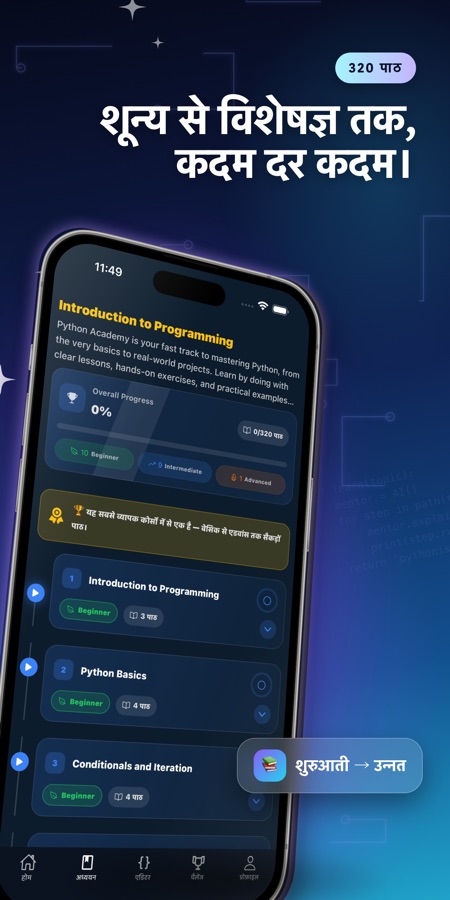
ऐप की अपनी कोर्स सूची से लिए गए 76 courses और 320 lessons — पहले print() स्टेटमेंट से लेकर web backends, data tools और machine learning की शुरुआती जानकारी तक।
Introduction to Programming & Python Basics
प्रोग्रामिंग क्या है और Python पहली भाषा के रूप में एक उपयुक्त विकल्प क्यों है, इसके बाद variables, types, input और वास्तविक कोड की पहली पंक्तियाँ।
Conditionals, Iteration और Data Structures
if/elif/else और loops के बाद lists, tuples, dictionaries और sets — वे बुनियादी building blocks जिनकी हर आगे की course में आपसे पहले से समझ होने की अपेक्षा की जाती है।
Functions और Object-Oriented Programming
Functions और arguments, modular programming, फिर classes, inheritance, polymorphism, dataclasses और enums।
File Handling, Errors और Testing
pathlib से फ़ाइलें पढ़ना और लिखना, try/except से error handling, logging और debugging, तथा pytest से testing।
Libraries के साथ काम करना और Advanced Python Features
Modules, packages, pip और virtual environments, फिर comprehensions, generators, decorators, context managers, closures और async/await।
Introduction to Web Development
पहले web backend course के बाद Flask, Django और FastAPI पर समर्पित courses आते हैं, जैसे-जैसे ऐप का curriculum अधिक गहराई में जाता है।
Python for Automation
Command-line tools, subprocess module, openpyxl से Excel को automate करना, और BeautifulSoup तथा Scrapy से web scraping।
Data Science with Python
SQLite और SQLAlchemy, data work के लिए NumPy और pandas, charts के लिए Matplotlib और Plotly, तथा scikit-learn के साथ machine learning का परिचय।
यह कैसे काम करता है
एक session कैसे काम करता है
हर session में छोटा-सा explanation और वह code शामिल होता है जिसे आप सच में run करते हैं। इसलिए lesson और practice एक ही sitting में हो जाते हैं, न कि theory अभी और practice बाद में।
एक छोटा lesson लें
कोई topic खोलें और पाँच से दस मिनट का एक lesson पूरा करें: पहले आसान भाषा में theory, फिर practice — इसे इस तरह बनाया गया है कि bus ride ख़त्म होने से पहले lesson भी पूरा हो जाए।
Device पर असली Python लिखें और चलाएँ
Built-in editor फ़ोन पर असली CPython interpreter चलाता है — इसे एक बार डाउनलोड करें (लगभग 11 MB), फिर code offline चलता है। input() program के बीच में काम करता है और turtle drawings या matplotlib charts सीधे output में render होते हैं।
जाँचें कि बात समझ में आ गई, फिर आगे बढ़ें
हर topic के अंत में एक quiz और coding challenge होता है। जब कोई concept या error message समझ में न आए, तो AI Mentor कुछ ही seconds में उसे समझाता है; और coding mission, Weekly Code Duel या Bug Hunt round उस idea की दोबारा practice कराते हैं।
इसमें क्या है
ऐप में क्या-क्या मिलता है
76
Courses, A1 से C1 तक
76 courses में 320 lessons हैं — variables, loops और functions से लेकर object-oriented programming, error handling, decorators और async/await तक, और फिर Flask, Django, FastAPI, pandas तथा scikit-learn की शुरुआती जानकारी तक।
Device पर
असली CPython interpreter
Code फ़ोन पर ही चलता है, server पर नहीं: program चलने के दौरान input() काम करता है और turtle graphics या matplotlib charts output window में दिखाई देते हैं। Runtime को एक बार डाउनलोड करें और offline चलाएँ।
AI
AI Mentor
किसी concept या error message पर अटक गए? AI Mentor से पूछें और lesson की chat screen से कुछ ही seconds में स्पष्ट explanation पाएँ।
60
Coding missions
20 आसान, 20 मध्यम और 20 कठिन missions, साथ में 20 guided projects — जैसे SQLite database को query करना या अपना decorator लिखना — एक-एक step करके।
Bug Hunt
Bug ढूँढ़ें
छोटे snippets जिनमें bug छिपा होता है और जो उन topics पर ज़्यादा केंद्रित होते हैं जिन्हें आप व्यक्तिगत रूप से सबसे अधिक भूलते हैं — scratch से code लिखने से अलग तरह की practice।
Interview
Python interview prep
Model answers के साथ Python interview questions, और एक AI mock interview भी, जो follow-up questions पूछता है और अंत में आपके answers को score करता है।
पृष्ठभूमि
क्या आप वाकई फ़ोन पर Python सीख सकते हैं, और इसका इस्तेमाल किस लिए होता है?
Python एक general-purpose programming language है, जिसका syntax सामान्य English के क़रीब पढ़ा जाता है; इसी वजह से इसे आम तौर पर पहली language के रूप में सुझाया जाता है। यह web backends (Django, Flask, FastAPI) चलाता है, दोहराए जाने वाले कामों को automate करता है (files का नाम बदलना, spreadsheets भरना, web pages scrape करना), और data analysis व machine learning (pandas, NumPy, scikit-learn) में ज़्यादातर मुश्किल काम संभालता है। बड़े multi-file project के लिए फ़ोन laptop की जगह नहीं ले सकता, लेकिन beginners के लिए उस हिस्से में यह एक वास्तविक विकल्प है जो उन्हें सच में रोकता है: किसी concept को एक बार पढ़कर, idea भूलने से पहले उसका इस्तेमाल करने वाला code टाइप कर लेना। इसके लिए पाँच से दस मिनट का खाली समय laptop खोलने से कहीं बेहतर है।
Interpreted, compiled नहींयह तुरंत क्यों चलता है
Python code को interpreter line by line पढ़कर execute करता है; इसके लिए कोई अलग build step नहीं होता। इसी कारण यह फ़ोन पर locally चल भी पाता है: laptop पर चलने वाला वही CPython interpreter ऐप में चलता है, इसलिए lesson का code run पर tap करते ही execute हो जाता है।
Dynamic typingपहला वास्तविक बदलाव
किसी variable का type पहले से declare नहीं किया जाता, बल्कि उसे assign की गई value तय करती है और उसी program में बाद में type बदल भी सकता है। शुरुआती व्यक्ति की code की पहली lines के लिए यह आम तौर पर आसान होता है, लेकिन functions और arguments आने के बाद इसी से एक खास तरह की error भी पैदा होती है।
Structure के रूप में indentationशुरुआती लोगों का पहला जाल
Python यह बताने के लिए braces की जगह indentation का इस्तेमाल करता है कि कौन-सी lines किसी loop, function या condition के अंदर आती हैं। बात समझ में आ जाने के बाद यह साफ़-सुथरा लगता है, लेकिन spaces या tabs का असंगत इस्तेमाल style की शिकायत नहीं, बल्कि syntax error होता है — और लगभग हर beginner कम-से-कम एक बार इसकी चपेट में आता है।
Standard library और pipPython इतना सक्षम क्यों लगता है
Python के साथ एक बड़ी standard library (file handling, dates, regular expressions) आती है और जो इसमें नहीं होता, उसे pip install कर देता है — data के लिए pandas, web server के लिए Flask और scraping के लिए BeautifulSoup। Python का जिन कामों के लिए इस्तेमाल किया जाता है, उनमें से ज़्यादातर क्षमताएँ वास्तव में लोकप्रिय third-party packages से आती हैं, core language से नहीं।
उपयुक्तता
यह किन लोगों के लिए है — और किनके लिए नहीं
आपके लिए सही है, अगर आप
- आप पूरी तरह beginner हैं और कोड की एक पंक्ति लिखने से पहले हर concept को समझना चाहते हैं
- आप ऐसा कोड चाहते हैं जो डिवाइस पर सचमुच चले, input() और chart output के साथ — केवल read-only example नहीं
- आप लंबे study block के बजाय five-to-ten-minute sessions में सीखना चाहते हैं
- आप technical interview की तैयारी कर रहे हैं और practice questions के साथ scored mock interview चाहते हैं
- आप Python का उपयोग केवल theory के लिए नहीं, बल्कि automation और data work के लिए भी देखना चाहते हैं
आपके लिए सही टूल नहीं है, अगर आप
- आपको बड़ा multi-file project बनाना है — इसके लिए आगे चलकर laptop और full IDE की ज़रूरत होगी
- आप हर चीज़ मुफ्त होने की उम्मीद करते हैं: पहला course और कुछ features मुफ्त हैं, बाकी Pro से unlock होते हैं
- आप पहले से Python professional रूप से लिखते हैं और beginner course के बजाय reference manual चाहते हैं
- आप numpy, pandas या matplotlib को zero setup के साथ चलाना चाहते हैं — ये first import पर download होते हैं, जिसके लिए एक बार connection चाहिए
सवाल
अक्सर पूछे जाने वाले सवाल
फ़ोन पर Python सीखने के लिए सबसे अच्छा ऐप कौन-सा है?
फ़ोन पर दो बातें सबसे ज़्यादा मायने रखती हैं: क्या कोड वास्तव में डिवाइस पर चलता है और क्या एक session दिन के किसी छोटे-से खाली समय में पूरा हो सकता है। Python सीखें और लिखें वास्तविक CPython interpreter को locally चलाता है — input() काम करता है, turtle drawings और matplotlib charts output में render होते हैं — और इसमें five-to-ten-minute lessons वाले 76 courses हैं। जो बात समझ न आए, उसके लिए AI Mentor भी है। इसे iOS और Android पर 22 languages में मुफ़्त शुरू किया जा सकता है।
क्या आप सच में फ़ोन पर Python सीख सकते हैं, या laptop की ज़रूरत होती है?
Fundamentals फ़ोन पर सचमुच काम करते हैं: variables, loops, functions, data structures और object-oriented programming ऐसे concepts हैं जिन्हें आप छोटे-छोटे हिस्सों में पढ़ और test कर सकते हैं। Python सीखें और लिखें डिवाइस पर वास्तविक interpreter चलाता है, इसलिए आप Python के बारे में केवल पढ़ते नहीं, बल्कि वास्तविक Python लिखकर execute करते हैं। जब आप अपने folder structure, database और deployment step वाले multi-file project पर काम करने लगते हैं, तब laptop फिर उपयोगी हो जाता है — वह चरण बाद में आता है, पहले दिन नहीं।
Python का वास्तव में उपयोग किस लिए किया जाता है?
मुख्य रूप से तीन चीज़ों के लिए: web backends (Django, Flask, FastAPI वेब के server side के बड़े हिस्से को power करते हैं), automation (फ़ाइलों के नाम बदलना, spreadsheets भरना, web page scrape करना), और data work (analysis के लिए pandas और NumPy, तथा first model के लिए scikit-learn)। आपके लिए इनमें से कौन-सा महत्वपूर्ण है, उसी के आधार पर तय होना चाहिए कि आप कौन-से courses पहले लें — ऐप का curriculum इन तीनों को अलग-अलग tracks के रूप में कवर करता है, यह मानकर नहीं चलता कि हर किसी के लिए एक ही path सही है।
Python की basics सीखने में कितना समय लगता है?
कुल घंटों से ज़्यादा consistency मायने रखती है। short daily lessons के ज़रिए variables, conditionals, loops, functions और core data structures सीखते हुए, ज़्यादातर beginners कुछ ही हफ्तों में छोटे working programs लिख सकते हैं — object-oriented programming या web frameworks तक पहुँचने से काफ़ी पहले। Python सीखें और लिखें इसी तरीके के अनुसार बनाया गया है: five-to-ten-minute lessons, हर topic के बाद एक quiz, और streaks व reminders ताकि sessions के बीच का अंतर बढ़ता न जाए।
क्या शुरुआत करने के लिए मुझे किसी अनुभव की ज़रूरत है?
नहीं। Python सीखें और लिखें यह मानकर चलता है कि आपको programming का कोई पूर्व अनुभव नहीं है। यह variable क्या होता है और विशेष रूप से Python में indentation क्यों महत्वपूर्ण है, यहीं से शुरू होता है। Lessons में छोटी, आसान भाषा वाली theory के साथ कुछ type करके run करने के लिए दिया जाता है, इसलिए पहला course वास्तव में शुरुआत करने के लिए है, न कि पहले से कोई दूसरी language जानने वालों के लिए बनाया गया refresher।
numpy, pandas या matplotlib को पहली बार इस्तेमाल करने पर download की ज़रूरत क्यों पड़ती है?
ऐप का interpreter लगभग 11 MB runtime download हो जाने के बाद Python को पूरी तरह offline चलाता है, लेकिन numpy, pandas और matplotlib जैसी भारी libraries को lesson में पहली बार import किए जाने पर fetch किया जाता है, और उस one-time download के लिए connection चाहिए। उस first import के बाद वही package locally चलता है। इसका असर केवल data-science courses पर पड़ता है — core language courses शुरुआत से ही offline चलते हैं।
क्या Python सीखें और लिखें मुफ़्त है?
ऐप को App Store और Google Play से मुफ़्त download किया जा सकता है। पहला course मुफ़्त है। इसके साथ AI Mentor questions की daily allowance, two coding missions और Weekly Code Duel भी मिलते हैं, ताकि आप कोई निर्णय लेने से पहले real lessons आज़मा सकें। Pro से every course और lesson, unlimited AI Mentor, mid और senior mock interviews, तथा certificate exam unlock होते हैं।
क्या अंत में कोई certificate मिलता है?
हाँ। Final exam पास करने पर completion certificate जारी होता है, जिसे आप LinkedIn पर share कर सकते हैं — यह आपके किए गए काम का evidence है और interview में जिन projects को आप समझाकर बता सकें, उनके साथ उपयोगी है; यह accredited academic qualification नहीं है।
क्या ऐप Python interview की तैयारी में मदद करता है?
हाँ, और यह कोई बाद में जोड़ा गया feature नहीं, बल्कि dedicated section है: model answers के साथ Python interview questions का एक set, और एक AI mock interview जो follow-up questions पूछता है तथा अंत में scored report देता है। एक free junior mock interview monthly उपलब्ध है; mid और senior-level mock interviews Pro का हिस्सा हैं।
यह किन platforms और languages को support करता है?
Python सीखें और लिखें iOS पर App Store के ज़रिए और Android पर Google Play के ज़रिए चलता है, और ऐप का interface 22 languages में उपलब्ध है। इसकी rating 4+ है, इसलिए material में age-restricted कुछ भी नहीं है।
शुरू करें
आज ही Python की अपनी पहली line लिखें
iOS और Android पर शुरुआत मुफ़्त, 22 भाषाओं में।
CoddyKit की ओर से और
iOS और Android पर उपलब्ध है।