
Class fields, private # fields, static members
Create classes with public fields, hide data with private # fields, and add static properties/methods.
Class fields, private # fields, static members is a free JavaScript Academy lesson on CoddyKit. This is lesson 1 of 3. Any 3 lessons of this learning path are free to read in full — after that, CoddyKit PRO unlocks every lesson, plus hands-on practice with a built-in code editor and a 24/7 AI tutor. It is part of the JavaScript Academy learning path, and your progress syncs across the web and the CoddyKit app. The JavaScript Academy course includes 3 lessons in total.
Why classes?
Goal: Build small, clear classes.
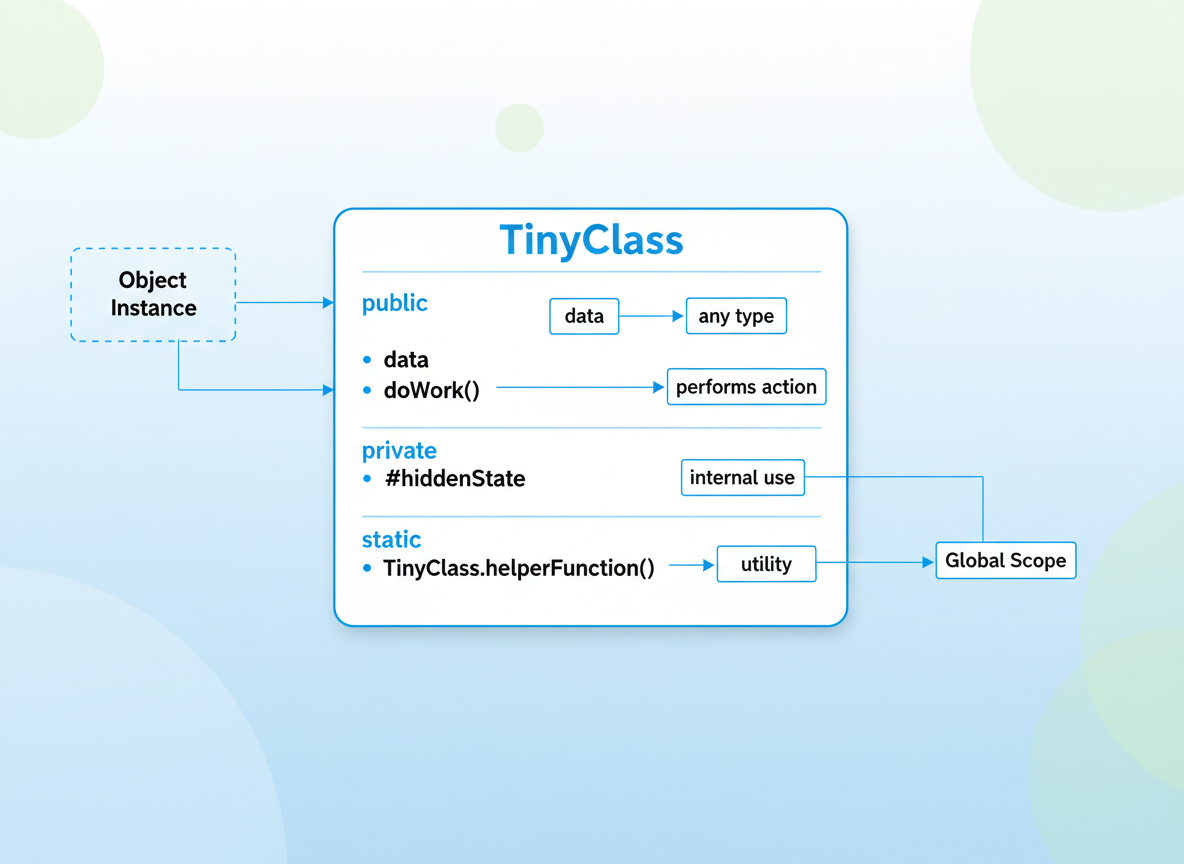
- Public fields and methods
- #private fields for hidden state
- static properties/methods for class-level helpers
- Keep examples tiny and readable
Public fields & constructor
Create a class with a public field and small methods; keep logic simple for beginners.
// Public fields and a simple method
class Counter {
  // public field with default
  value = 0;

  constructor(start) {
    // use a default if start is not provided
    this.value = Number.isFinite(start) ? start : 0;
  }

  inc() {
    this.value = this.value + 1;
  }
}

const c1 = new Counter(2);
c1.inc();
console.log("value:", c1.value); // 3

Private # fields
#private fields are enforced by the language and only usable inside the class body. Expose read methods if needed.
// Private # fields hide internal state
class SafeCounter {
  // private field (only inside the class)
  #value = 0;

  constructor(start) {
    this.#value = Number.isFinite(start) ? start : 0;
  }

  inc() { this.#value = this.#value + 1; }
  getValue() { return this.#value; } // expose via method
}

const sc = new SafeCounter(5);
sc.inc();
console.log("safe value:", sc.getValue());

// External access fails (uncommenting the next line would throw):
// console.log(sc.#value);

Getters for safe reads
A getter can return a derived or validated value while keeping the field private.
// Getters provide read-only views; simple guard logic
class User {
  #name = "Anonymous";
  constructor(name) {
    if (typeof name === "string" && name.trim().length > 0) {
      this.#name = name.trim();
    }
  }
  get name() {
    return this.#name;
  }
}

const u = new User(" Ayla ");
console.log("name:", u.name);

Static members
static members are called on the class (e.g., MathHelp.circleArea()), not on instances.
// Static = belongs to the class, not to instances
class MathHelp {
  static PI = 3.14159;
  static circleArea(r) {
    if (!(typeof r === "number" && r >= 0)) return 0;
    return MathHelp.PI * r * r;
  }
}

console.log("PI:", MathHelp.PI);
console.log("area r=2:", MathHelp.circleArea(2));

// Instances do not have the static members:
const mh = new MathHelp();
console.log("instance has PI?", "PI" in mh); // false

Beginner-friendly habits
Tips:
- Prefer small classes with few, clear methods.
- Use #private for true privacy; underscores are only a naming convention.
- Put constants/utilities on static members.
- Expose minimal read methods (getters) if you need outside access.

Private field basics quiz
Quick check: #private fields.

Recap
Recap: Use public fields for simple state, #private to hide internals, and static for class-level helpers. Keep each class tiny and easy to read.

Learn JavaScript with an AI tutor — free
Write and run real code in your browser, get instant help from a 24/7 AI tutor, and pick up where you left off on the web or in the app.
- Courses
- 59
- Lessons
- 200
Frequently Asked Questions
Is the “Class fields, private # fields, static members” lesson free?
Yes — any 3 lessons of the JavaScript Academy learning path, including “Class fields, private # fields, static members”, are free to read in full here on the web. After that, CoddyKit PRO unlocks every lesson, plus interactive practice with a built-in code editor and a 24/7 AI tutor. The JavaScript Academy course includes 3 lessons in total.
What will I learn in “Class fields, private # fields, static members”?
Create classes with public fields, hide data with private # fields, and add static properties/methods. You practise JavaScript Academy with hands-on code you run directly in the browser, and a 24/7 AI tutor answers your questions as you work through the lesson.
Do I need any experience to start JavaScript Academy?
No prior experience is required. JavaScript Academy on CoddyKit is structured for beginners through advanced learners, so you can start here or from the beginning and move at your own pace. This is lesson 1 of 3.
How long does the “Class fields, private # fields, static members” lesson take?
Most CoddyKit lessons take about 5–10 minutes. Each one is bite-sized and interactive, so you make steady progress and pick up exactly where you left off across the web and the app.
Can I write and run code in this JavaScript Academy lesson?
Yes. Every JavaScript Academy lesson includes a built-in code editor, so you write and run real code right in your browser and get instant AI feedback — no local setup required.
All lessons in this course
- Class fields, private # fields, static members
- Inheritance, super, and when to prefer composition
- Mixins (taste) — simple reuse without deep hierarchies