
Pixel Feast: Food Sort
Pixel Feast: Food Sort — A color sort puzzle where ants eat a pixel-art picture clean, one color at a time
Pixel Feast: Food Sort is a free iPhone and iPad color-sort puzzle where the board is the picture. Every level is a pixel-art food built from colored blocks, and you tap a color to send in your ants, who carry off every block of that color until the picture is gone. There are 300 levels, no timer and one-tap controls.

- Price
- Free, with optional in-app purchases
- Platforms
- iPhone and iPad
- Genre
- Pixel-art color-sort puzzle
- Age rating
- 4+
- Levels
- 300
- Requires
- iOS 16.0 or later
The picture is the puzzle and the progress bar.
Nothing is added to the screen as you play. The apple, the eggplant or the burger on the board simply gets smaller as the ants carry it away, and the only thing standing between you and a clean board is the order you chose to clear the colors in.
What it is
Pixel Feast: Food Sort is a free puzzle game for iPhone and iPad in which each level is a pixel-art food made of colored blocks. You tap a color and a line of ants marches up from the nest and carries away every block of that color, one at a time, until the picture disappears. Your jars are limited, so opening colors in the wrong order makes them jam, and later levels add ice, locks and frozen jars. There are 300 hand-crafted levels, no timer, one-tap controls and offline play.
Highlights
What a level looks like
Every level starts on a picture
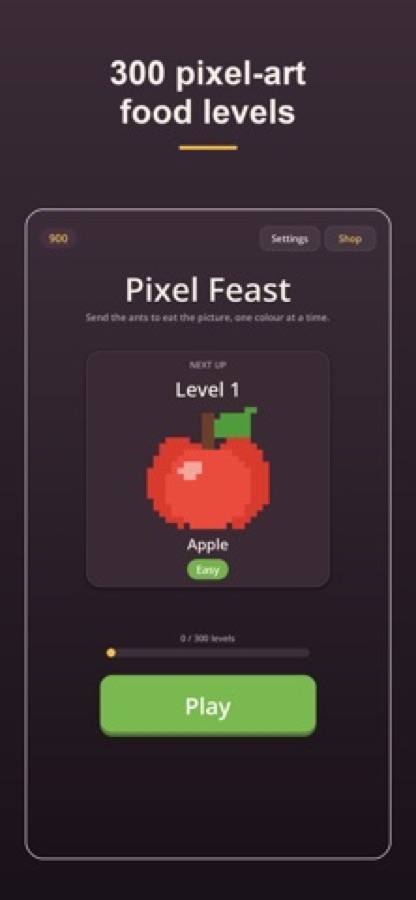
The home screen names the next level, here an apple marked Easy, and tracks how many of the 300 levels you have cleared. A coin counter and a Shop button sit in the corners, and Settings is one tap away.
Choose a color, send in the ants
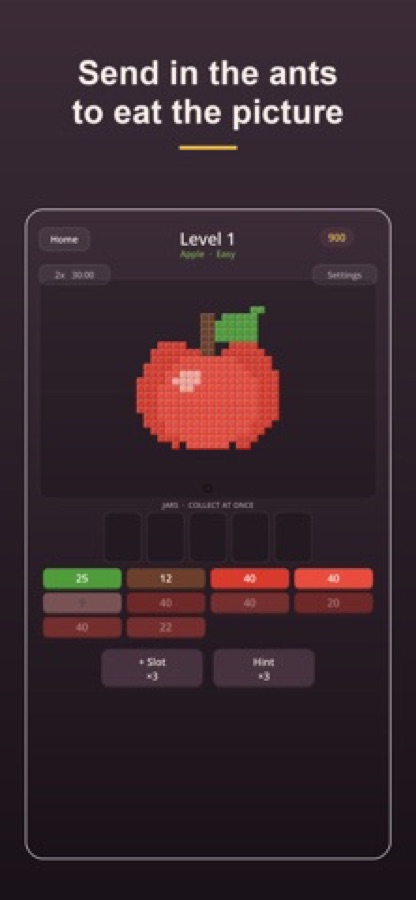
On the level itself the apple is made of blocks, with a jar row labelled collect at once above a button for each color. The numbers on the buttons are how many blocks of that color are left, and a plus-slot and a hint booster wait at the bottom.
Clear it clean for stars and coins
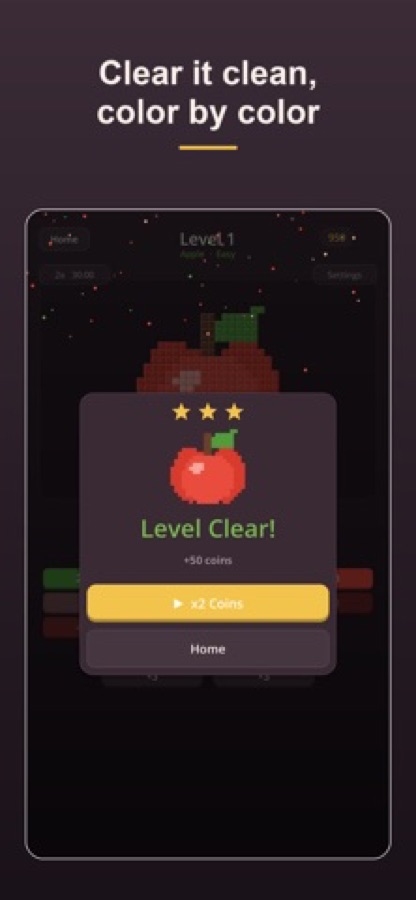
When the last block is gone the level ends on a Level Clear panel with up to three stars and a coin reward, and a button to double the coins. Then the next food is waiting.
Tougher pictures, trickier jars
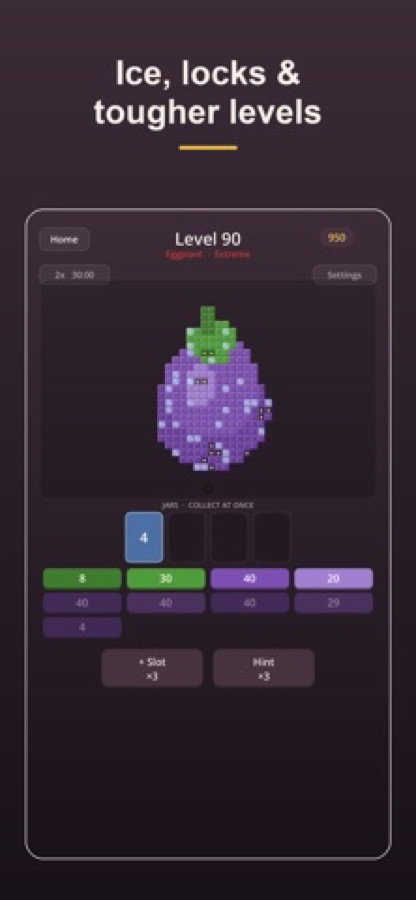
By level 90 the picture is an eggplant labelled Extreme, with more colors to juggle on the buttons. A jar is already in use, so the order of your next taps decides whether the row jams.
How it works
How a level plays
A level takes a few minutes and ends the same way every time: an empty board.
Read the picture and the colors
Each level opens on a pixel-art food and a set of colored buttons, each with the number of blocks of that color still on the board. Work out which color sits on top and which is hardest to reach.
Tap a color to send in the ants
The ants march up from the nest and carry off every block of that color, one at a time. The color takes a jar for as long as it is being collected, and the blocks drop out of the picture as they go.
Free a jar before it jams, then clear the board
Keep an eye on the jar row, because a full row means a jam. A Hint button and an extra-slot booster are there for a tight spot, and clearing the whole board ends the level with stars and coins.
Background
What is a color-sort puzzle, and why does the order of your taps matter?
Color-sort puzzles ask you to group things by color under a limit, and the challenge comes from the limit rather than from speed. In Pixel Feast the limit is the number of jars that can hold a color at once: send in too many colors and the jars fill and jam, so the puzzle is about sequencing, which color to open first and when to free a jar before it clogs. Because the picture on the board shrinks as you succeed, the game shows you how close you are without a timer or a score to chase.
The picture as the boardpixel art made of blocks
Each level is a food, from an apple on the first level to an eggplant on the ninetieth, drawn in colored blocks. Fruit, sweets and fast food all appear, and clearing every block is how you win.
Jarsthe limit that makes it a puzzle
The row of jars above the color buttons holds the colors currently being collected. When a color is opened it takes a jar until its blocks are gone, so opening too many at once leaves nowhere for the next one.
Sequencingdecide before you tap
Every tap commits a jar, which turns each choice into a small question: which color is the cheapest to clear, and which one frees a jar for the next? That is the whole game, and it is why the later levels feel different from the first.
Pressure-free pacingno timer, optional speed-up
There is no countdown to beat, so you can stop and think. A 2x speed option makes the ants move faster for people who would rather watch less and tap more.
What's inside
What is in the game
300
Hand-crafted pixel-art levels
Fruit, sweets, fast food and more, each drawn as its own picture in colored blocks, with a difficulty label on each level from easy up to extreme.
No timer
Relax at your own pace
Nothing counts down while you think, so a hard level costs patience rather than a failed clock.
1 tap
One-handed controls
Every action is a tap on a color or a button, which makes the game comfortable to play with one hand.
Ice
Ice, locks and frozen jars
Later levels add ice, locks and frozen jars, so the puzzle keeps asking new questions.
ASMR
Crunchy ant chomps
The ants eat the picture with a satisfying chomp for each block, a sound design that suits short, calm sessions.
2x
Double-speed ants
Switch on 2x to speed the ants up for snappier levels once you know where you are heading.
Offline
Play anywhere
The game works offline, so a level is always available on a commute or a flight.
Fit
Who it's for — and who it isn't
A good fit if you
- Like color-sort and pixel-art puzzles where the order of moves matters more than speed
- Want a calm game with no timer and one-tap controls
- Play in short sessions on a commute or in bed, often with one hand
- Enjoy a clean, satisfying board-clearing finish to every level
- Want a puzzle that works without a connection
Not the right tool if you
- Want fast reflex action or a countdown to beat
- Want multiplayer or leaderboards, since this is a solo puzzle
- Prefer a game with no in-app purchases at all
- Need an Android version, since the game is currently on the App Store for iPhone and iPad
Questions
Frequently asked questions
What is Pixel Feast: Food Sort?
Pixel Feast: Food Sort is a free color-sort puzzle for iPhone and iPad in which every level is a pixel-art food made of colored blocks. You tap a color to send in ants that carry off every block of it, and you win by clearing the whole picture. It has 300 hand-crafted levels, no timer and works offline.
How do you play Pixel Feast: Food Sort?
Look at the picture and the list of colors, then tap a color to send in the ants. They march up from the nest and carry away every block of that color, one at a time, until none is left. Open colors in a sensible order so your jars do not fill, and clear the whole board to finish the level.
What are the jars and why do they jam?
The jars are the limited slots that hold the colors currently being collected. In Pixel Feast: Food Sort a color keeps a jar until its blocks are gone, so opening too many colors at once fills the row and leaves nowhere for the next one. Freeing a jar before it clogs is the central decision of the game.
Is there a timer?
No. Pixel Feast: Food Sort has no timer and no pressure, so you can pause to think about the next color for as long as you like. If you would rather the ants moved quicker, there is a 2x speed option.
How many levels are there?
There are 300 hand-crafted levels in Pixel Feast: Food Sort, covering fruit, sweets, fast food and more. Each level carries a difficulty label, and later levels add ice, locks and frozen jars, so the puzzle keeps changing as you progress.
Can I play without internet?
Yes. Pixel Feast: Food Sort can be played offline, so you can keep going on a commute, on a flight or anywhere else without a signal.
Is Pixel Feast: Food Sort free?
The game is free to download and play, with optional in-app purchases. You earn coins by clearing levels, and there is a shop in the corner of the home screen.
Which devices does it run on?
Pixel Feast: Food Sort runs on iPhone and iPad with iOS 16.0 or later, and it is rated 4+. It is currently on the App Store only, and no Android version is listed.
What are the boosters on the level screen?
Below the colors in Pixel Feast: Food Sort there is a plus-slot button and a Hint button for a tight spot. They are there to help you out of a jam, not to replace working out the order in which to clear the colors.
Get started
Send in the first ant
Free on iPhone and iPad, with 300 pixel-art levels and no timer.
More from CoddyKit
Available on iOS.