

Generative AI Course: Learn AI
Generative AI Course: Learn AI — Understand chatbots and write better prompts, with no code and no math
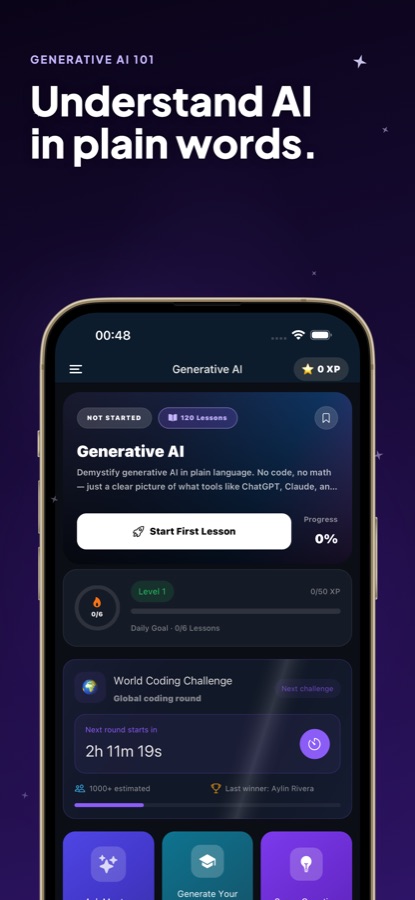
Generative AI Course: Learn AI is a generative AI course for beginners on Android, with iPhone coming. 30 courses and 120 interactive lessons explain how chatbots and large language models work, how to ask for what you actually want, and how to use these tools for writing, work, study and everyday life with good judgment. No coding and no math. A built-in next-word simulator lets you watch how a model picks its words.


- Price
- Free, Pro upgrade
- Platforms
- Android now, coming to iPhone
- Languages
- 22
A teaching simulation, not a model running on your phone.
The Simulate tab splits a sentence into tokens, shows the odds behind each candidate next word and lets you turn the temperature up or down to see the output change. The odds come from a fixed table on the phone and no model is running, so you can see how sampling works without any setup.
What it is
Generative AI Course: Learn AI is a free Android app that teaches AI literacy to complete beginners. Its 30 courses and 120 short lessons run from what generative AI is, through writing clear prompts, fixing weak replies and spotting hallucinations, to everyday uses in work, study, a job search and small business, plus privacy, safety and ethics. It needs no coding or math, and the lessons use tasks you can try in any chatbot.
Inside the app
What it looks like
The course
What the generative AI course covers
30 courses and 120 lessons, with course names from the app's own list, from the first conversation with a chatbot to a personal AI routine.
What Generative AI Actually Is
A plain-language picture of what tools like chatbots and image generators do, then your first conversation with an AI assistant.
Asking for What You Actually Want
Turning a vague idea into a clear request, sharing helpful context, and the back-and-forth moves that fix a so-so reply.
Everyday Writing, Brainstorming and Summaries
Handling emails and messages, generating ideas, and condensing or explaining long articles and threads.
Spotting When AI Gets It Wrong
Recognising hallucinations, double-checking facts, and building the critical-thinking habits of a human in the loop.
Choosing the Right AI Tool
Which assistant suits which job, what free and paid plans give you, and how to cut through the noise.
AI for Work, Study and Life
Meeting notes and reports, studying honestly, a job search, small business marketing, trip and budget planning, and creating images from a sentence.
Privacy, Safety, Ethics and Responsible Use
What happens to your chats, protecting sensitive information, and the basics of copyright, deepfakes, fairness and disclosure.
Agents, Custom Assistants and Your Own Workflow
From chatbots to AI that takes action, custom assistants and workspaces, AI built into the apps you use, and a routine that saves real time.
How it works
How a lesson works
Each lesson is a few quick screens with one question at the end and a recap. The path goes from A1 basics to B2 prompting frameworks.
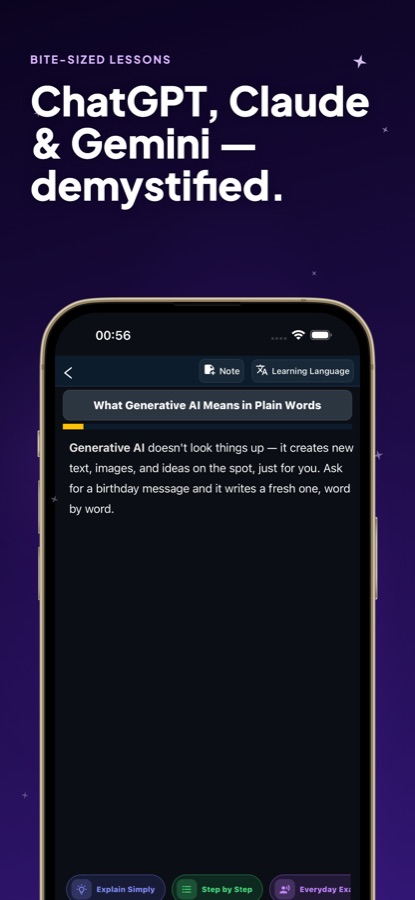
Read a short lesson in plain words
Lessons explain one idea, such as what generative AI means or why a chatbot is more like an artist than a librarian, using everyday examples and a quick check at the end.
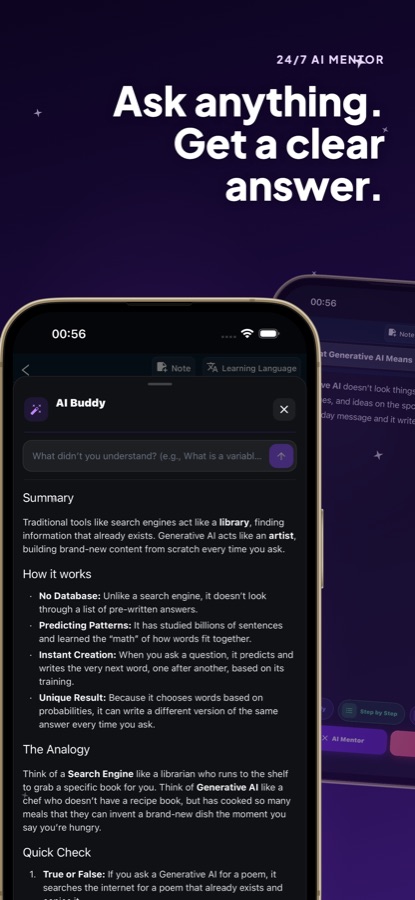
Ask the AI Mentor when something is unclear
Open the mentor to hear a point explained another way or with an example. You can also generate a custom lesson on any topic you want to learn next.
Practise with missions, quizzes and the simulator
Missions ask you to diagnose why a chatbot feature misbehaves and choose the fix. A 50-question mini quiz, a cheatsheet of 72 entries, flashcards and the next-word simulator cover the rest.
What's inside
What is in the app
30
Courses
From what generative AI is and your first chatbot conversation to prompting frameworks, agents, privacy and ethics, ordered from A1 to B2.
120
Interactive lessons
Short screens with one question at the end and a recap, built around tasks you can try in any chatbot.
20
Missions
Scenarios such as a total that changes every run, a reply with no source, an instruction hidden in an uploaded PDF or an agent that searches forever.
Simulate
Next-word simulator
Watch a sentence split into tokens, read the odds for each candidate word and change the temperature. Pro adds top-k, top-p and repetition penalty.
72
Cheatsheet entries
Tokens, prompting, embeddings, RAG, evaluation, cost and safety in one place, with a 50-question mini quiz and flashcards.
AI
AI Mentor
Ask for another explanation or an example, or generate a custom lesson. Free accounts get 1 mentor message a day and 1 generated lesson a week.
Background
How do chatbots like ChatGPT work, and how do you learn to use them well?
A generative AI chatbot is built on a large language model, which learns patterns in huge amounts of text and then writes a reply by predicting the next word, one after another, based on probabilities. It does not look an answer up, which is why it can sound confident and still be wrong. Using it well is mostly a human skill: saying clearly what you want, giving background, checking the result and knowing what not to paste in. That skill is learned by practice with real tasks, not by studying how the maths works.
Large language modelthe engine behind a chatbot
A system trained on text to predict what comes next. Because it produces likely wording rather than retrieving facts, the same question can get different answers on different tries.
Promptyour instruction to the model
Whatever you type, including the task, the audience, the length and the format you want. Vague prompts get vague replies, and the biggest early improvement usually comes from stating the goal and the context plainly.
Hallucinationa confident wrong answer
A reply that reads as fluent and certain but contains an invented fact, quote or source. The defence is a habit: check names, numbers and sources that matter before you rely on them.
Temperaturehow adventurous the word choice is
A setting that changes how much a model favours its most likely next word. A low value gives steadier, more predictable text and a high value gives more varied, riskier text, which is easy to see in the app's simulator.
Fit
Who it's for — and who it isn't
A good fit if you
- Are new to AI and want it explained in plain words, without code or formulas
- Use a chatbot already but get uneven results and want to write clearer prompts
- Want to use AI at work, in study or in a job search while checking its answers
- Are a parent, student or office worker who wants to understand the tools without the hype
- Prefer short lessons you can finish in a few minutes
Not the right tool if you
- Want to build or train models, since the course is about using AI, not programming it
- Need an iPhone app today, because the iOS version is not live yet
- Expect every lesson free: the first course is free and Pro unlocks all 30 courses
- Need advice on a specific tool's latest features, as the lessons teach tool-neutral skills
Questions
Frequently asked questions
What is the best way to learn generative AI as a complete beginner?
Start with plain-language lessons that explain what a chatbot does, then practise on everyday tasks. Generative AI Course: Learn AI has 30 courses and 120 short lessons with no code or math, a next-word simulator and 20 missions that make you diagnose and fix chatbot problems. It is free to start on Android.
How do ChatGPT and other chatbots actually work?
They are built on large language models that learn patterns in a lot of text and then write a reply by predicting the next word, one at a time, from probabilities. They do not look answers up. Generative AI Course: Learn AI shows this in its Simulate tab, where you watch a sentence split into tokens and change the temperature to see the output change.
Do I need to know how to code or do math?
No. Generative AI Course: Learn AI is written for beginners in plain language, and the lessons rely on everyday tasks such as emails, summaries and planning. The simulator and the cheatsheet cover terms like tokens, embeddings and RAG without requiring any programming.
How can I write better prompts?
State the task, say who the answer is for, and give the length and format you need, then add helpful background. If the first reply is weak, ask for a specific change instead of starting over. Generative AI Course: Learn AI teaches these moves in its early courses and returns to them with prompting frameworks at the B2 level.
How do I know when an AI answer is wrong?
A fluent answer is not proof of a correct one. Check names, numbers, quotes and sources that matter, and treat missing sources as a warning sign. A dedicated course in Generative AI Course: Learn AI covers hallucinations, red flags and quick fact-checks, and another covers critical thinking.
Is it tied to ChatGPT, Claude or Gemini?
No. The lessons are tool-neutral, so the skills carry across assistants. Generative AI Course: Learn AI is an independent educational app by CoddyKit and is not affiliated with, endorsed by or sponsored by any AI company. Product names appear only to describe what the lessons cover.
Is the simulator a real AI model?
No. It is a teaching simulation: the odds come from a fixed table on your phone and no model is running. That lets Generative AI Course: Learn AI show how language models sample text, including tokens and temperature, without any setup.
Is Generative AI Course: Learn AI free?
The app is free to download on Google Play. Free includes the first course (4 lessons), 1 mentor message a day, 1 generated lesson a week, 2 missions and the basic simulator. Pro unlocks all 30 courses and 120 lessons, all 20 missions, the full simulator, unlimited mentor and lesson generation, and removes ad banners.
Is there an iPhone version?
An App Store listing is reserved for Generative AI Course: Learn AI, but the iPhone version is not live yet. For now the app is available on Android through Google Play.
Which languages does it support?
The app and this page are available in 22 languages. The course path runs from A1 basics to B2 prompting frameworks, so it suits readers from first-time users up to confident ones.
Get started
Learn how AI works, then use it well
Free to start on Android, with iPhone coming. No code, no math.
More from CoddyKit
Available on Android.