

Car Maintenance Log - Service
Car Maintenance Log: a fuel, service and reminder record for every vehicle you own
Car Maintenance Log is a free fuel log, service history and reminder system for every car, truck or bike you own. Log a fill-up or a repair the moment you pay for it, and let the app work out your real fuel economy and tell you when the next oil change or inspection is actually due — based on your own mileage, not a guess.


- Price
- Free, Pro upgrade
- Platforms
- iOS and Android
- Languages
- 10
- Age rating
- 4+
- Version
- 1.6.0
- Requires
- iOS 15.1 or later
The receipt is the record, if you keep it.
A glovebox folder of paper receipts and oil-change stickers is a service history nobody can search. The same entries, dated and tied to an odometer reading, turn into a record a buyer trusts and a reminder system that actually knows when the next job is due.
What it is
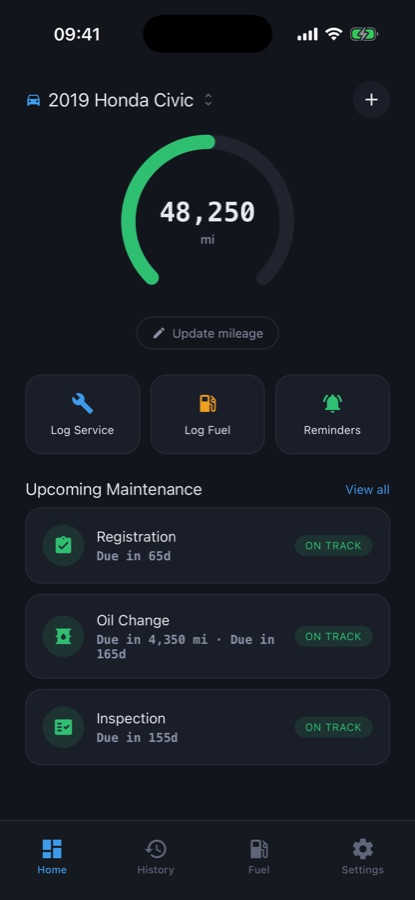
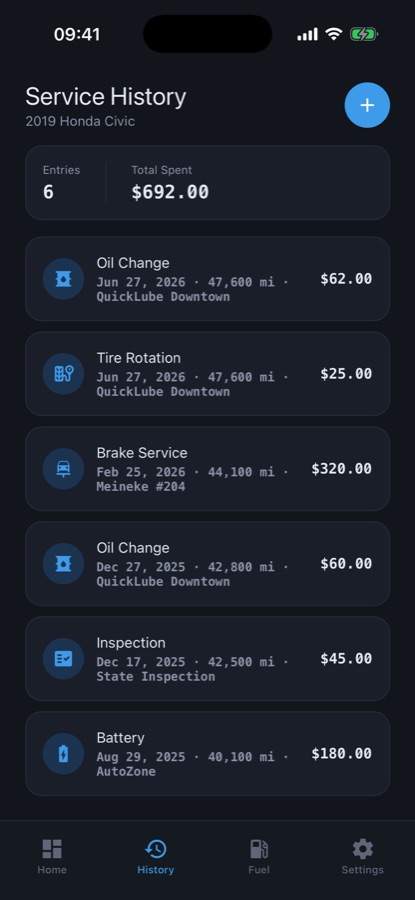
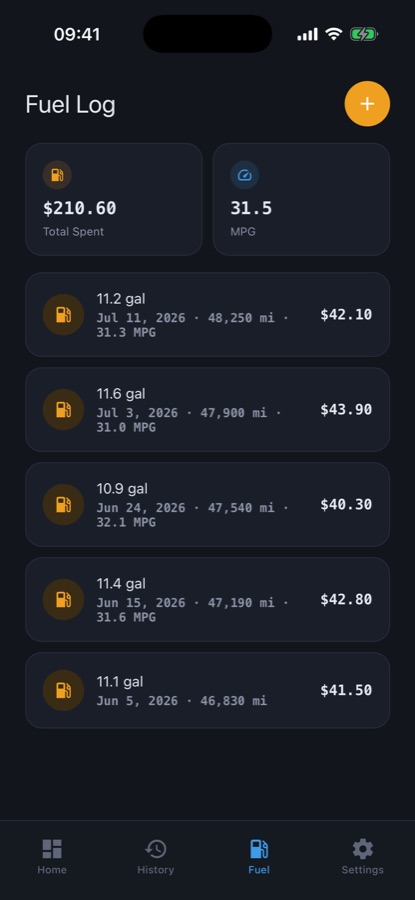
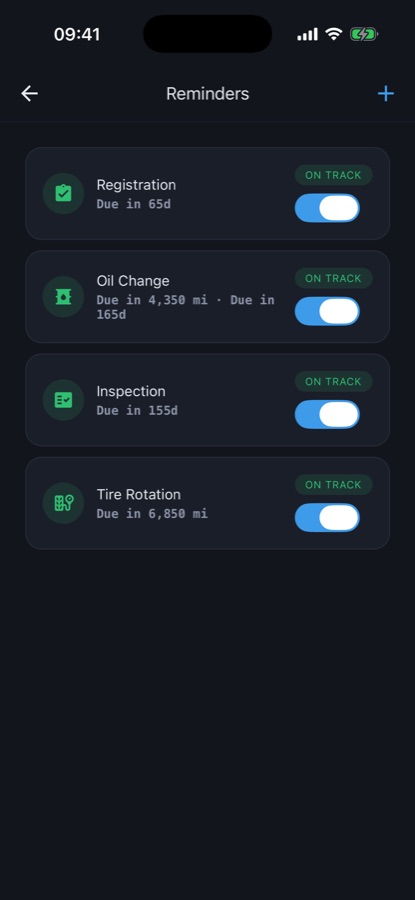
Car Maintenance Log - Service is a free iOS and Android app for tracking fuel fill-ups, service jobs and maintenance reminders for one or more vehicles. Each fill-up records volume, price and odometer reading, and the app calculates real fuel economy (MPG or L/100km) between full tanks. Each service job — chosen from 14 types such as oil change, tire rotation or brakes, or a custom label — records date, odometer, cost, shop and notes. Reminders set by mileage, by time or both track when the next job is due and show a clear on-track, due-soon or overdue status.
Inside the app
What it looks like
Background
What actually needs tracking on a car?
A usable vehicle record has three separate pieces that most people keep, if at all, in three different places: what fuel actually costs and returns in distance, what work has been done and when, and what work is coming up. None of the three is useful without the other two — a fuel receipt without an odometer reading cannot produce a real MPG number, and a service date without a mileage figure cannot tell you when a mileage-based reminder is actually due.
Fuel economyfrom full tank to full tank
A single fill-up tells you nothing about economy on its own. MPG or L/100km only means something when it is calculated between two full tanks, using the distance driven and the fuel it took to refill — which is why a fuel log needs the odometer reading at every fill, not just the price.
Mileage-based intervalsnot a fixed calendar date
Most service intervals — an oil change every 5,000 miles, a rotation every 6,000 — are written against distance, not a date. A reminder that only tracks time will mislead a driver who covers 30,000 miles a year as much as one who covers 5,000.
Service history for resalethe record a buyer checks
A complete, dated service and fuel history is one of the few concrete things a seller can show a buyer or a mechanic doing a pre-purchase inspection. A folder of loose receipts proves the same facts far less convincingly than a searchable timeline with cost and mileage attached to each entry.
What it is nota diagnosis
A maintenance log records what was done and when it is due again. It has no way to tell whether a noise, a warning light or a drop in performance points to a real mechanical problem — that always calls for a qualified mechanic's inspection.
How it works
How the app is used
Set up a vehicle once. After that, logging is two taps at the pump or in the parking lot after a service, and the reminders and economy numbers build themselves from those entries.
Add every vehicle
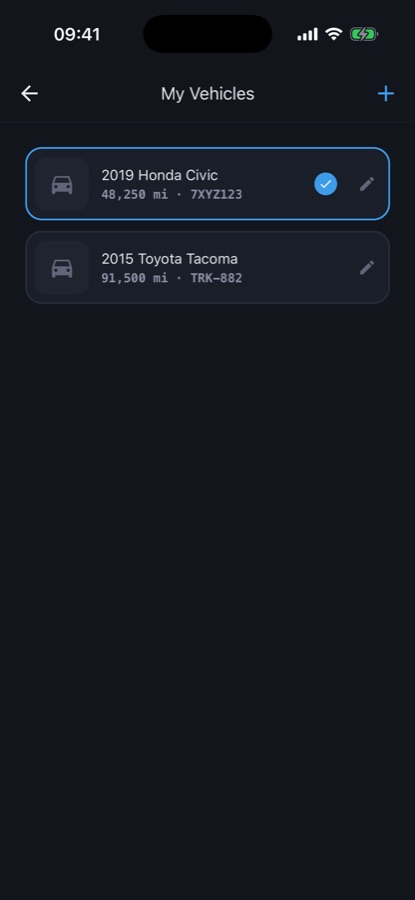
Add a car, truck or motorbike with make, model, year, license plate and current mileage, and an optional photo. Each vehicle keeps its own fuel log, service history and reminder set, so a commuter car and a family SUV never mix records.
Log fuel and service as it happens
Record each fill-up with volume, price and odometer, and mark full tanks so the app can calculate MPG or L/100km between them. Log a service job from 14 built-in types — oil change, tire rotation, brakes, inspection, registration, battery and more, or a custom label — with date, odometer, cost and shop.
Let reminders track what is due
Set a reminder by mileage, by months, or both — every 5,000 miles for an oil change, every 12 months for an inspection. Recording the matching job resets the reminder from that date and mileage, and the home screen shows the most urgent one first with a clear on-track, due-soon or overdue status.
What's inside
What the app tracks
14
Service job types
Oil change, tire rotation, tire replacement, brakes, inspection, registration, battery, coolant, air filter, transmission, wiper blades, alignment, car wash, or a custom label, each with date, odometer, cost, shop and notes.
MPG
Fuel economy calculator
Record volume, price and odometer at each fill-up, mark full tanks, and the app works out MPG or L/100km between them from your own numbers, in miles or kilometers and your chosen currency.
3
Reminder states
Set a reminder by mileage, by months, or both. Each one shows on track, due soon or overdue with the miles or days left, and a notification fires when it becomes due. Pro.
CSV
Exportable history
Export the full service and fuel record of any vehicle as a CSV file to hand to a mechanic, drop into a spreadsheet, or show a buyer at sale time. Pro.
∞
One garage for every vehicle
Add a car, truck or motorbike with make, model, year, license plate and current mileage. Free covers one vehicle; Pro adds unlimited vehicles so the commuter, the pickup and the family SUV each keep their own log.
10
10 languages
English, Spanish, French, German, Portuguese, Russian, Turkish, Japanese, Korean and Chinese, with light and dark mode.
Fit
Who it's for — and who it isn't
A good fit if you
- Own one car and want fuel and service records in one place instead of a glovebox folder
- Manage more than one vehicle, each on its own maintenance schedule
- Want your real cost per mile instead of a rough guess
- Are selling a vehicle and want a complete, provable service history ready to hand over
- Keep forgetting when the last oil change actually happened
Not the right tool if you
- Want the app to diagnose a mechanical problem — it is a record keeper, not a mechanic's inspection
- Need more than one vehicle tracked for free — a second vehicle and maintenance reminders are Pro
- Want a shared fleet log for a business with many drivers rather than a personal or household record
- Dislike the free version's ads — Pro removes them
Questions
Frequently asked questions
What's a good app for tracking car maintenance?
A useful maintenance app needs three things in one place: a fuel log that produces a real MPG number, a service history tied to the odometer reading at the time, and reminders that work off mileage rather than just a calendar date. Car Maintenance Log - Service covers all three: 14 service job types, a fuel log with an automatic economy calculator, and mileage-or-time reminders with on-track, due-soon and overdue status. It is free for one vehicle on iOS and Android.
How does the app calculate MPG?
You record the volume and odometer reading at each fill-up and mark which ones were full tanks. Car Maintenance Log then works out the distance covered and the fuel used between two full tanks to produce MPG, or L/100km if you use kilometers. Because the number comes from your own logged fill-ups rather than a manufacturer estimate, it reflects how you actually drive that vehicle.
Does the app remind me when an oil change is due?
Yes, as a Pro feature. You set a reminder by mileage, by months, or both — for example every 5,000 miles or every 12 months, whichever comes first. Recording the matching service resets the reminder from that date and mileage, and the home screen shows its status as on track, due soon or overdue with the miles or days remaining, plus a notification when it becomes due.
Can I track more than one vehicle?
The free version covers one vehicle with unlimited fuel and service entries, fuel economy, full history and spending totals. Pro removes that limit, so a household with a car and a truck, or a commuter car and a weekend vehicle, can keep each one's mileage, service history and reminders completely separate under one account.
What service jobs can I log?
Fourteen built-in types are ready to pick: oil change, tire rotation, tire replacement, brakes, inspection, registration, battery, coolant, air filter, transmission, wiper blades, alignment and car wash, plus a custom label for anything else. Each entry stores the date, odometer reading, cost, shop or mechanic, and notes, and you can edit or delete any past entry.
Can I export my vehicle's records?
Yes, as a Pro feature. You can export the full service and fuel record of any vehicle as a CSV file, which is useful for handing a complete history to a mechanic doing a pre-purchase inspection, dropping it into a spreadsheet, or giving a buyer proof of how the vehicle was maintained.
Is Car Maintenance Log free?
Yes. The free version covers one vehicle with unlimited repair and fill-up entries, fuel economy calculation, full history and spending totals, and shows ads. Car Maintenance Log Pro is a monthly or yearly subscription that adds unlimited vehicles, mileage-or-time maintenance reminders with notifications, CSV export, and removes ads.
Does the app diagnose car problems?
No. Car Maintenance Log - Service is a personal record keeper, not a substitute for a qualified mechanic's inspection. It tracks what work was done, what it cost and what is due next based on your own mileage and service history — for an actual mechanical problem, always consult a professional mechanic.
What units and currencies does it support?
The app works in miles or kilometers and the currency you choose, so the fuel economy calculation and cost totals match how you actually measure distance and spend. Switching units does not require starting a new vehicle record.
Does the app need an internet connection?
The core logging — adding vehicles, fuel fill-ups and service jobs, viewing history and the fuel economy calculation — works on your phone without needing a live connection for every entry, since each vehicle's data is tied to its own record. An internet connection is only relevant for downloading the app, receiving reminder notifications and future updates.
Get started
Give every vehicle the record it deserves
Free on iOS and Android, with a fuel log, service history and reminders built from your own numbers.
More from CoddyKit
Available on iOS and Android.