

Swift सीखें और अभ्यास करें
Swift सीखें और अभ्यास करें — आपके पहले let से SwiftUI और concurrency तक Swift coding
Swift सीखें और अभ्यास करें शुरुआती लोगों और iOS developer बनने की आकांक्षा रखने वालों के लिए एक निःशुल्क iOS और Android Swift programming course है, जो आपको फ़ोन पर Swift coding करने देता है: built-in editor में code edit और run करें, playground में SwiftUI views का live preview देखें, और 122 courses के ज़रिए variables से protocols, generics, SwiftUI और async/await तक सीखें।

- कीमत
- निःशुल्क, Pro upgrade
- प्लैटफ़ॉर्म
- iOS और Android
- भाषाएँ
- 22
- आयु रेटिंग
- 4+
- आवश्यकताएँ
- iOS 15.1 या बाद का संस्करण
- App Store
- 4.5 ★ (12)
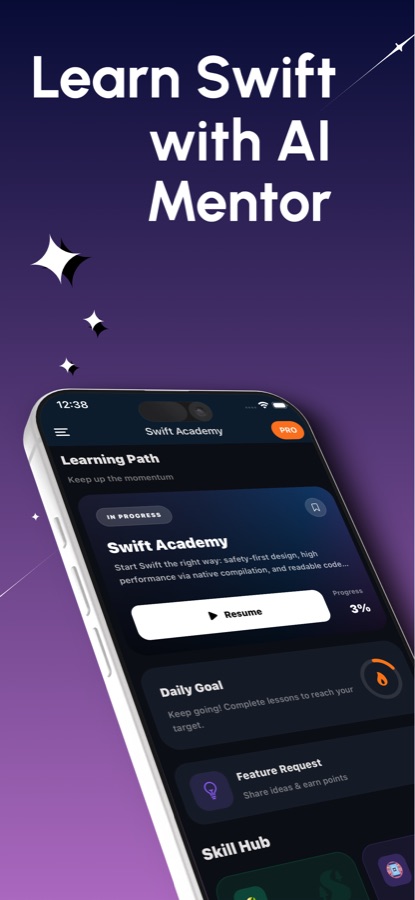
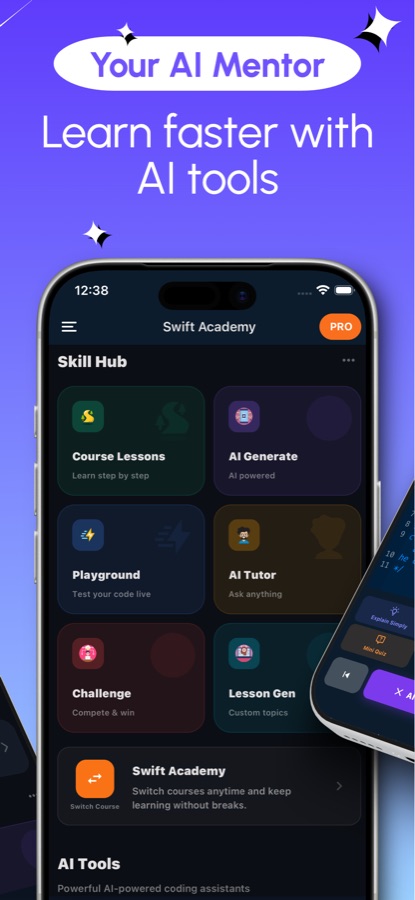
Plain Swift cloud में चलता है, SwiftUI views आपके फ़ोन पर render होते हैं।
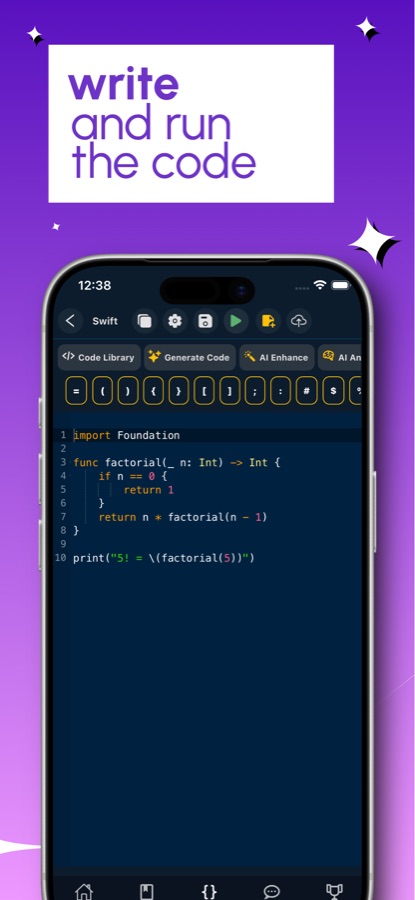
editor command-line Swift को server पर मौजूद compiler में भेजता है, इसलिए program चलाने के लिए internet connection चाहिए। Compiler error पर tap करके सीधे उस line पर जा सकते हैं और आसान भाषा में explanation पढ़ सकते हैं। Screens अलग तरह से काम करती हैं: SwiftUI Playground stacks, text, buttons, images, lists और @State को device पर ही render करता है और जिस syntax को वह support नहीं करता, उसकी line number के साथ जानकारी देता है।
यह क्या है
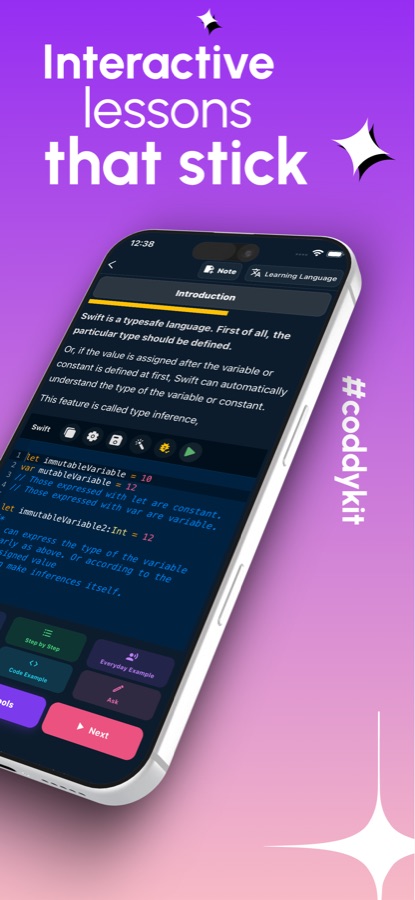
Swift सीखें और अभ्यास करें iOS और Android के लिए एक Swift programming course है, जिसमें 122 courses और 409 short lessons हैं, जिनका स्तर beginner (A1) से advanced (C2) तक है। Lessons let और var से शुरू होकर optionals, protocols, generics, SwiftUI, Core Data और SwiftData, तथा structured concurrency तक जाते हैं। हर lesson के साथ code editor, cloud Swift compiler और live previews के लिए SwiftUI Playground मिलता है, इसलिए learner को practice करने के लिए Xcode खोलने की ज़रूरत नहीं पड़ती।
ऐप के अंदर
यह कैसा दिखता है
कोर्स
Swift कोर्स में क्या-क्या शामिल है
ऐप की कोर्स सूची से लिए गए 122 courses और 409 lessons, उसी क्रम में जिसमें पाथ उन्हें सिखाता है।
Swift की बुनियाद: Variables, Constants और Types
Swift, सेटअप, variables और constants, types, boolean logic और ternary operator का परिचय, जिसके बाद शुरुआती functions और conditionals सिखाए जाते हैं।
Optionals, Control Flow और Collections
Optional binding और chaining, nil coalescing, switch और pattern matching, loops और ranges, तथा arrays, dictionaries और sets।
Structs, Classes, Enums और Protocols
Struct design, class inheritance और polymorphism, state machines के रूप में enums, protocol conformance और composition, तथा value types और reference types का अंतर।
Closures, Generics और Functional Swift
Closures और capture, higher-order functions, property wrappers, where clauses के साथ generic constraints और Swift में functional programming।
SwiftUI: Views, Layout, Data Flow और Animation
Views, modifiers और state, stacks और grids, bindings और environment, animations और custom modifiers, तथा custom layout protocol।
समवर्ती प्रोग्रामिंग: async/await, Combine, Actors
async/await की बुनियादी बातें, structured concurrency, task groups और actors, Sendable और strict concurrency, साथ ही Combine framework।
Data and iOS Frameworks
Codable, Core Data और SwiftData, URLSession के साथ networking, Core Location और MapKit, push notifications, Keychain services, widgets और app extensions।
Architecture, Testing और Shipping
MVVM और coordinators, dependency injection, clean architecture और TCA, XCTest, Instruments के साथ profiling, Swift Package Manager, तथा distribution और CI।
यह कैसे काम करता है
Swift session कैसे काम करता है
Short lessons, उसी app में editor, और compiler के आपसे असहमत होने पर तुरंत उपलब्ध explanation।
Lesson पढ़ें, फिर example edit करें
हर lesson कुछ मिनटों में एक idea समझाता है और आपको बदलने के लिए code देता है। आपके edits save किए जा सकते हैं और lesson से दोबारा ढूँढे जा सकते हैं।
इसे run करें या preview देखें
Connection की ज़रूरत वाले cloud compiler पर command-line Swift run करें। Screen के लिए SwiftUI Playground खोलें और फ़ोन पर draw हुआ view देखें। कुछ fail होने पर error पर tap करके उसकी line पर जाएँ और आसान भाषा में fix पढ़ें।
Recall और missions से इसे पक्का करें
जिन questions के जवाब आप गलत देते हैं, वे Swift Recall में flashcards बन जाते हैं और spaced schedule के अनुसार फिर सामने आते हैं। Coding missions, guided projects और daily interview question lessons से आगे का practice देते हैं।
इसमें क्या है
App आपको क्या देता है
122
Courses, A1 से C2 तक
409 lessons, जिनमें basics, optionals, collections, structs, classes, enums, protocols, closures, generics, error handling, Codable और Swift Package Manager शामिल हैं।
Preview
SwiftUI Playground
एक view लिखें और उसे फ़ोन पर rendered देखें। Stacks, text, buttons, images, lists और @State supported हैं, और unsupported चीज़ की जानकारी line number के साथ दी जाती है।
Cloud
Swift compiler और editor
Examples की library वाला code editor, जो cloud में मौजूद Swift compiler पर चलता है। Compiler errors पर tap किया जा सकता है और उन्हें ठीक करने के तरीके की short explanation भी मिलती है।
60
Coding missions
आसान से कठिन तक 60 missions, साथ में 20 guided projects और 6 multi-step build-along projects।
77
Cheat sheet और recall
Syntax देखने के लिए 77-entry cheat sheet और Swift Recall, जहाँ आपके गलत जवाब spaced schedule के अनुसार flashcards में बदल जाते हैं।
50
iOS interview prep
Developer job की तैयारी के लिए 50 Swift interview questions, एक daily interview question और 50 quiz questions, जिनमें हर answer समझाया गया है।
पृष्ठभूमि
Swift में code करने के लिए आपको क्या जानना चाहिए, और इसमें फ़ोन की क्या भूमिका है?
Swift iPhone, iPad, Mac, Apple Watch और Apple Vision Pro पर apps के लिए Apple की language है और servers पर भी इस्तेमाल होती है। इसे readable बनाने और mistakes को जल्दी पकड़ने के लिए design किया गया है, इसलिए बहुत से लोग इसे पहली language के रूप में चुनते हैं। App बनाने और ship करने के लिए फ़ोन Xcode की जगह नहीं ले सकता, लेकिन उस हिस्से के लिए उपयोगी है जो तय करता है कि आप दूसरे लोगों का Swift code पढ़ सकते हैं या नहीं: language को खुद समझना और किसी real project में आज़माने से पहले छोटे programs और SwiftUI views आज़माना।
Optionalsवह विचार जो Swift को परिभाषित करता है
Swift में कोई value missing हो सकती है, और type system आपको इसे स्पष्ट रूप से बताने के लिए बाध्य करता है: optional में या तो कोई value होती है या कुछ भी नहीं होता, और इसे optional binding, guard, optional chaining या nil coalescing से मिलने वाले default के ज़रिए unwrap किया जाता है। यह एक हफ़्ते तक झंझट भरा लगता है, फिर crashes की पूरी एक श्रेणी को रोकता है।
Value types और reference typesstructs बनाम classes
structs और enums को पास करने पर copy किया जाता है, जबकि classes reference के ज़रिए साझा की जाती हैं। इनके बीच चुनाव का असर इस बात पर पड़ता है कि app के दो हिस्से किसी data को छूने पर वह कैसे व्यवहार करता है, और Swift की standard library value types को प्राथमिकता देती है।
SwiftUIscreen को declare करें, framework को उसे draw करने दें
SwiftUI interface को छोटे views के tree के रूप में describe करता है, जिनका appearance state से तय होता है। Modifiers हर view को adjust करते हैं, और @State जैसा property wrapper framework को बताता है कि कब redraw करना है। यह screens बनाने के पुराने UIKit तरीके का काफ़ी हिस्सा बदल देता है।
Structured concurrencycallback pyramids के बिना async work
async और await network call के दौरान interface को block किए बिना code को wait करने देते हैं, जबकि task groups और actors एक साथ होने वाले work को व्यवस्थित करते हैं। Sendable checks compiler को यह साबित करने में मदद करते हैं कि shared data को सुरक्षित ढंग से handle किया जा रहा है।
उपयुक्तता
यह किन लोगों के लिए है — और किनके लिए नहीं
आपके लिए सही है, अगर आप
- आप प्रोग्रामिंग में नए हैं और एक दिन iPhone ऐप बनाना चाहते हैं, इसलिए Swift चुना है
- आप web या Android कोड लिखते हैं और सीखना चाहते हैं कि Swift optionals, protocols और SwiftUI को कैसे संभालता है
- आप iOS developer इंटरव्यू की तैयारी कर रहे हैं और अभ्यास के लिए Swift के सवाल चाहते हैं
- आप Mac पर प्रोजेक्ट खोलने से पहले अपने फ़ोन पर SwiftUI का कोई आइडिया आज़माना चाहते हैं
- आप छोटे लेसन पसंद करते हैं, जिन्हें दूसरे कामों के बीच पूरा किया जा सके
आपके लिए सही टूल नहीं है, अगर आप
- आपको ऐप बनाना, साइन करना और रिलीज़ करना है; इसके लिए अब भी Mac पर Xcode चाहिए
- आप कोड ऑफलाइन चलाना चाहते हैं; Swift compiler क्लाउड में है और कनेक्शन की ज़रूरत होती है
- आप हर चीज़ मुफ़्त चाहते हैं: पहला कोर्स और कुछ सुविधाएं मुफ़्त हैं, जबकि Pro बाकी सब अनलॉक करता है
- आप Apple का आधिकारिक कोर्स चाहते हैं; यह एक स्वतंत्र learning app है और Apple से संबद्ध नहीं है
सवाल
अक्सर पूछे जाने वाले सवाल
Swift सीखें और अभ्यास करें क्या है?
Swift सीखें और अभ्यास करें, iPhone और Android के लिए Swift programming course है, जिसमें 122 courses और 409 short lessons हैं। इसमें lessons के साथ code editor, cloud Swift compiler, live previews के लिए SwiftUI Playground, AI Mentor, coding missions और interview preparation शामिल हैं। इसकी शुरुआत मुफ़्त है और यह 22 भाषाओं में उपलब्ध है।
क्या Mac के बिना Swift सीखी जा सकती है?
आप Mac के बिना भी भाषा सीख सकते हैं। ऐप cloud compiler पर Swift code चलाता है और फ़ोन पर SwiftUI views का preview दिखाता है, इसलिए आप केवल फ़ोन से syntax, optionals, protocols और layout पढ़ सकते हैं। वास्तविक iOS ऐप बनाने और प्रकाशित करने के लिए अंततः Mac पर Xcode की ज़रूरत होगी।
क्या कोड ऑफलाइन चलता है?
नहीं। Command-line Swift क्लाउड में मौजूद compiler पर चलता है, इसलिए किसी प्रोग्राम को चलाने के लिए internet connection चाहिए, जैसा कि store listing में बताया गया है। केवल SwiftUI Playground previews डिवाइस पर ही बनाए जाते हैं।
SwiftUI Playground क्या है?
यह Swift सीखें और अभ्यास करें के अंदर मौजूद preview area है, जहाँ आप SwiftUI view लिखकर उसे अपने फ़ोन पर बना हुआ देख सकते हैं। Stacks, text, buttons, images, lists और @State समर्थित हैं। जब syntax का कोई हिस्सा समर्थित नहीं होता, तो playground line number के साथ इसकी सूचना देता है, ताकि आपको पता चले कि ऐसा क्यों है।
क्या Swift पहली programming language के रूप में अच्छी है?
अगर आपका लक्ष्य Apple platforms हैं, तो यह एक उचित विकल्प है। इसका syntax पढ़ने में आसान है और language को शुरुआत से safe बनाया गया है; optionals आपको missing values संभालने के लिए मजबूर करते हैं। इसकी कीमत यह है कि optionals, closures और value types जैसे कुछ विचार शुरुआत में ही आ जाते हैं। कोर्स इन्हें एक-एक लेसन में सिखाता है।
क्या ऐप iOS developer इंटरव्यू में मदद करता है?
हाँ। iOS developer की तैयारी के लिए 50 Swift interview questions, रोज़ का एक interview question और 50 quiz questions हैं, जिनमें हर उत्तर समझाया गया है। Swift Recall spaced repetition का उपयोग करके आपके छूटे हुए सवालों को फिर से सामने लाता है।
AI Mentor Swift में कैसे मदद करता है?
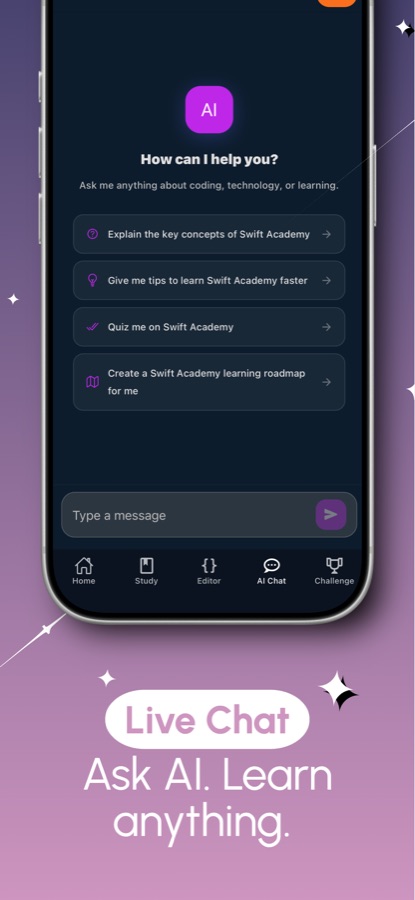
AI Mentor किसी कॉन्सेप्ट या compiler error के बारे में सवालों के जवाब देता है—जैसे कि किसी optional का सीधे इस्तेमाल क्यों नहीं किया जा सकता। मुफ़्त उपयोगकर्ताओं को रोज़ एक सवाल मिलता है, जबकि Pro यह सीमा हटा देता है।
क्या मुफ़्त है और Pro में क्या मिलता है?
पहला कोर्स, पहला guided project, दो missions, playground basics, रोज़ की Recall practice और प्रतिदिन एक AI Mentor question मुफ़्त हैं, और मुफ़्त संस्करण में ads दिखाई जाती हैं। Pro हर course, project और mission, पूरा playground और certificate exam अनलॉक करता है, असीमित AI Mentor देता है और ads हटा देता है।
क्या इसका Apple से संबंध है?
नहीं। Swift सीखें और अभ्यास करें एक स्वतंत्र learning tool है। Apple, iOS, Swift, SwiftUI, Xcode और UIKit, Apple Inc. के trademarks हैं और इस ऐप को Apple का समर्थन प्राप्त नहीं है।
शुरू करें
आज ही Swift की अपनी पहली लाइन लिखें
iOS और Android पर शुरुआत मुफ़्त है, 22 भाषाओं में।
CoddyKit की ओर से और
iOS और Android पर उपलब्ध है।