
Color ve Background
Color ve Background
Color ve Background is a free HTML for Kids lesson on CoddyKit. This is lesson 1 of 1. You can read the complete lesson below for free — then practise it hands-on in the browser with a built-in code editor and a 24/7 AI tutor. It is part of the HTML for Kids learning path, and your progress syncs across the web and the CoddyKit app. The HTML for Kids course includes 1 lessons in total.
Introduction
Hello,
We can change the colors of the text with the Color property.
We can assign the values to this property in RGB, HEX, HSL, RGBA, or HSLA type.
We have already used the color property in many examples so far. Now let's illustrate its usage with different value types.
<style>

#txt1{
    color: red;
}

#txt2{
    color: #ff0000;
}

#txt3{
    color:  rgb(255,0,0);
}

/*
   0.4 is the alpha value.
   We can define decimal values
   between 1 and 0.
 */
#txt4{
    color:  rgba(255,0,0, 0.4);
}

</style>

<div class="box">
<h1 id="txt1">
    This is red color
</h1>
<h1 id="txt2">
    This is red color that defined with HEX type
</h1>
<h1 id="txt3">
    This is red color that defined with RGB type
</h1>
<h1 id="txt4">
    This is red color that defined with RGBA type
</h1>
</div>
Background
We can define styles to the backgrounds of the elements using the Background properties.
Now let's learn the background properties listed below.
- background-color
- background-image
- background-repeat
- background-attachment
- background-position
background-color
It is a property that is used to change the background color of an element.
Let's give an example.
<!DOCTYPE html>
<html>
<head>
<style>
#box {
  padding:10px;
  background-color: lightblue;
  border:1px solid #c0c0c0;
  color:#ffffff;
}
</style>
</head>
<body>

<div id="box">Lorem ipsum dolor sit amet,
    consectetur adipiscing elit. Donec ante purus,
    eleifend egestas tempus non, consequat ac ex..
</div>

</body>
</html>
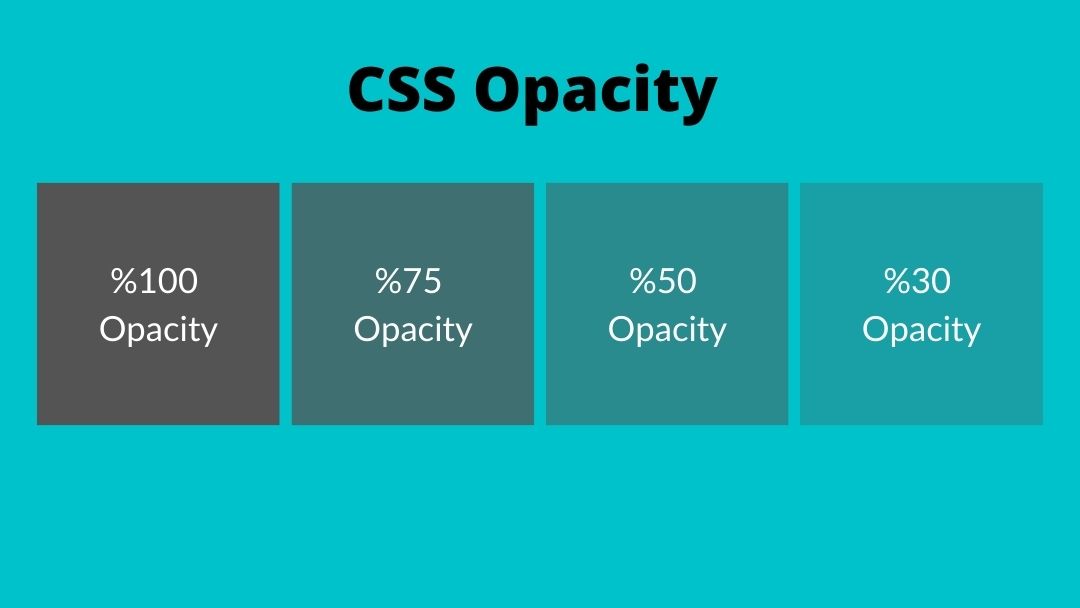
Opacity
It is a property that is used to change the background opacity of an element.
<!DOCTYPE html>
<html>
<head>
<style>
#box {
  padding:10px;
  background-color: lightblue;
  opacity: 0.5;
  border:1px solid #c0c0c0;
  color:#ffffff;
}
</style>
</head>
<body>

<div id="box">
    Lorem ipsum dolor
    sit amet, consectetur adipiscing elit.
</div>

</body>
</html>
Opacity - 2
The change of CSS Opacity is shown in the picture above.
Background image
The background-image property is used to add images to the background of an element.
We have the image at https://coddy.s3.amazonaws.com/cms/Profile_Pictures_dc459075ee.png.
Now let's define a div element and add an image to its background.
<!DOCTYPE html>
<html>
<head>
<style>
#box {
  padding:10px;
  width:300px;
  height:300px;
  background-image: url("https://cdn.coddykit.com/cms/coddy_test.png");
}
</style>
</head>
<body>

<div id="box"></div>

</body>
</html>
background-position
background-size
If you noticed in our example above, we couldn't place it properly because the standard size of the image is larger than the area we will add.
We will use the background-size property to solve this.
While the Background-size property can take values such as cover, contain, auto, we can assign it to a specific value for the width and height value.
Let's update our example again.
<!DOCTYPE html>
<html>
<head>
<style>
#box {
  padding:10px;
  width:300px;
  height:300px;
  background-image: url("https://cdn.coddykit.com/cms/coddy_test.png");

/* the element's background would fill the
 div's background without
the image's ratio being distorted*/
 background-size: contain;
}
</style>
</head>
<body>

<div id="box"></div>

</body>
</html>
background-position 2
Now let's set its value as a percentage for the background-position property.
<!DOCTYPE html>
<html>
<head>
<style>
#box {
  padding:10px;
  width:300px;
  height:300px;
  background-image: url("https://cdn.coddykit.com/cms/coddy_test.png");

 /* The width and height values
     are set to 50%. */
 background-size: 50% 50%;
}
</style>
</head>
<body>

<div id="box"></div>

</body>
</html>
background-repeat
However, there is a problem here. Since the image size was smaller than the background size of the element, it was used more than once to fill the area.
To avoid this, use the property background-repeat (with repeat, repeat-x, repeat-y, initial, inherit, or no-repeat values).
<!DOCTYPE html>
<html>
<head>
<style>
#box {
  padding:10px;
  width:300px;
  height:300px;
  background-image: url("cdn.coddykit.com/cms/coddy_test.png");

 /* The width and height
     values are set to 50%. */
 background-size: 50% 50%;
background-repeat:no-repeat;
}
</style>
</head>
<body>

<div id="box"></div>

</body>
</html>
background-attachment
Another background property is background-attachment. With this property, we can determine whether the background image will scroll on the page.
This property takes fixed or scroll values.
<!DOCTYPE html>
<html>
<head>
<style>
#box {
  padding:10px;
  width:300px;
  height:300px;
  background-image: url("https://cdn.coddykit.com/cms/coddy_test.png");

 /* The width and height
     values are set to 50%. */
 background-size: 50% 50%;
background-attachment:scroll;
background-repeat:no-repeat;
}
</style>
</head>
<body>

<div id="box"></div>

</body>
</html>
Background Shorthand
When we want to apply the background properties we learned in the examples above, we may need to define 4-5 lines of expressions.
We use the background shortcut property to make defining in a single line.
Come on, let's look at our example.
In the background property, no-repeat, size, placement within the page, and the URL of the source image are defined.
<!DOCTYPE html>
<html>
<head>
<style>
#box {
  padding:10px;
  width:300px;
  height:300px;
  background: no-repeat center/50%
      url("https://cdn.coddykit.com/cms/coddy_test.png");
   }
</style>
</head>
<body>

<div id="box"></div>

</body>
</html>
Congratulations
Congratulations 🎉
In this section, We learned the Color and Background.
In the next section, We will learn Box, Block ve Inline concepts

Learn HTML with an AI tutor — free
Write and run real code in your browser, get instant help from a 24/7 AI tutor, and pick up where you left off on the web or in the app.
- Courses
- 16
- Lessons
- 35
Frequently Asked Questions
Is the “Color ve Background” lesson free?
Yes — the full text of “Color ve Background” is free to read here on the web. To practise it interactively (a built-in code editor and a 24/7 AI tutor) and unlock the rest of the HTML for Kids course, upgrade to CoddyKit PRO. The HTML for Kids course includes 1 lessons in total.
What will I learn in “Color ve Background”?
Color ve Background You practise HTML for Kids with hands-on code you run directly in the browser, and a 24/7 AI tutor answers your questions as you work through the lesson.
Do I need any experience to start HTML for Kids?
No prior experience is required. HTML for Kids on CoddyKit is structured for beginners through advanced learners, so you can start here or from the beginning and move at your own pace. This is lesson 1 of 1.
How long does the “Color ve Background” lesson take?
Most CoddyKit lessons take about 5–10 minutes. Each one is bite-sized and interactive, so you make steady progress and pick up exactly where you left off across the web and the app.
Can I write and run code in this HTML for Kids lesson?
Yes. Every HTML for Kids lesson includes a built-in code editor, so you write and run real code right in your browser and get instant AI feedback — no local setup required.